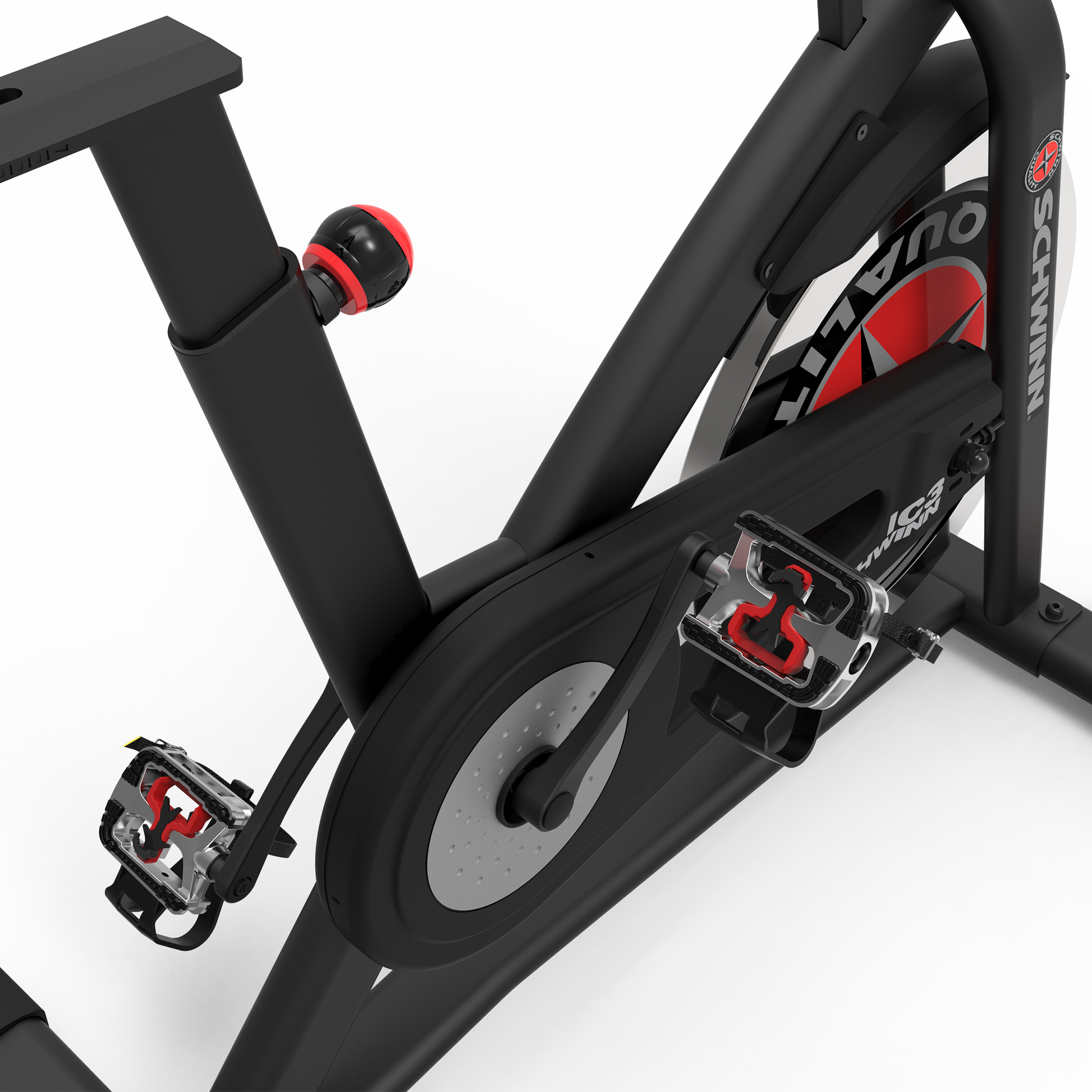
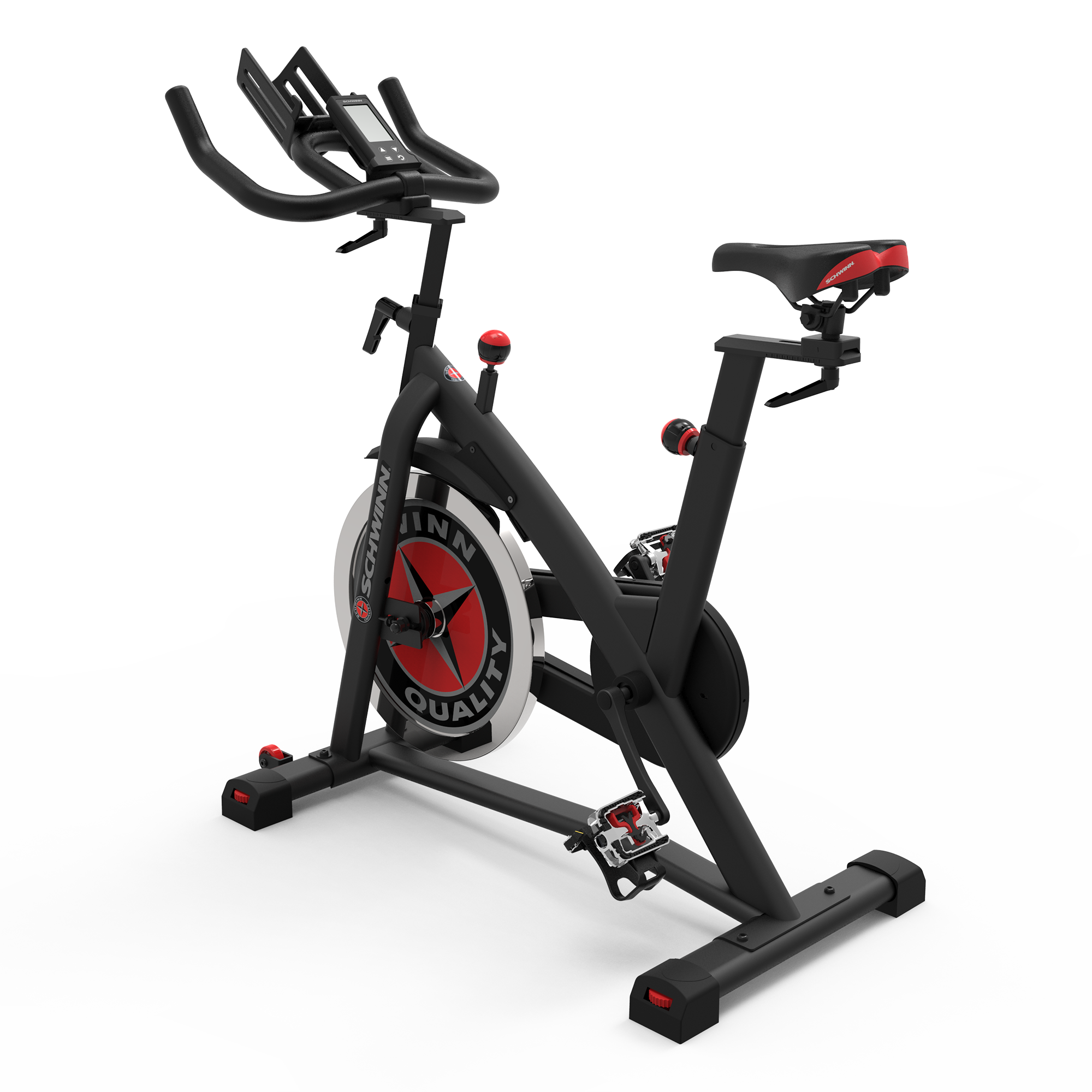
The Schwinn IC3 indoor cycling bike is a favorite for home fitness. Its solid frame, adjustable resistance, and clear LCD display make it popular with both beginners and experienced riders. But like any exercise machine, the IC3 can have issues that affect performance and user experience.
Knowing how to troubleshoot your Schwinn IC3 can save you frustration, money, and time. This guide shows you how to solve the most common problems, understand the cause, and keep your bike running smoothly.
You’ll discover solutions for three main trouble areas: resistance problems, display issues, and noise or mechanical faults. Each section gives you practical steps and clear examples. You’ll also find data, comparison tables, and expert tips that go beyond basic advice. If you want your Schwinn IC3 to last longer and perform better, this article will help.
Resistance Problems
Resistance lets you control your workout intensity. If your Schwinn IC3 loses resistance or does not adjust as expected, your training suffers. Let’s look at possible causes and how to fix them.
Physical Resistance Not Changing
The IC3 uses a friction resistance system. Turning the knob presses a felt pad against the flywheel. Over time, this mechanism can wear out or get stuck.
Common symptoms:
- The resistance knob feels loose or too tight
- Turning the knob does not change the pedaling difficulty
- Resistance is always high or low
Troubleshooting steps:
- Check the resistance knob: Remove the knob and inspect for cracks or stripped threads. Sometimes, the threads inside the knob or on the stem can wear out, making the knob slip or not grip properly.
- Inspect the felt pad: Look for wear, flat spots, or debris. A worn pad cannot create enough friction. Sometimes, you may notice that the pad has developed shiny, hardened spots from excessive heat—this means it’s time to replace it.
- Clean the flywheel: Dirt or sweat buildup reduces friction and causes uneven resistance. Use a clean, dry cloth to wipe the flywheel. If there’s sticky residue, a little rubbing alcohol on the cloth can help, but avoid letting any liquid drip onto the pad.
- Tighten or replace parts: If the pad is worn out, replace it. If the knob is loose, tighten it gently—do not force it. Forcing the knob can damage the threads further, making repair more difficult.
A good practice is to test resistance at different knob positions after each check or fix. This helps you catch subtle issues that may only appear at certain resistance levels.
Resistance Not Matching Display
Sometimes, the display shows resistance levels that do not match what you feel. This can happen if the sensor is misaligned or faulty.
Symptoms:
- The LCD shows resistance changes, but the pedal feel stays the same
- Resistance jumps suddenly on the screen
Fixes:
- Calibrate the sensor: Follow the Schwinn manual to reset the resistance sensor. Calibration ensures the sensor and the felt pad position are in sync.
- Check wiring: Loose wires can cause incorrect readings. Secure all connections. Sometimes, wires can get pinched or damaged during transport or assembly, causing intermittent faults.
- Replace sensor if needed: If calibration does not help, the sensor may need replacement. Replacement parts are available from Schwinn or third-party suppliers, but always check compatibility.
Real-life example: One owner reported that after moving their IC3 across the room, the resistance display started showing random numbers. Reseating the sensor wire under the frame fixed the issue.
Felt Pad Maintenance And Replacement
Regular maintenance keeps resistance smooth and consistent. Most users forget to check the felt pad until problems begin.
How to maintain:
- Wipe the pad monthly with a dry cloth. This removes dust and sweat that can cause sticking.
- Avoid oil or cleaning sprays—they damage the pad. If you accidentally spill anything on the pad, replace it rather than try to clean it with chemicals.
- Replace the pad every 12–24 months, depending on use. If you ride daily or do lots of high-resistance workouts, check more often.
When replacing the felt pad, make sure to align it evenly on both sides of the flywheel. Uneven pads can cause resistance to feel jerky or inconsistent during pedaling.
Data table: Schwinn IC3 Resistance Troubles
| Issue | Common Cause | Fix | Cost Estimate |
|---|---|---|---|
| No resistance change | Worn felt pad | Replace pad | $15–$30 |
| Loose knob | Stripped threads | Replace knob | $10–$20 |
| Display mismatch | Sensor misaligned | Calibrate sensor | $0–$50 |
Non-obvious insight: Many beginners confuse a tight resistance knob with high resistance, but if the felt pad is worn, the knob can feel tight without actually increasing resistance. Always check the pad before assuming the knob is faulty. Also, if the bike was recently assembled, double-check that the knob and pad were installed in the correct order—an assembly error can cause similar issues.
Display Issues
The Schwinn IC3’s LCD display shows speed, distance, calories, and heart rate. When the screen stops working or gives wrong data, your workouts become less effective. Let’s look at the most common display problems and how to fix them.
Lcd Not Powering On
If the screen stays blank, the problem is often with power or connections.
Causes:
- Dead batteries
- Loose wires
- Damaged display unit
Troubleshooting steps:
- Replace the batteries: The IC3 uses two AA batteries. Always use fresh, high-quality batteries. Cheap batteries can sometimes leak and damage the terminals.
- Check battery contacts: Corrosion or dirt blocks power. Clean contacts with a cotton swab. If there’s visible corrosion, a tiny bit of vinegar on the swab can help remove it (wipe dry after).
- Inspect wiring: Follow the wire from the display to the flywheel sensor. Look for loose plugs or broken wires. Sometimes, connectors may look plugged in but are not fully seated—push gently to ensure a snug fit.
- Reset the display: Remove batteries, wait 30 seconds, then reinstall. This can clear temporary glitches.
If the display still does not turn on after these steps, try swapping batteries in another device to confirm they are working. This helps rule out battery issues before assuming the display is bad.
Incorrect Readings
Sometimes the display shows wrong speed, distance, or calories.
Symptoms:
- Speed reads zero even when pedaling
- Distance increases too fast or too slow
- Heart rate is not detected
Fixes:
- Check sensor alignment: The sensor must be close to the magnet on the pedal crank. There’s often a small gap—if it’s too wide, the sensor won’t pick up movement.
- Calibrate the display: Use the reset function to recalibrate. Some users find that removing and reinstalling the batteries also triggers recalibration.
- Check for interference: Wireless devices nearby can cause display errors. Avoid placing your bike near Wi-Fi routers, cordless phones, or other electronics.
Example: If you see ‘0’ for speed while pedaling, the sensor may be too far from the magnet. Adjust it until readings appear. If the display sometimes works and sometimes doesn’t, check if the sensor wire is damaged or pinched under the frame.
Display Freezing Or Flickering
A frozen or flickering screen suggests electrical issues.
Possible causes:
- Low battery voltage
- Internal circuit problem
- Exposure to moisture
Solutions:
- Replace batteries first. Always use the same brand and type for both batteries to avoid power differences.
- If moisture is present, dry the display and bike thoroughly. Store your bike in a dry area and avoid using it near open windows or humid rooms.
- For persistent problems, contact Schwinn support for replacement. Sometimes, a display that has been exposed to condensation may recover after a day or two of drying.
Data table: Schwinn IC3 Display Problems
| Problem | Likely Cause | Action | Downtime Estimate |
|---|---|---|---|
| No power | Dead batteries | Replace batteries | 5 minutes |
| Wrong speed/distance | Sensor misalignment | Adjust sensor | 10 minutes |
| Frozen display | Moisture or circuit fault | Dry and reset | 1–2 hours |
Non-obvious insight: Most users do not realize that low-quality batteries can cause display flicker or freeze. Use reputable brands and avoid mixing old and new batteries. Also, if you store your bike in a cold garage, bring the display inside for a few hours to rule out temperature-related problems.

Noise And Mechanical Faults
A quiet indoor bike is important for home use. If your Schwinn IC3 makes loud noises, squeaks, or clicks, it can distract you and signal deeper problems. Here is how to diagnose and solve the most common mechanical faults.
Squeaking Or Grinding Sounds
Many IC3 owners notice squeaks after a few months. These usually come from the felt pad, pedals, or chain.
Troubleshooting steps:
- Identify the source: Pedal slowly and listen. Is the sound from the flywheel, pedals, or frame? Sometimes, noises echo through the frame and are hard to locate, so use a stethoscope or long screwdriver to listen closely.
- Check the felt pad: If squeaking, lightly sand the pad or replace it. Sanding removes glazed or hardened spots. Be gentle to avoid damaging the pad.
- Lubricate moving parts: Use bike-specific lubricant on the chain and pedal threads. Avoid oil on the felt pad or flywheel. For chains, apply lubricant, then wipe off excess to prevent dust buildup.
- Tighten bolts: Loose bolts on the frame or seat can cause noise. Check all bolts, including those under the stabilizer bars and around the seat post.
If noises continue after checking these, try riding while standing up (out of the saddle) versus sitting. Sometimes, seat or post issues only appear under body weight.
Clicking Pedals
Pedal clicks can signal worn bearings or loose parts.
Fixes:
- Check pedal tightness: Use a wrench to tighten pedals—don’t overtighten. Pedals are threaded opposite (left pedal is reverse-threaded), so make sure to turn in the correct direction.
- Inspect bearings: If clicking persists, bearings may need replacement. Dry bearings often click under load and may feel rough when spinning the pedals by hand.
- Replace pedals if needed: Cheap pedals wear out faster. Upgrading to metal or sealed-bearing pedals can reduce noise and last longer.
A tip: If the sound only happens when you push down hard on the pedals, it’s more likely a bearing or pedal thread issue.
Chain Slipping Or Sticking
The IC3 uses a chain drive system. If the chain slips or sticks, pedaling feels uneven.
Causes:
- Loose chain tension
- Dirty or dry chain
- Worn sprocket
Solutions:
- Adjust chain tension: Use the tension bolts near the rear wheel. The chain should have a little play (about 1/2 inch up and down) but not be loose.
- Clean and lubricate: Regular cleaning prevents buildup. Use a degreaser if the chain is very dirty, then re-lubricate.
- Replace worn parts: Sprockets last 2–4 years with regular use. Worn sprockets may show hooked teeth or rough edges.
Data table: Schwinn IC3 Mechanical Faults
| Noise Type | Source | Fix | Average Cost |
|---|---|---|---|
| Squeak | Felt pad | Sand/replace pad | $15–$30 |
| Click | Pedal bearings | Replace bearings | $25–$50 |
| Chain slip | Loose chain | Adjust tension | $0 |
Practical tip: After fixing noise, ride for 10 minutes to check if the sound returns. Some noises only happen under load, not when spinning by hand. Also, keep a simple log of noises and fixes—this can help if you need professional service later.
Preventive Maintenance For Schwinn Ic3
Troubleshooting is easier when you keep your bike in good condition. Regular maintenance prevents most common problems.
Weekly tasks:
- Wipe down the frame and flywheel. Use a damp cloth, but avoid soaking any parts. Sweat is corrosive over time.
- Check for loose bolts or parts. Pay special attention after moving your bike.
- Test resistance and display. Quick checks help spot issues early.
Monthly tasks:
- Lubricate chain and pedal threads. Always wipe off extra lube to avoid attracting dust.
- Inspect felt pad for wear. Look for discoloration or hard spots.
- Clean display and sensors. Use a microfiber cloth—avoid water or harsh cleaners.
Yearly tasks:
- Replace felt pad if needed. Keep a spare pad on hand, especially if you ride often.
- Check pedals and bearings. Spin pedals by hand—if they feel rough, consider replacing.
- Inspect chain and sprocket. If the chain has stretched (lots of play) or the sprocket teeth are worn, replace them.
Comparison table: Schwinn IC3 Maintenance vs. Repair Costs
| Task | Frequency | DIY Cost | Professional Cost |
|---|---|---|---|
| Wipe frame/flywheel | Weekly | $0 | $20–$30 |
| Replace felt pad | Yearly | $15–$30 | $40–$60 |
| Chain lubrication | Monthly | $5–$10 | $25–$40 |
| Pedal bearing replacement | As needed | $25–$50 | $75–$120 |
Experience-based advice: Many people wait until something breaks before fixing it. But just ten minutes of maintenance each week can prevent most expensive repairs. Also, keeping your bike clean and maintained can boost resale value if you ever upgrade.
When To Call Schwinn Support
Some issues need expert help. If you’ve tried the above steps and the problem persists, it’s time to contact Schwinn.
Situations requiring support:
- Display does not work after battery and wiring checks
- Resistance mechanism is broken or cannot be repaired
- Frame or flywheel damage (cracks, warping, or severe dents)
- Warranty repairs (always check your warranty period before attempting major fixes)
How to prepare:
- Take photos of the problem. Good lighting helps support staff see details.
- Record serial number and purchase date. You can usually find the serial number under the frame or near the rear stabilizer bar.
- Describe the issue clearly. Include when the problem started, what you’ve tried, and any unusual sounds or smells.
Schwinn’s official website has support guides and contact details. For parts and manuals, visit Schwinn Fitness Support.
Non-obvious insight: Schwinn support often asks for photos or videos. Prepare these before calling to speed up the process. Having proof of regular maintenance can also help if your issue is covered under warranty.
Frequently Asked Questions
Why Is My Schwinn Ic3 Resistance Knob Hard To Turn?
A hard-to-turn resistance knob can mean the felt pad is worn or dirty. First, check for debris under the knob and clean it. If the knob remains tight, the pad may be compressed or damaged and needs replacement. Avoid forcing the knob, as this may damage the threads. If you recently replaced the pad, double-check that it’s seated correctly and not pinched against the flywheel.
My Ic3 Display Shows Wrong Speed And Distance. What Should I Do?
Incorrect speed and distance readings are usually caused by sensor misalignment. Check that the sensor sits close to the magnet on the crank. Adjust it until the display responds correctly. If the problem continues, reset the display and check for wireless interference nearby. Make sure the sensor wire is not twisted or pinched—this can interrupt signal flow.
How Often Should I Replace The Felt Pad On My Schwinn Ic3?
The felt pad should be replaced every 12–24 months, depending on usage. Heavy riders or daily workouts wear out the pad faster. Signs you need a new pad include uneven resistance, squeaking, or visible wear. Regular inspection helps you avoid sudden failures. If you notice resistance feels rough or changes suddenly, check the pad first.
Can I Use Any Lubricant On The Chain And Pedals?
It’s best to use bike-specific lubricant for the chain and pedal threads. Household oils can attract dust and cause sticking. Avoid getting oil on the felt pad or flywheel, as this reduces resistance and may damage parts. Dry lubricants are also available and can help reduce dust buildup if your bike is in a carpeted room.
What Should I Do If My Schwinn Ic3 Makes Loud Noises?
First, identify the noise source—pedals, chain, or flywheel. Most squeaks come from the felt pad or loose bolts. Tighten bolts, sand or replace the pad, and lubricate the chain if needed. If the noise persists, check pedal bearings or contact Schwinn support. Sometimes, unusual noises can signal a part that’s about to fail, so don’t ignore ongoing sounds.
Regular troubleshooting and maintenance keep your Schwinn IC3 running smoothly for years. With the right guidance, most issues can be fixed at home. If you follow these steps, you’ll enjoy quieter, safer, and more effective workouts.