
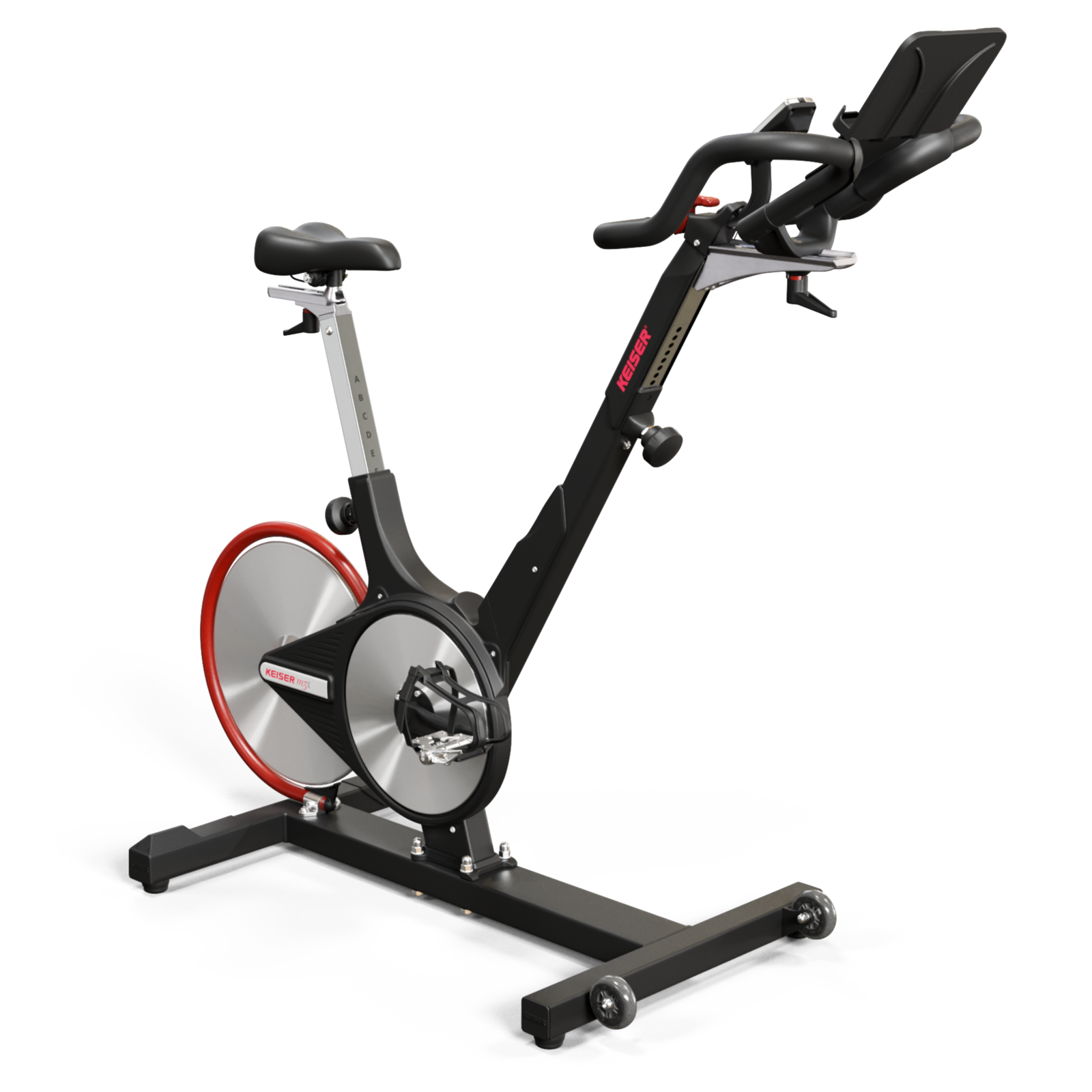
The Keiser M3I is a well-known indoor cycling bike, popular in gyms and homes for its smooth ride and advanced tracking features. With its magnetic resistance system, Bluetooth connectivity, and sturdy build, the M3I stands out among exercise bikes. However, like any complex equipment, it may develop issues over time.
If your Keiser M3I is not working as expected, troubleshooting the problem can save you time and money. This guide offers clear steps, practical advice, and real examples to help you solve common Keiser M3I issues quickly—even if you’re not an expert.
Understanding Your Keiser M3i
Before you start troubleshooting, it helps to know how the M3I works. The bike uses a magnetic resistance system with an onboard computer to track metrics like cadence, power, and distance. It connects to fitness apps via Bluetooth. The drive system is nearly maintenance-free, but issues can arise from sensors, electronics, or mechanical parts.
The M3I is built to last, but user error, regular wear, or technical glitches can cause problems. Recognizing how the main systems interact will help you pinpoint issues faster. For example, if the bike’s computer isn’t displaying data, it could be a sensor, battery, or connection issue—not necessarily a broken bike.
Common Keiser M3i Issues And Solutions
1. Console Not Turning On
If your console is blank or won’t power up, start with the basics:
- Check the batteries: The M3I console uses two AA batteries. Weak or dead batteries are the most common cause of power issues.
- Inspect battery contacts: Sometimes, the contacts get rusty or dirty. Clean them gently with a dry cloth.
- Re-seat the batteries: Remove and re-insert them, ensuring proper alignment.
If these steps don’t work, the problem may be with the wiring or the console itself. Loose connections can cause the console to fail. Gently check the wiring harness behind the console for loose or damaged wires.
2. Inaccurate Data Display
Sometimes, the console shows incorrect speed, distance, or cadence. This can be confusing and affect your workout tracking.
- Check the sensor alignment: The M3I uses a magnetic sensor to measure cadence and speed. If the sensor is too far from the magnet, it won’t read correctly.
- Adjust the magnet position: The magnet should pass close to the sensor with each pedal rotation (usually within 3-5mm).
- Inspect the sensor wiring: Look for pinched, cut, or loose wires.
For more advanced troubleshooting, compare your readings against another bike or fitness tracker. If the values still don’t match, the sensor may need replacing.
3. Resistance Issues
A smooth resistance change is one reason people love the Keiser M3I. When resistance doesn’t change or feels stuck, consider these steps:
- Check the resistance lever: Make sure it moves freely and isn’t blocked by debris.
- Inspect the magnetic system: The resistance is created by magnets moving closer or farther from the flywheel. If magnets are stuck or misaligned, resistance may fail.
- Look for mechanical obstructions: Sometimes, dust or hair can get caught, preventing smooth movement.
If you hear grinding or feel uneven resistance, stop using the bike and inspect for broken parts. Continuing to ride can cause more damage.
4. Bluetooth Connectivity Problems
Many M3I owners use Bluetooth to connect with apps like Zwift or Keiser M Series. If your bike won’t pair:
- Check if Bluetooth is enabled on your device: Sometimes, it’s a simple setting.
- Restart the console and your device: This often solves pairing issues.
- Update the app: Outdated apps may fail to recognize the bike.
- Move your device closer: Bluetooth works best within a few feet.
If you still can’t connect, try another device. If the issue persists, the console may need a firmware update or replacement.
5. Squeaks And Unusual Noises
A quiet ride is a sign of a healthy Keiser M3I. If you hear squeaks, clicks, or grinding, it’s time to act.
- Identify the noise location: Pedals, seat, and handlebars are common sources.
- Tighten bolts and screws: Loose hardware can cause rattling.
- Lubricate moving parts: Use bike-safe lubricant on the pedal threads and seat post. Never lubricate the flywheel or magnetic system.
If the noise persists, check for worn bearings or a damaged belt. These parts can be replaced, but it’s best to consult a technician if you’re unsure.
6. Pedal And Crank Problems
The pedals and crank arms take heavy loads during workouts. Problems can show up as wobbling, resistance changes, or even breakage.
- Check pedal tightness: Loose pedals can damage threads and cause wobbling.
- Inspect crank arms: Cracks or bends mean replacement is needed.
- Replace worn pedals: If the grip is gone or the pedal won’t spin smoothly, it’s time for new pedals.
Never over-tighten pedals—this can strip the threads. Use a torque wrench if possible.
7. Console Backlight Not Working
The backlight makes the console easy to read. If it’s not working:
- Check settings: Sometimes, the backlight is turned off in console settings.
- Change batteries: Low power can disable the backlight.
- Inspect wiring: Loose wires can cut power to the backlight.
If none of these steps work, the backlight may have failed. You can still use the console, but visibility will be reduced.
Deeper Troubleshooting Steps
For stubborn issues, follow a step-by-step process. This prevents missing important details and helps you avoid unnecessary repairs.
Step 1: Visual Inspection
Look over the entire bike. Check for:
- Loose bolts
- Frayed wires
- Broken plastic parts
- Dust buildup
Often, a quick cleaning and tightening can solve the problem.
Step 2: Systematic Testing
Test each system one by one:
- Console power
- Data accuracy
- Resistance changes
- Bluetooth connection
If one system fails, focus your troubleshooting there.
Step 3: Compare With Manufacturer Specs
Sometimes, you need to know if your bike is performing as it should. Here’s a quick comparison of key specs:
| Feature | Keiser M3I | Typical Indoor Bike |
|---|---|---|
| Resistance | Magnetic, 24 levels | Friction or magnetic, 10-20 levels |
| Console | Bluetooth, backlit | Basic LCD, rarely Bluetooth |
| Maintenance | Low, belt-driven | Medium, chain-driven |
If your M3I isn’t matching these specs, you may have a deeper issue. For example, if resistance doesn’t reach level 24, the magnetic system may need adjustment.
Step 4: Reset And Recalibrate
Sometimes, resetting the console or recalibrating sensors solves odd problems.
- Console reset: Remove batteries for 10 seconds, then reinstall.
- Sensor calibration: Follow Keiser’s instructions for sensor alignment.
Refer to the official Keiser manual for calibration steps. You can find a helpful guide on their website: Keiser Support.
Step 5: Contact Support
If you’ve tried everything and still have issues, reach out to Keiser’s support team. They can walk you through advanced troubleshooting or help you order replacement parts.
Preventive Maintenance Tips
Most Keiser M3I issues can be avoided with regular care. Here’s how to keep your bike running smoothly:
- Clean your bike weekly: Dust and sweat can cause corrosion or block sensors. Use a soft cloth and mild cleaner.
- Check bolts monthly: Tighten any loose bolts, especially on the seat, handlebars, and pedals.
- Lubricate moving parts: Apply lubricant to pedal threads and seat post. Avoid the flywheel and magnetic system.
- Inspect the drive belt yearly: Look for cracks or wear. Replace if needed.
- Replace batteries every 6 months: Even if the console works, weak batteries can cause glitches.
- Update console firmware: Check for updates on Keiser’s website.
Here’s a quick maintenance comparison:
| Task | Frequency | Time Needed |
|---|---|---|
| Clean bike | Weekly | 10 minutes |
| Check bolts | Monthly | 5 minutes |
| Lubricate parts | Monthly | 5 minutes |
| Inspect belt | Yearly | 15 minutes |
| Replace batteries | 6 months | 2 minutes |
Most users skip regular checks, leading to avoidable breakdowns. Set reminders to stay ahead.
Real-world Troubleshooting Examples
Let’s look at some actual situations to make troubleshooting clearer.
Example 1: Console Won’t Turn On
A user noticed their console was completely blank. They replaced the batteries, but nothing changed. After checking the battery contacts, they found a small piece of foil blocking the contact. Removing it fixed the issue.
Example 2: Resistance Stuck At One Level
After moving the bike, a user found the resistance wouldn’t change. They checked under the shroud and found a small piece of packaging stuck in the magnetic system. Removing the debris restored normal operation.
Example 3: Bluetooth Drops During Workout
A cyclist reported their Bluetooth connection dropped halfway through every session. They moved their phone closer to the console, updated their app, and restarted both devices. The problem disappeared.
Example 4: Squeaky Pedals
A user heard squeaks from the pedal area. They tightened the pedals, applied lubricant, and the squeak stopped. Loose pedals are a common noise source.
Example 5: Incorrect Cadence Readings
The console was showing unusually high cadence numbers. The user checked the sensor and found it had shifted away from the magnet. Adjusting the sensor fixed the readings.
When To Call A Professional
Some problems are best handled by experts:
- Electrical failures: If wires are frayed or the console won’t respond after all steps.
- Mechanical damage: Cracked frames or broken crank arms need professional repair.
- Firmware issues: If updates fail or the console freezes.
Attempting repairs on these parts can void your warranty. Always check warranty terms before opening the console or replacing major parts.
Upgrading And Replacing Parts
If your Keiser M3I is several years old, consider upgrading or replacing certain parts:
- Console upgrade: Newer consoles have better Bluetooth and improved displays.
- Pedal replacement: Upgrading to SPD-compatible pedals can improve your ride.
- Seat replacement: Custom seats can boost comfort.
Here’s a comparison of upgrade costs:
| Upgrade | Estimated Cost | Benefit |
|---|---|---|
| Console | $120-$200 | Improved connectivity |
| Pedals | $50-$100 | Better grip, SPD |
| Seat | $30-$80 | Greater comfort |
Upgrading can extend your bike’s life and improve your experience. Always buy genuine Keiser parts for best results.
Non-obvious Troubleshooting Insights
Many beginners miss these important points:
- Static electricity: If you live in a dry climate, static can interfere with sensors. Wipe the console with a damp cloth to reduce buildup.
- Environmental factors: Humidity and temperature swings can affect the bike’s electronics. Keep your M3I in a climate-controlled room.
- Sensor reset: Sometimes, simply rotating the pedals quickly for 30 seconds can reset the cadence sensor.
Safety And User Mistakes
Safety is key. Avoid these common mistakes:
- Using the wrong lubricant (can damage magnets)
- Over-tightening bolts (can crack frame)
- Ignoring warning noises (can lead to bigger failures)
- Not checking batteries (can cause data loss)
Always use Keiser-approved products for maintenance.
Frequently Asked Questions
What Should I Do If The Keiser M3i Console Is Completely Blank?
First, replace the AA batteries. If this doesn’t help, clean the battery contacts and check for loose wiring behind the console. If the console still won’t turn on, contact Keiser support for further assistance.
Why Does My Bike Make Squeaking Sounds During Workouts?
Squeaks usually come from loose pedals, seat posts, or handlebar bolts. Tighten all hardware and apply bike-safe lubricant. If the noise persists, check for worn bearings or a damaged drive belt.
How Can I Improve Bluetooth Connectivity With My Keiser M3i?
Keep your device close to the console, update your fitness app, and restart both the bike and your device. If connection problems continue, try resetting the console or updating its firmware.
What Causes Incorrect Speed Or Cadence Readings?
Misaligned sensors or magnets are the most common cause. Check that the sensor is close to the magnet (within 3-5mm). Inspect wiring for damage and recalibrate if needed.
Is It Safe To Repair The Keiser M3i Myself?
Simple repairs like battery replacement, sensor adjustment, or tightening bolts are safe for most users. For electrical or mechanical damage, consult a professional or Keiser support to avoid voiding your warranty.
—
Troubleshooting your Keiser M3I doesn’t need to be stressful. With clear steps, regular maintenance, and a bit of patience, most issues can be solved at home. If you run into persistent problems, Keiser’s support team and local technicians are ready to help.
Taking care of your bike ensures smooth rides and accurate tracking, so you can focus on your fitness goals with confidence.


