
If you own the Sunny Health & Fitness SF-B901 indoor cycling bike, you probably appreciate its simple design and solid performance. But even the best exercise equipment can run into issues over time. Whether you’re a beginner or a seasoned rider, knowing how to troubleshoot your SF-B901 can save you time, money, and frustration. In this guide, you’ll learn practical solutions for the most common problems, plus some tips that many users overlook. You’ll also find advice on upgrades, safety, and real user experiences that help you get the most from your investment.
Understanding Your Sf-b901
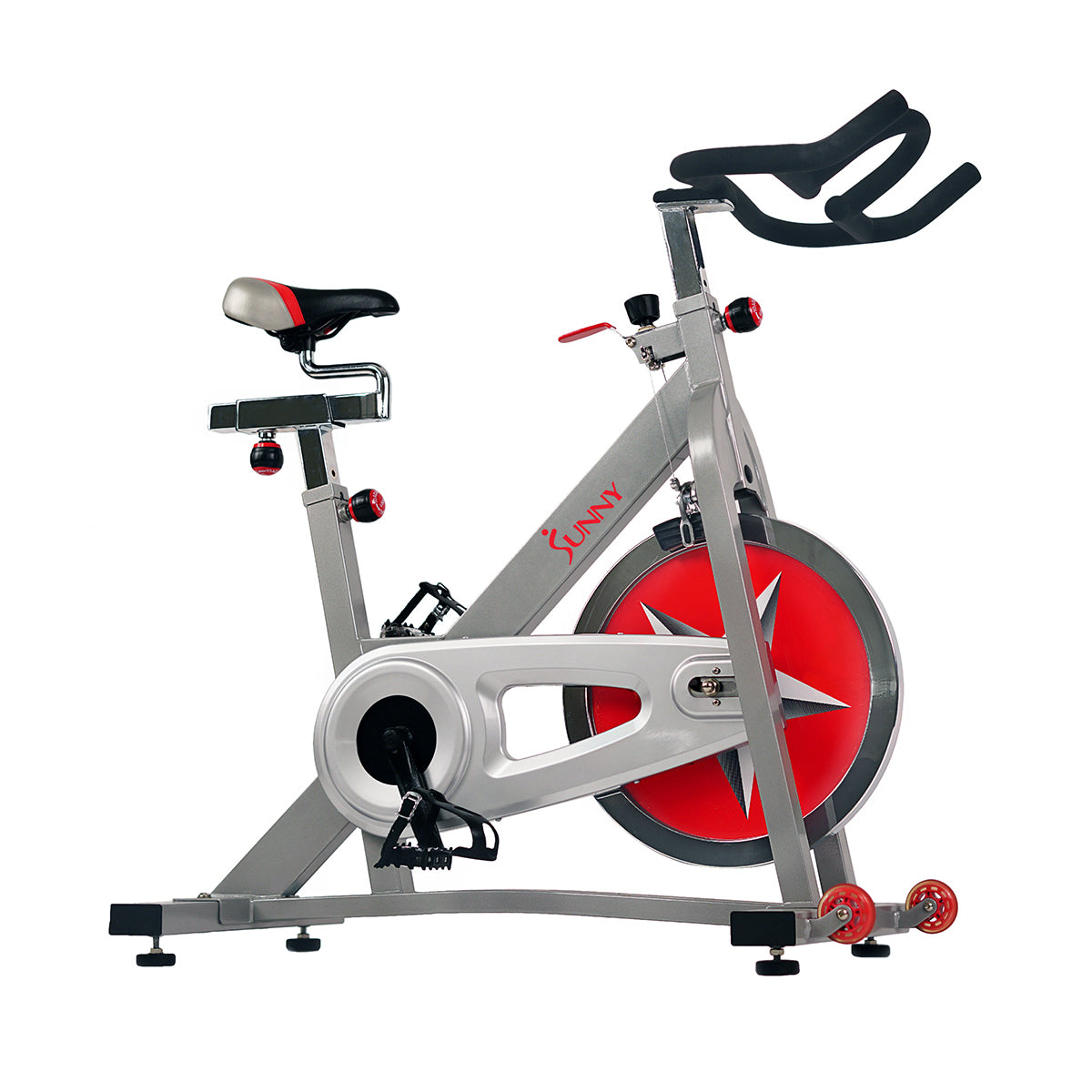
Before diving into troubleshooting, it helps to know your bike’s basics. The SF-B901 is a popular indoor cycling bike with a sturdy steel frame, chain drive system, and adjustable resistance. It’s designed for home fitness, offering a smooth ride and easy adjustments. While it has fewer electronics than some modern bikes, mechanical issues can still occur. Common challenges include noisy operation, resistance problems, and pedal issues.
The SF-B901 is known for its simplicity. This means there are fewer things that can break, but also that most issues relate to the physical parts—like the chain, pedals, or resistance pad. Unlike bikes with screens and software, you don’t have to worry about firmware updates or app glitches.
This makes troubleshooting more straightforward for most users. Another big plus is that replacement parts are usually easy to find and install, even if you’re new to bike maintenance.
Owners often appreciate the SF-B901 for its solid feel and ability to mimic the ride of a road bike. The heavy flywheel helps maintain smooth motion, which is important for longer workouts. However, regular adjustments and cleaning are needed to keep the ride quiet and safe.
Understanding these basics will help you spot problems faster and fix them with confidence.
Common Sf-b901 Issues And Solutions
You don’t need advanced skills to fix most SF-B901 problems. Here are the main issues users face, along with practical steps to solve them.
1. Bike Not Stable Or Wobbly
A wobbly bike can make workouts uncomfortable and unsafe. The cause is usually uneven floors or loose parts.
- Check Floor Leveling: The SF-B901 has adjustable stabilizers on the base. Turn them to raise or lower each corner until the bike sits flat. Sometimes, placing a mat under the bike helps absorb vibrations and protects your floor.
- Tighten Bolts: Use the included wrench to check all bolts, especially under the seat and handlebars. Loose bolts are a common beginner mistake. Make sure to check bolts after moving the bike, as movement can loosen them over time.
- Inspect Floor Surface: Hardwood or tile floors can be slippery. If the stabilizers don’t help, try rubber pads under the feet for extra grip.
2. Squeaking Or Noisy Operation
Noise can come from several sources. Most often, it’s due to lack of lubrication or loose parts.
- Lubricate Chain: Apply bike chain oil to the chain every few months. Wipe off excess to avoid dirt build-up. If your room is dusty or humid, more frequent oiling might be needed.
- Inspect Pedals: Tighten pedals with a wrench. A loose pedal can cause clicking sounds. Check pedal washers too; missing or damaged washers can cause squeaks.
- Check Flywheel: Make sure the flywheel nut is tight. Sometimes, a small amount of dust can collect between the flywheel and frame—wiping it off can reduce noise.
- Examine Crank Arm: If you hear a rhythmic creak, check the crank arms for tightness. Crank arms can loosen with heavy use.
3. Resistance Not Working
If the resistance knob seems loose or doesn’t change the difficulty, it’s usually a simple fix.
- Adjust Tension Pad: Open the knob and check the felt pad under it. If it’s worn out, replace it with a new pad. Sometimes, a pad may look okay but still be glazed or hard—replace it if resistance feels uneven.
- Check Knob Connection: Sometimes the knob unscrews from the tension rod. Re-tighten it. If the rod spins freely, check if the threads are stripped.
- Pad Alignment: Make sure the felt pad is centered on the flywheel. If it’s off-center, resistance will feel uneven or weak.
4. Pedal Problems
Pedals can become loose or slip. This often happens if they aren’t installed correctly.
- Reinstall Pedals: Remove and reinstall pedals, making sure to match left and right sides. The left pedal is reverse-threaded—this confuses many people.
- Use Grease: Apply bike grease to pedal threads before installation. This reduces squeaks and makes future removal easier.
- Check Pedal Type: If you use clip-in or SPD pedals, make sure they are compatible with the crank arm and tightened properly.
5. Seat Movement Or Discomfort
A moving seat can cause injury. The seat post should be tightly secured.
- Tighten Seat Clamp: Use the knob under the seat to lock it in place. After tightening, try rocking the seat side-to-side to check for movement.
- Adjust Height: Make sure the seat is at the right height for your body. Too high or low can cause pain. As a rule, your leg should be slightly bent at the bottom of the pedal stroke.
- Cushion and Angle: If discomfort continues, adjust the angle of the seat. A level seat is best for most riders, but a slight tilt forward may help with numbness.

Advanced Troubleshooting
Some SF-B901 issues are less obvious but still important. Here are a few advanced tips:
Drive System Maintenance
The chain drive system needs regular care. If you notice slipping or a rough ride:
- Check Chain Tension: If the chain is too loose, adjust it using the rear wheel nuts. A chain that’s too tight can also cause resistance and noise.
- Inspect Chain for Wear: Replace the chain if links are damaged. A worn chain can skip or make grinding noises, especially under heavy resistance.
- Lubricate Sprockets: Don’t forget to oil the sprockets (the gears at each end of the chain). Dry sprockets can create extra friction.
Brake Pad Replacement
The felt brake pad wears out over time. If resistance is weak, you may need to replace it.
- Remove Old Pad: Unscrew the resistance knob and lift out the pad. Check for pad dust or debris on the flywheel.
- Install New Pad: Place the new pad and reattach the knob. Test resistance at various levels to ensure smooth operation.
- Break-in Period: New felt pads may feel rough or squeak at first. Ride gently for a few sessions to allow them to settle.
Handlebar Adjustment
Handlebars can become loose, especially after frequent changes.
- Tighten Handlebar Bolts: Use an Allen wrench to secure the bolts. Loose handlebars can throw off your posture and make riding dangerous.
- Align Handlebars: Make sure they are centered and straight. If you share the bike with others, mark your preferred handlebar position with tape for easy reference.
Keeping Your Sf-b901 In Top Shape
Regular maintenance is the key to avoiding big problems. Here are some habits that can extend your bike’s lifespan:
- Clean After Every Use: Sweat can cause rust. Wipe down the bike after workouts, especially metal parts and adjustment knobs. Use a soft cloth and mild cleaner.
- Monthly Bolt Check: Check and tighten all bolts once a month. Focus on the seat post, handlebars, and pedals.
- Lubricate Moving Parts: Chain, pedals, and resistance knob should be oiled regularly. Avoid over-lubrication, which can attract dust.
- Inspect for Wear: Look for cracks in the frame, pedal play, or worn-out pads. Early detection prevents bigger issues.
- Test Resistance Settings: Every few weeks, turn the resistance knob through its full range to check for smooth operation.
A well-maintained SF-B901 lasts longer and provides a safer, smoother ride. Scheduling maintenance into your calendar can help you stay consistent.
Comparison: Sf-b901 Vs. Other Indoor Bikes
To help you understand where the SF-B901 stands, here’s a comparison with similar models.
| Feature | SF-B901 | Peloton Bike | Schwinn IC4 |
|---|---|---|---|
| Drive System | Chain | Belt | Belt |
| Resistance | Manual felt pad | Digital magnetic | Magnetic |
| Price | $299 | $1,495 | $899 |
| Electronics | None | Touchscreen | LCD Display |
| Weight Limit | 275 lbs | 297 lbs | 330 lbs |
As you can see, the SF-B901 is simple and affordable, but lacks electronics and magnetic resistance. For most home users, this is enough. But if you want more features, consider models with digital displays or magnetic resistance.
Magnetic systems are quieter and require less maintenance than felt pads, but they cost more. Digital bikes like Peloton offer classes and progress tracking but need Wi-Fi and a subscription. The SF-B901 is best for riders who value simplicity, manual control, and easy repairs.
How To Replace Sf-b901 Parts
Over time, parts like pedals, seats, and brake pads wear out. Here’s how to replace them:
Pedal Replacement
- Remove old pedals with a wrench. Remember, the left pedal has a reverse thread—turn it clockwise to loosen.
- Apply grease to new pedal threads. This helps prevent squeaks and makes future removal easier.
- Screw in new pedals, matching left/right. Tighten firmly but don’t overdo it.
Seat Replacement
- Loosen the seat clamp. You may need an Allen wrench or the included tool.
- Remove old seat.
- Attach new seat and tighten clamp. Check alignment and comfort before final tightening.
Brake Pad Replacement
- Unscrew resistance knob.
- Remove old felt pad. Clean the flywheel surface if dusty.
- Install new pad and re-tighten knob. Test for even contact with the flywheel.
Chain Replacement
- Remove chain cover.
- Loosen rear wheel nuts.
- Remove old chain.
- Install new chain and adjust tension. Make sure the chain has about 1/2 inch of vertical movement when pressed.
Replacing parts can feel intimidating, but most users can do it with basic tools. Watch online videos or ask for help on user forums if you get stuck.
Data: Sf-b901 Maintenance Frequency
Here’s a quick reference for how often you should maintain key parts.
| Part | Maintenance Frequency | Replacement Interval |
|---|---|---|
| Chain | Every 2 months | Every 2 years |
| Pedals | Check monthly | Every 3 years |
| Brake Pad | Check monthly | Every 1 year |
| Bolt Tightening | Monthly | N/A |
Maintaining your SF-B901 on this schedule prevents most issues.
Non-obvious Insights Beginners Miss
Many new users overlook these tips:
- Proper Pedal Alignment: If the pedals aren’t installed with the correct left/right orientation, they can strip threads. Always check before tightening. Stripped threads are difficult and expensive to repair.
- Resistance Pad Cleaning: Dust from the felt pad can build up and reduce resistance. Clean the pad regularly with a soft brush. Never use water or harsh chemicals—just a dry brush or cloth.
- Flywheel Cleaning: Occasionally, wipe the flywheel with a clean, dry cloth. Sweat and dust can make the surface slippery, reducing resistance and causing noise.
- Seat Post Grease: Apply a little grease to the seat post to prevent rust and make height adjustments smoother.
Safety Tips For Sf-b901 Users
Safety is often overlooked. Here are some reminders:
- Use Proper Shoes: Avoid riding with bare feet or loose sandals. Athletic shoes with a firm sole protect your feet and improve pedaling efficiency.
- Check Seat and Handlebar Tightness: Loose parts can cause injury. Always check before starting your ride.
- Place Bike Away from Walls: Leave space for movement and ventilation. This prevents the bike from tipping if you lean side-to-side.
- Child Safety: If you have young children, keep them away from the bike during use. Moving parts can pinch fingers.
- Hydration: Keep water nearby and stay hydrated, especially during longer rides.
Upgrading Your Sf-b901
If you want more comfort or features, consider these upgrades:
- Gel Seat Cover: Adds extra comfort. Many users find the stock seat too firm for long rides.
- SPD Pedals: Compatible with cycling shoes for better performance and a more efficient pedal stroke.
- Tablet Mount: Lets you watch fitness videos or follow online classes while riding. Make sure the mount is stable before use.
- Floor Mat: Reduces noise, protects floors, and stabilizes the bike.
- Heart Rate Monitor: While the SF-B901 doesn’t have built-in electronics, you can wear a chest strap or wrist monitor to track your effort.
Upgrades can make the SF-B901 feel more personal and enjoyable, especially for regular riders.
Sf-b901: Real User Experiences
The SF-B901 is praised for its reliability and value. Many users report years of trouble-free operation with basic maintenance. One user noted, “After tightening the bolts and lubricating the chain, my bike feels brand new again. ” Another said, “Replacing the brake pad was simple, and now resistance is strong.
”
Some users share that the initial setup can be tricky, especially with pedal installation. Others mention that the bike is heavier than expected, which helps with stability but can make moving it difficult. Users who switch from more expensive bikes often say the SF-B901 is surprisingly sturdy and quiet after some adjustments.
Common feedback includes praise for the smooth ride and how easy it is to upgrade parts like the seat or pedals.
Data Table: Sf-b901 Common Problems And Fixes
Here’s a summary of the most frequent issues and their solutions.
| Problem | Cause | Solution |
|---|---|---|
| Noisy Chain | Lack of lubrication | Apply bike chain oil |
| Loose Pedals | Incorrect installation | Reinstall with grease |
| Weak Resistance | Worn felt pad | Replace pad |
| Wobbly Bike | Uneven floor | Adjust stabilizers |
| Seat Movement | Loose clamp | Tighten clamp |

When To Call For Professional Help
Some problems need expert attention. If you notice:
- Metal frame cracks: These are rare but very serious. Stop riding immediately.
- Severe chain damage: If the chain is bent, broken, or keeps slipping after adjustment, get professional help.
- Unusual smells (burning, rubber): This may signal overheating or electrical issues (if using an upgrade). Stop using the bike and inspect carefully.
Stop using the bike and contact Sunny Health & Fitness support. These issues are rare but serious.
Resources For Sf-b901 Owners
For official parts and manuals, visit the Sunny Health & Fitness website. They offer parts, guides, and support. You can also find community forums with tips and tricks from other users. For more technical info, see this official product page.
If you prefer video guides, YouTube has many tutorials on basic repairs and upgrades for the SF-B901. Reading through online reviews and Q&A sections can also help you learn from other owners’ experiences and solutions.
Frequently Asked Questions
How Often Should I Lubricate The Chain On My Sf-b901?
Lubricate the chain every two months. If you ride daily, check monthly. Use bike chain oil for best results. Too much oil can attract dust—wipe off excess.
What Should I Do If The Resistance Knob Isn’t Working?
First, check the felt pad under the knob. If it’s worn out, replace it. If the knob is loose, re-tighten it. Make sure the tension rod is connected. If you hear grinding or scraping, clean the area before installing a new pad.
Can I Use Replacement Parts From Other Brands?
It depends. Pedals and seats are standard sizes, but brake pads and chains should match SF-B901 specs. Always check compatibility before buying. Some users have success with universal brake pads, but results may vary.
Is It Safe To Adjust The Seat While Riding?
No, always stop the bike before adjusting the seat. Adjusting while moving can cause falls or injuries. Make all adjustments before starting your session.
Where Can I Find The Official Sf-b901 Manual?
You can download it from the Sunny Health & Fitness website. The manual includes assembly instructions, maintenance tips, and troubleshooting guides. Keeping a digital copy on your phone or computer is a good idea for quick reference.
Keeping your Sunny Health & Fitness SF-B901 in good shape doesn’t require advanced skills or expensive tools. With regular care and smart troubleshooting, your bike can last for years. Remember to check bolts, lubricate moving parts, and replace worn components as needed. If you run into bigger issues, don’t hesitate to reach out to Sunny Health & Fitness for support. Your indoor cycling journey will be smoother, safer, and more enjoyable with a well-maintained SF-B901.

