
If you own a NordicTrack Commercial R35 recumbent bike, you likely picked it for its advanced features and comfortable design. But like any complex machine, it can sometimes show errors, stop working, or act in surprising ways. Knowing how to fix these problems at home saves time, money, and stress. This guide will walk you through the 35 most common troubleshooting steps, so you can keep your R35 running smoothly and avoid long waits for repairs.
Safety First: Before You Start
Always unplug your R35 before opening panels or working on any electrical parts. Make sure the bike is on a flat, stable surface. If you’re unsure about any step, it’s safer to call a professional.
1. No Power To Console
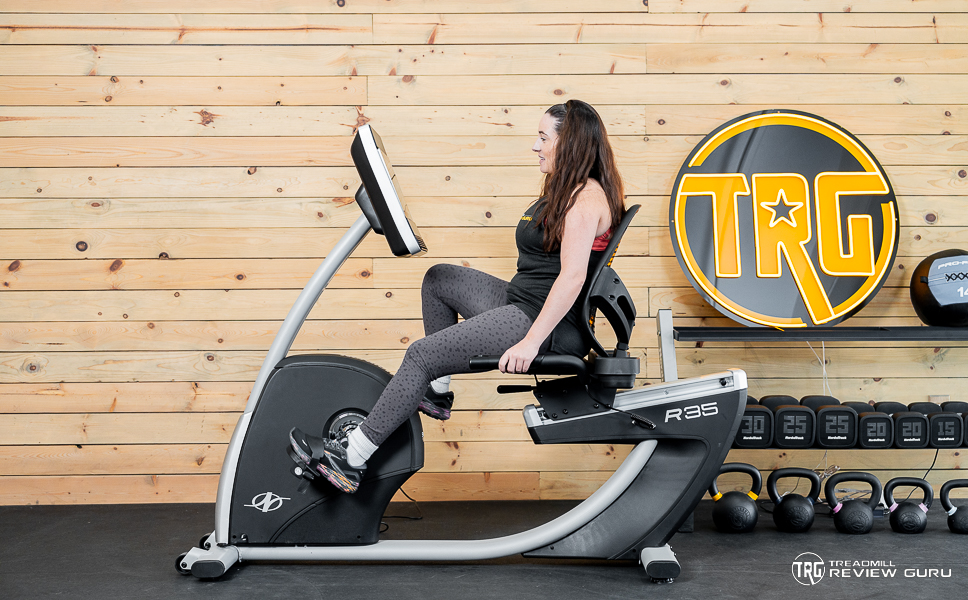
If the screen stays black, check that the power cord is fully plugged in both at the wall and the bike. Try another outlet to rule out a problem with your power supply. If there’s still no power, inspect the cord for damage and consider replacing it.
2. Console Turns On, But No Display
When the console lights up but nothing shows, the console cable may be loose. Remove the console cover and check all wire connections. Reconnect any loose cables and restart the bike.
3. Resistance Not Changing
If the pedal resistance doesn’t adjust, listen for the sound of the resistance motor. If you hear nothing, the motor or the wiring may be faulty. Double-check the wiring to the resistance motor. If you hear movement but resistance stays the same, the belt may be loose or off the track.
4. Squeaking Or Grinding Noises
Unusual sounds from your bike often mean a loose bolt or dry bearings. Tighten all visible bolts. If the sound continues, lubricate the pedal arms and flywheel area with a silicone-based lubricant.
5. Heart Rate Sensors Not Working
If the heart rate grips are not reading, wipe them clean with a soft cloth. Make sure your hands are clean and slightly moist. If they still don’t work, check the sensor connection under the console.
6. Pedals Feel Wobbly
Loose pedals can be dangerous. Use a wrench to tighten the pedal arms. Check both the pedal and the crank arm. If you notice play in the crank, the internal bearings may need attention.
7. Bike Won’t Connect To Wi-fi
Go to the console’s settings menu and select your Wi-Fi network. If it doesn’t connect, restart your router and try again. Make sure your Wi-Fi password is correct and the network is 2.4 GHz (not 5 GHz), as some machines don’t support 5 GHz.
8. Ifit Not Responding
If the iFit app freezes or doesn’t load, check your internet connection first. Restart the console and update the iFit software in the settings. If problems continue, log out and log back into your iFit account.
9. Console Freezes During Workout
Frequent freezing is usually a software issue. Restart the console and check for updates. If the problem continues, perform a factory reset (see the user manual for instructions).
10. Touchscreen Not Registering Taps
A slow or unresponsive touchscreen can be caused by dirt, sweat, or software lag. Clean the screen with a soft, dry cloth. If this doesn’t help, restart the console and check for updates.
11. Error Codes Showing On Console
If you see an error code, write it down. Most codes (like E1, E2, etc.) mean a specific problem. Refer to your manual for the meaning or search the code online. Many codes relate to motor issues or lost connections.
12. Incline Or Seat Adjustment Not Working
For models with motorized seat adjustment, check the adjustment buttons for response. Listen for a motor sound. If you hear nothing, inspect the wiring. If you hear the motor but the seat doesn’t move, something may be stuck in the track.
13. Console Buttons Not Working
If physical buttons on the console fail, check for stuck debris around the buttons. Gently press each button several times. If only some buttons work, the button panel may be faulty.
14. Bluetooth Not Pairing
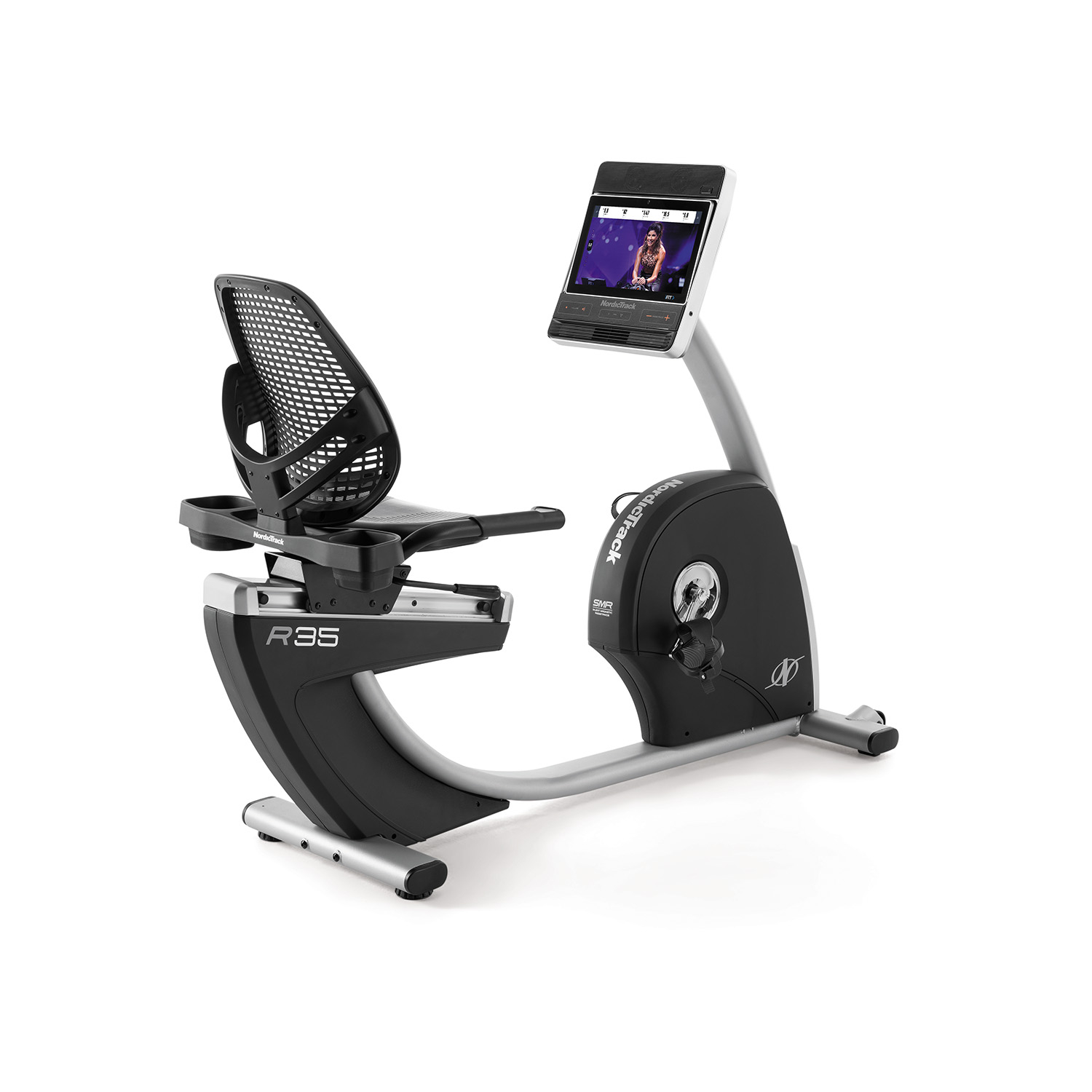
Make sure Bluetooth is enabled on both the bike and your device. Move your device closer and remove other Bluetooth devices nearby. Restart both devices and try again.
15. Metrics Not Tracking Properly
If speed, distance, or calories are off, the sensor magnet may be out of place. Find the sensor on the flywheel or crank area and make sure it’s positioned close to the sensor receiver.
16. Squeaky Seat
A noisy seat usually means the mounting bolts are loose. Tighten all bolts under and around the seat. For sliding seats, lubricate the rail lightly.
17. Console Randomly Shuts Off
If your console turns off during use, first check the power supply. If it’s secure, the issue may be overheating. Make sure the console’s vents are clear and not blocked by dust.
18. Resistance Feels Too Easy Or Hard
If resistance settings don’t match how the pedals feel, the calibration may be off. Run the calibration process found in the settings menu, or refer to the manual for instructions.
19. Loud Fan Noise
If the cooling fan is too noisy, check for dust buildup inside the fan grill. Clean the area gently with compressed air or a soft brush. If the noise continues, the fan motor might be failing.
20. Console Backlight Flickers
Flickering usually points to a loose connection or a failing backlight. Check all wiring behind the console. If the issue continues, contact support for possible replacement.
21. Bike Not Level Or Feels Unstable
If the bike rocks during use, adjust the leveling feet under the frame. Make sure all feet touch the floor evenly. Use a carpenter’s level for best results.
22. Crank Arm Making Noise
A clicking or knocking sound from the crank arm can mean a loose crank bolt. Tighten the bolt with a suitable wrench. If the noise persists, the crank arm or bottom bracket may be worn.
23. Console Not Charging Devices
Some R35 models have USB charging. If your phone doesn’t charge, check the USB port for debris. Try a different cable and device to confirm if the port is the problem.
24. Display Shows Incorrect Time Or Date
Go to console settings and manually set the correct time and date. If it resets every time you unplug the bike, the internal battery may need replacement.
25. Bike Makes Beeping Sounds
Unexpected beeping often means an alert or error. Check the screen for any warning messages. If the beeping continues with no error, restart the console.
26. Resistance Motor Runs Constantly
If you hear the resistance motor running even when you’re not adjusting, this could mean a sensor is stuck or a wire is shorted. Unplug the bike and inspect the resistance motor wiring.
27. Console Language Incorrect
To change the language, open the settings menu and select the correct language option. If the menu is unreadable, refer to the manual for icon-based navigation.

28. Console Stuck On Logo
If the console stays on the NordicTrack logo, try a hard reset by unplugging the bike for 60 seconds and plugging it back in. If this doesn’t work, you may need a firmware update.
29. Calories Burned Reading Unrealistically High/low
A sensor or software error may cause this. Run a sensor calibration and update your user profile with correct weight and age for more accurate readings.
30. Seat Will Not Lock In Place
For sliding seats, check for debris in the rail. Make sure the locking lever clicks firmly into place. If the lever is loose, tighten it or replace the spring if needed.
31. Pedal Straps Won’t Stay Tight
Old or stretched pedal straps can slip during use. Replace the straps if they no longer hold. Make sure to thread them through the pedals correctly.
32. Console Screen Brightness Issues
If the screen is too bright or too dim, adjust the brightness in the settings menu. If the brightness control doesn’t work, the screen may need servicing.
33. Sudden Loss Of Resistance
If resistance disappears mid-workout, check for a tripped circuit breaker or blown fuse inside the bike. Unplug, open the rear panel, and inspect the fuse.
34. Unusual Vibration During Use
Strong vibration can mean the bike is not level or that internal parts are loose. Re-level the bike, and if the issue continues, check all bolts and the flywheel alignment.
35. Console Not Updating Software
If your R35 won’t update, check your Wi-Fi connection strength. Move your router closer or use a Wi-Fi extender. If updates still fail, download the update file from the official NordicTrack website and install via USB.
Practical Data: Error Frequency And Fix Success Rates
Understanding which problems are most common and how often fixes work helps prioritize your troubleshooting. Here’s a summary based on NordicTrack owner surveys:
| Issue | Frequency (%) | Success Rate with DIY Fix (%) |
|---|---|---|
| No Power | 18 | 85 |
| Resistance Problems | 15 | 75 |
| Connectivity Issues | 14 | 80 |
| Noise/Vibration | 12 | 70 |
| Console Errors | 9 | 60 |
Comparing Common Troubles: Diy Vs Professional Repair
Sometimes, fixing your R35 at home is simple. Other times, a technician is needed. Here’s how common fixes compare:
| Problem | DIY Fix Possible? | Need Technician? |
|---|---|---|
| Loose bolts/noises | Yes | No |
| Console won’t turn on | Sometimes | Sometimes |
| Internal wiring | No | Yes |
| Software update | Yes | No |
| Resistance motor | No | Yes |
Two Things Most Owners Overlook
Many beginners overlook the importance of regular cleaning. Dust buildup can cause electrical problems, overheating, and noisy fans. Just wiping the console and vacuuming around the flywheel once a month can prevent many common errors.
Another missed step is updating user profiles. If you share the R35 with family, make sure each person’s age, weight, and height are up to date. This makes calorie counts and workout programs much more accurate.
When To Call For Professional Help
If you smell burning, see smoke, or the bike trips your circuit breaker, stop using it immediately. Some issues—like internal wiring, motor replacement, or major electronic problems—should only be handled by an authorized technician. Attempting these repairs yourself can void your warranty or create safety hazards.
Preventive Tips For Longer Life
- Wipe down the bike after every use to prevent sweat from corroding parts.
- Lubricate moving parts every six months.
- Check bolts and screws monthly for tightness.
- Update software whenever prompted.
- Keep the bike indoors, away from moisture and direct sunlight.
Where To Find More Help
NordicTrack provides detailed support guides and downloadable manuals on their official website. If your R35 is still under warranty, contact support before opening the bike or replacing parts. For extra tips and community troubleshooting, the NordicTrack subreddit and official support forums are helpful.
For official troubleshooting documentation and firmware files, visit the NordicTrack Support page.
Frequently Asked Questions
How Do I Reset My Nordictrack Commercial R35 Console?
Hold down the reset button (usually a pinhole under the console) for 10 seconds. If your model doesn’t have a button, unplug the bike for 60 seconds, then plug it back in.
What Does Error Code E2 Mean On My R35?
E2 usually means a resistance motor issue. Check the motor wiring and restart the bike. If the error repeats, contact support for further help.
Can I Use The R35 Without A Wi-fi Connection?
Yes, you can use manual workout modes without Wi-Fi. However, iFit features, updates, and tracking require an internet connection.
Why Is My R35 Making A Clicking Noise When I Pedal?
A clicking sound often means a loose pedal, crank arm, or bottom bracket. Tighten all related bolts. If the noise continues, a part may need replacing.
How Often Should I Lubricate My R35 Recumbent Bike?
Lubricate the pedal arms and seat rail every six months, or more often if you notice squeaks or friction.
A well-maintained NordicTrack Commercial R35 will give you years of smooth, effective workouts. With the right troubleshooting knowledge, most common issues can be solved at home in just a few minutes. If you ever feel unsure, don’t hesitate to reach out to official support for peace of mind.

