
Peloton bikes have become a symbol of interactive home fitness, drawing in millions with their sleek design and immersive classes. While these bikes are built to last, a major question for new and prospective owners is: What does the Peloton Bike warranty really cover? This article breaks down every detail about Peloton’s warranty—what’s included, what isn’t, how to use it, and how it compares to other brands. If you’re considering a Peloton or already own one, understanding your warranty rights is crucial for getting the best value and peace of mind.
What Is A Peloton Bike Warranty?
A warranty is a manufacturer’s promise to repair or replace certain parts of your product if they fail within a set time. The Peloton Bike warranty covers repairs and replacements for specific problems caused by manufacturing defects—not normal wear and tear or accidental damage. The policy is designed to protect you from unexpected costs due to faulty parts or poor workmanship.
Peloton offers different warranties depending on the bike model and purchase location. The two main models are the Peloton Bike (original) and the Peloton Bike+ (premium version). Each has its own coverage details and duration. Peloton also allows buyers to add extended coverage for extra protection.
Understanding your warranty is important because repairs can be expensive without it. For example, a replacement screen for the Bike+ can cost several hundred dollars, and labor fees add up quickly. The warranty helps cover these costs when issues are the manufacturer’s fault.
Peloton Bike Standard Warranty: What’s Covered And For How Long?
Peloton’s standard warranty comes included with every new bike purchase. While terms can change over time, here’s what the current (as of mid-2024) coverage looks like for US customers:
| Component | Original Peloton Bike | Peloton Bike+ |
|---|---|---|
| Frame | 5 years | 5 years |
| Touchscreen | 12 months | 12 months |
| Other Components | 12 months | 12 months |
| Labor | 12 months | 12 months |
Breakdown Of Covered Parts
- Frame: Peloton guarantees the frame (main body) for 5 years. If the frame cracks or breaks due to a defect, Peloton will repair or replace it.
- Touchscreen: The display and internal electronics are covered for 12 months. This includes failure due to manufacturing faults, but not accidents or misuse.
- Other Components: This covers pedals, resistance mechanisms, drive belt, seat post, and more, for 12 months.
- Labor: If a repair requires professional help, Peloton covers the labor cost for 12 months.
What’s Not Covered
The warranty does not cover normal wear, cosmetic damage (scratches, dents), misuse, or issues from improper assembly. For example, if you drop a weight on the screen, that’s not covered. Damage from using non-Peloton parts or accessories can also void the warranty.
Differences Between Peloton Bike And Bike+ Warranties
While both the original Bike and the Bike+ have similar warranty periods, there are some subtle differences in how claims are processed and what’s considered a defect. For example, the Bike+ has more advanced electronics and a rotating screen, so the process for repairing these parts may differ. Peloton’s support team usually handles both bikes with similar policies, but always check the latest terms for your specific model.
The main distinctions are:
- Both models get 5 years for the frame and 12 months for other parts/labor.
- The Bike+ touchscreen includes extra features (e.g., soundbar, higher resolution) but doesn’t get longer warranty coverage.
- If you bought your Bike+ through a special promotion or in a bundle, your coverage start date may be tied to the delivery date, not the order date.
How To Make A Warranty Claim
Peloton makes the claim process straightforward, but you’ll need to follow specific steps to avoid delays.
- Contact Peloton Support: Use the official website, app, or customer service hotline.
- Have Information Ready: You’ll need your bike’s serial number, purchase date, and a description of the problem. Photos or video can speed things up.
- Follow Troubleshooting Steps: Peloton may ask you to try basic troubleshooting to confirm the issue is covered.
- Schedule Service: If a repair or part replacement is needed, Peloton will arrange for a technician visit or ship parts to you.
- Keep Records: Save emails, receipts, and any warranty claim numbers.
A common beginner mistake is waiting too long to report a problem. If you notice an issue, contact support right away—even small problems can get worse over time.
What Voids A Peloton Bike Warranty?
Warranty coverage is not unconditional. Certain actions or situations can void your warranty, meaning Peloton will refuse to cover repairs or replacements.
Common reasons a warranty is voided:
- Modifying the bike with non-Peloton parts (e.g., third-party pedals, screens)
- Using the bike in a commercial setting (like a gym) unless commercial use is specifically covered
- Improper assembly or repair by someone not authorized by Peloton
- Obvious signs of abuse or neglect (significant rust, water damage, or outdoor storage)
- Failing to follow cleaning and maintenance instructions in the user manual
Always read the manual and warranty terms to avoid these pitfalls. Even small unauthorized changes can give Peloton a reason to reject your claim.
Peloton Extended Warranty: Is It Worth It?
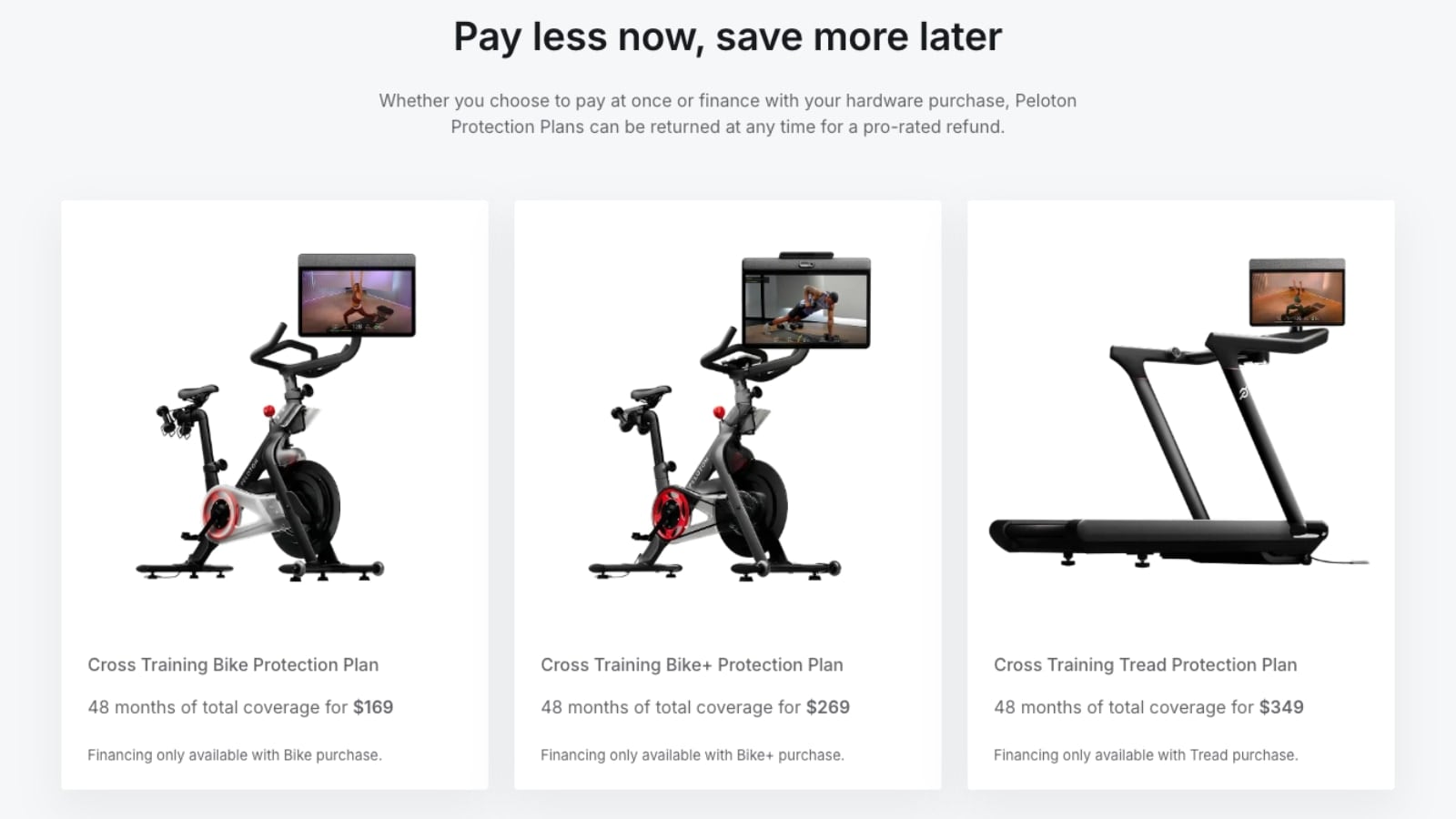
Peloton offers an extended warranty called Peloton Protection Plan, administered by a third-party provider (Asurion in the US). This plan extends your coverage beyond the standard 12 months for parts and labor, up to 48 months total (4 years).
What Does The Extended Warranty Cover?
- Touchscreen (including accidental damage, in some cases)
- Electronics
- Most mechanical parts (drive belt, pedals, sensors)
- Labor costs for repairs
It does not extend the 5-year frame warranty—frames are already covered for that period under the basic policy.
| Warranty Type | Length | What’s Covered | Approx. Cost (2024) |
|---|---|---|---|
| Standard | 1 year (parts/labor), 5 years (frame) | Manufacturer defects | Included |
| Extended (Asurion) | Up to 4 years (parts/labor) | Defects, accidental damage (some cases) | $199–$249 |
Pros And Cons Of The Extended Warranty
Pros:
- Peace of mind for expensive repairs after the first year
- Includes labor, which can be costly for screen or electronics fixes
- Coverage for accidental damage (in some plans)
Cons:
- Added cost ($199–$249, depending on promotions)
- Some claims may still be denied due to exclusions
- Extended warranty cannot be purchased after your original warranty expires
Most owners who plan to keep their Peloton for more than 2 years find the extended plan worthwhile, especially if you have kids or pets at home. However, if you’re comfortable with minor repairs and take good care of your bike, you may decide the standard policy is enough.
What The Peloton Warranty Does Not Cover
It’s just as important to know what’s not included. Peloton’s warranty (standard or extended) does not cover:
- Cosmetic issues (scratches, paint chips, normal fading)
- Damage from moving, dropping, or transporting the bike
- Problems from power surges or using non-approved power sources
- Damage caused by using the bike outdoors or in high-humidity environments
- Wear and tear on items like toe cages, seats, or grips
Also, accessories not made by Peloton, like third-party mats or weights, are not covered—even if they damage the bike. You’re responsible for regular cleaning and maintenance. Failing to do so can lead to denied claims.
How Does Peloton’s Warranty Compare To Other Brands?
Peloton’s warranty is good, but not the most generous in the industry. Here’s a comparison with other leading connected bike brands:
| Brand | Frame Warranty | Parts & Labor | Extended Option? |
|---|---|---|---|
| Peloton | 5 years | 1 year | Yes |
| NordicTrack S22i | 10 years | 2 years | Yes |
| Echelon EX-5s | 1 year | 1 year | Yes |
| SoulCycle at-home bike | 5 years | 1 year | No |
| Bowflex C7 | 3 years | 1 year | No |
Peloton’s 5-year frame warranty is solid, but NordicTrack offers longer coverage on both frame and parts (10 and 2 years, respectively). Echelon and Bowflex are more limited. However, Peloton’s reputation for customer service and nationwide technician network is a major advantage.
Common Warranty Claims And Real-world Examples
To give you a better sense of what’s actually covered, here are some common real-world warranty claims:
- Touchscreen stops responding: Covered if it fails within 12 months (or longer with extended plan), as long as there’s no visible impact damage.
- Pedal breaks off: Covered if the pedal was installed correctly and failed due to a defect, not misuse.
- Drive belt noise: If the belt squeaks or slips within the first year, Peloton usually sends a technician or replacement part.
- Frame crack: Covered under the 5-year frame warranty unless there are signs of abuse or rust from improper storage.
- Screen scratched by pet: Not covered. Cosmetic and accidental damage are excluded unless you have an extended plan that specifically includes accidents.
One non-obvious insight: Labor coverage is just as important as parts. A new screen may be shipped for free, but the technician’s visit can cost $150+ if you’re outside the warranty window. Always check if labor is included before approving repairs.
How To Maintain Your Peloton Bike To Protect Your Warranty
Proper maintenance not only extends your bike’s life but also protects your warranty. Here are key tips:
- Clean regularly: Wipe down the frame, screen, and moving parts after every ride with a soft, damp cloth. Avoid harsh chemicals.
- Check for loose parts: Tighten pedals, seat, and handlebars as needed. Loose parts can cause damage that’s not covered.
- Keep it indoors: Store your bike in a dry, temperature-controlled room. Humidity and cold can rust or warp components.
- Use only Peloton accessories: Non-approved parts may void your warranty.
- Follow the manual: Use Peloton’s official setup and troubleshooting guides to avoid mistakes.
A common mistake is over-tightening bolts or using lubricants not recommended by Peloton. These can lead to damage that’s not covered. If you’re unsure, ask Peloton support before making adjustments.
Upgrading Or Selling Your Peloton: What Happens To The Warranty?
If you upgrade to a new Peloton Bike or sell your current one, it’s important to understand how the warranty transfers.
- Resale: Peloton’s warranty applies only to the original owner and the original delivery address. If you sell or gift your bike, the new owner is not covered.
- Moving: If you move, notify Peloton support. Some warranties are void if the bike is moved without official relocation services.
- Upgrades: If you trade in your bike for a newer model (for example, from Bike to Bike+), the new bike gets its own warranty starting from delivery.
If you’re buying a used Peloton, assume there’s no warranty unless you get a written exception from Peloton. This is a common area where buyers make costly mistakes—don’t count on coverage for secondhand bikes.
Warranty And Insurance: Do You Need Both?
Some owners wonder if they need extra insurance on top of the warranty. Here’s how the two compare:
- Warranty: Covers defects and some accidental damage (with extended plan), but not theft, fire, or all accidents.
- Homeowners or renters insurance: May cover your Peloton for theft, fire, or major accidents, but usually has a deductible and claims can affect your rates.
If your bike is in a high-risk area (e. g. , basement prone to flooding), extra insurance can provide peace of mind. Document your purchase and serial number for claims.
How To Check Your Peloton Warranty Status
If you’re unsure how much warranty time you have left:
- Log in to your Peloton account online.
- Go to the Orders or Support section.
- Enter your bike’s serial number to view warranty info.
- If you bought an extended plan, check for a confirmation email from Asurion or Peloton.
You can also call Peloton support for help. Keeping your purchase receipt and serial number handy is the fastest way to confirm coverage.
Real-world Tips For Maximizing Your Peloton Warranty
- Register your bike: Do this as soon as it arrives. Registration makes future claims faster.
- Document issues quickly: Take photos or video of any problems as soon as they appear.
- Avoid DIY repairs: If you’re not sure, let Peloton handle it. Unauthorized fixes can void your warranty.
- Ask about recall repairs: Sometimes, Peloton will fix certain issues for free, even out of warranty, if they’re part of a recall.
- Read the fine print: Policies can change, so check the latest terms before making a claim.
Two often-missed insights: Peloton sometimes offers goodwill repairs for loyal customers or well-documented cases even after the warranty ends. Also, keeping a clean service record (using only Peloton techs for repairs) strengthens your case if you ever need to ask for a favor.

Frequently Asked Questions
Does The Peloton Bike Warranty Cover Accidental Damage?
No, the standard Peloton warranty does not cover accidental damage, like dropping the bike or spilling water on the screen. Some extended protection plans may cover accidents—check the details before buying.
Can I Transfer My Peloton Warranty If I Sell My Bike?
No, Peloton’s warranty is for the original owner at the original delivery address. If you sell your bike, the new owner is not covered. Always clarify warranty status when buying or selling secondhand.
How Long Is The Peloton Bike Frame Warranty?
The frame is covered for 5 years from the delivery date. This covers cracks or breaks caused by manufacturing defects—not rust, outdoor storage, or abuse.
What Should I Do If My Peloton Bike Touchscreen Fails?
Contact Peloton support right away. Have your serial number and purchase details ready. If the screen failure is due to a defect and still under warranty, Peloton will arrange a repair or replacement. If it’s out of warranty, ask for repair options and costs.
Where Can I Find The Official Peloton Bike Warranty Terms?
You can read the latest official warranty details on the Peloton Support website. Policies may change, so always check for the most current information.
Peloton has made home fitness more accessible and motivating, but knowing your warranty rights is just as important as tracking your ride stats. With the right knowledge and a little regular care, your bike can deliver years of smooth, worry-free rides.

