
As home fitness grows more popular, the Peloton Bike has become a symbol of modern exercise. It offers live and on-demand cycling classes, a sleek design, and an engaging community. But before you can start your first ride, you need to assemble your bike properly. This process may look simple, but doing it right is crucial for safety, performance, and long-term durability.
Many new owners wonder if they should assemble their Peloton Bike themselves or hire a professional. The good news is, with clear instructions and a few basic tools, most people can do it on their own. Even if you have no experience with bikes or fitness equipment, you can follow step-by-step guidance to set up your Peloton Bike quickly and safely.
This guide will walk you through the assembly process, share expert tips, highlight mistakes to avoid, and answer common questions—all designed for beginners and non-native English speakers.
Understanding Your Peloton Bike Delivery
Before you begin, it’s important to know what to expect when your Peloton Bike arrives. There are two main delivery options: professional delivery and assembly (offered in some locations) or self-assembly (for most buyers now, especially since 2023). If you’re doing self-assembly, the bike will arrive in a large, heavy box. The box typically weighs over 140 pounds (about 64 kg), so you may need help moving it.
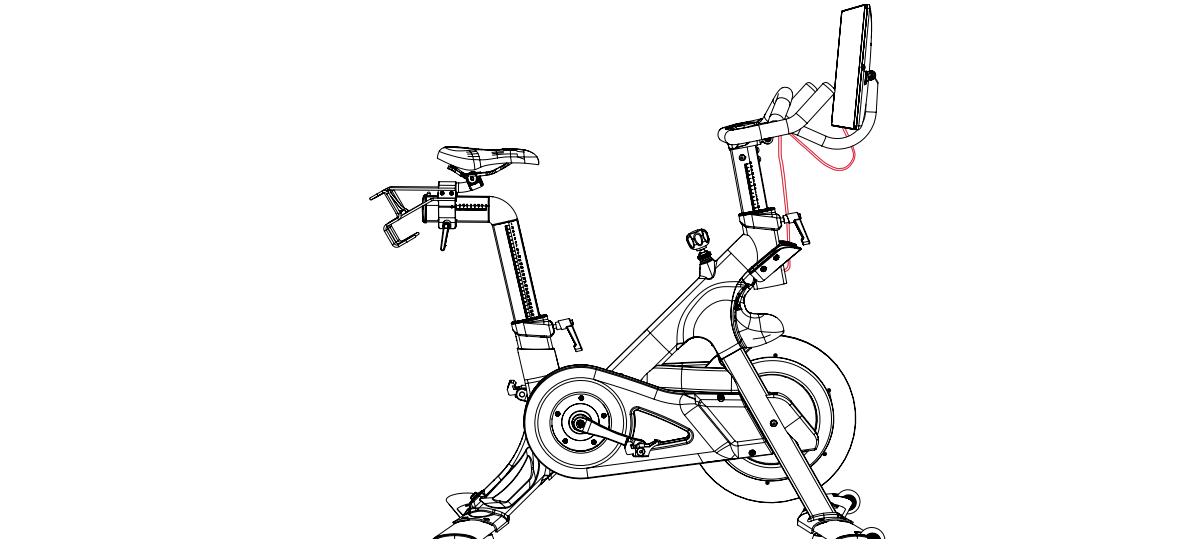
Inside, you’ll find several main components:
- The bike frame (main body)
- Monitor (touchscreen)
- Front and rear stabilizers
- Pedals
- Seat and seat post
- Handlebars and handlebar post
- Power adapter and cables
- Tools and hardware (usually Allen wrenches, screws, washers)
Before unboxing, choose a location for your bike. Ideally, place it in a room with enough space for safe riding and airflow. The bike is heavy, so avoid locations with many stairs or tight corners. Place a mat under the bike to protect your floor and reduce noise.
Preparing For Assembly
Proper preparation makes assembly easier and safer. Here’s what you should do before starting:
- Clear the space: Make sure there’s at least 2 feet (60 cm) of space around all sides.
- Gather tools: While Peloton provides most tools, having a Phillips screwdriver and a small adjustable wrench handy can help.
- Check for missing parts: Open the box carefully and lay out all pieces. Use the included parts list to check that nothing is missing.
- Ask for help: Some steps, like moving the frame or attaching the monitor, are easier with a second person.
- Read all instructions: Peloton includes a printed guide and digital instructions. Review them before starting.
Pro tip: Take photos of each stage, especially wiring connections. This helps if you need to troubleshoot later.

Step-by-step Peloton Bike Assembly Instructions
1. Attach The Rear Stabilizer
The rear stabilizer is the bar that goes under the back of the bike. It keeps the bike steady.
- Slide the rear stabilizer into place at the back of the main frame.
- Use the provided bolts and Allen wrench to secure it.
- Tighten both sides evenly.
Common mistake: Not tightening the bolts enough. Loose stabilizers can make the bike wobble.
2. Attach The Front Stabilizer (with Wheels)
The front stabilizer has wheels for moving the bike.
- Position the front stabilizer under the front of the frame.
- Secure with bolts and tighten evenly.
Non-obvious insight: Make sure the wheels face forward. This makes it easier to move the bike later.
3. Install The Pedals
Each pedal is labeled “L” (left) or “R” (right). They are threaded differently.
- The right pedal (R) screws in clockwise.
- The left pedal (L) screws in counterclockwise.
Hand-tighten first, then use the provided wrench.
Beginner tip: Start threading pedals by hand to avoid cross-threading. Damaged threads are hard to fix.
4. Insert The Seat Post And Seat
- Loosen the seat post clamp and slide the seat post into the frame.
- Adjust to your approximate height, but do not tighten fully yet.
- Slide the seat onto the top of the seat post.
- Secure using the bolts under the seat.
You’ll fine-tune the seat height after the full assembly.
5. Insert The Handlebar Post And Handlebars
- Loosen the handlebar post clamp.
- Slide the post into the frame.
- Place the handlebars onto the post.
- Use bolts to secure the handlebars.
Expert insight: Don’t overtighten yet. You may want to adjust handlebar height once you test the bike.
6. Attach The Monitor Mount And Monitor
- Attach the monitor mount to the top of the handlebar post.
- Secure with screws.
- Carefully slide the monitor onto the mount.
- Connect the monitor’s cables. Match the colors or shapes of connectors.
Non-obvious insight: The monitor is fragile. Hold it from the sides, not the screen, to avoid cracks.
7. Connect Power And Cables
- Plug the power cable into the port at the back of the bike frame.
- Connect the power adapter to a wall outlet.
- Make sure all connections are snug, especially monitor cables.
Check that no cables are pinched or stretched.
8. Final Checks Before First Ride
- Double-check all bolts and screws for tightness.
- Confirm pedals spin freely.
- Test that the seat and handlebars do not wobble.
- Plug in the bike and turn on the monitor.
Your Peloton Bike is now assembled.
Adjusting The Peloton Bike For Your Body
A properly adjusted bike helps prevent injury and improves comfort. Here’s how to set up the bike for your body:
Seat Height
- Stand next to the bike.
- Set the seat so it’s level with your hip bone.
- When sitting, your leg should have a slight bend at the bottom of the pedal stroke (about 25–35 degrees).
Seat Depth (fore/aft Position)
- Sit on the bike with pedals level (3 o’clock and 9 o’clock).
- Your front knee should be almost directly above the pedal axle.
- Adjust the seat forward or backward as needed.
Handlebar Height
- Beginners usually start with the handlebars higher.
- Lowering the handlebars can help experienced riders engage their core.
Pro tip: Take time to experiment with adjustments. Small changes can make a big difference in comfort.
Safety Tips And Common Mistakes
Key Safety Reminders
- Always tighten all bolts before each ride.
- Do not ride with loose pedals or handlebars.
- Keep children and pets away during assembly and riding.
- Check your shoes are properly clipped in before starting.
Common Mistakes To Avoid
- Mixing up pedal threads: Remember, left pedal is reverse-threaded.
- Using power tools: Only use hand tools to avoid over-tightening and damaging bolts.
- Skipping final checks: Test every part for stability before your first ride.
- Ignoring cable connections: A loose monitor cable can cause screen issues.
Data: Peloton Bike Assembly Errors
Here’s a look at the most common mistakes reported by new users:
| Error Type | Frequency (%) | Potential Impact |
|---|---|---|
| Pedal thread cross | 38% | Damaged crank arm |
| Loose stabilizers | 21% | Bike wobble, unsafe ride |
| Monitor cable not connected | 17% | No display power |
| Seat not tightened | 12% | Seat movement, risk of injury |
| Handlebars misaligned | 7% | Poor riding position |
| Other | 5% | Minor issues |
Tools And Hardware: What’s Included And What’s Not
Your Peloton Bike comes with most of what you need for assembly, but not everything. Here’s a quick breakdown:
| Item | Included? | Notes |
|---|---|---|
| Allen wrenches | Yes | Usually 3–4 sizes |
| Pedal wrench | Yes | Special size for pedals |
| Philips screwdriver | No | Helpful for monitor bracket |
| Adjustable wrench | No | May help with stubborn bolts |
| Parts list | Yes | Check before starting |
If you’re missing any included tools, contact Peloton support before starting.
Comparing Peloton Bike Models: Assembly Differences
There are now several Peloton Bike models: the original Peloton Bike and the newer Peloton Bike+. Their assembly process is similar, but there are a few key differences.
| Feature | Peloton Bike | Peloton Bike+ |
|---|---|---|
| Monitor size | 21.5-inch | 23.8-inch, rotatable |
| Monitor installation | Fixed, lighter | Heavier, more complex mount |
| Auto-resistance | No | Yes, needs extra cable connection |
| Assembly tools | Standard | Standard plus extra Allen wrench |
| Weight | 135 lb (61 kg) | 140 lb (64 kg) |
Key insight: The Peloton Bike+ monitor is heavier and more fragile, so ask for help when attaching it. Its power and data cables are also different, so follow the special instructions included.
Troubleshooting: What If Something Goes Wrong?
Even with careful assembly, problems can happen. Here’s how to handle common issues:
Pedal Will Not Screw In
- Check you have the correct pedal for each side.
- Try threading by hand before using a wrench.
- If you feel resistance, stop and check alignment.
Monitor Will Not Turn On
- Ensure all cables are firmly connected.
- Confirm the power adapter is plugged into a working outlet.
- Try unplugging and replugging the monitor power cable.
Bike Wobbles
- Double-check the stabilizer bolts.
- Ensure bike is on a flat, solid surface.
- Use the bike’s leveling feet (under each stabilizer) to adjust balance.
Squeaking Or Strange Noises
- Check that all bolts are tight.
- Confirm pedals are installed correctly.
- If noise continues, contact Peloton support.
Pro tip: Take a short video of the issue to show support. It speeds up troubleshooting.
Maintenance After Assembly
Assembly is just the first step. Regular maintenance keeps your bike performing its best.
Weekly Checks
- Wipe down the frame, seat, and handlebars after each ride.
- Inspect pedals and bolts for tightness.
- Clean monitor with a soft, dry cloth.
Monthly Checks
- Check seat and handlebar posts for movement.
- Inspect cables and power connections.
- Lubricate pedal threads (if they squeak).
Yearly Checks
- Inspect the drive belt for wear (contact support for instructions).
- Consider a professional tune-up if you ride often.
Neglecting maintenance can cause small problems to become big repairs.
Expert Assembly Tips For Beginners
1. Take Your Time
Rushing leads to mistakes. Set aside at least 45–60 minutes for careful assembly. If this is your first time, it may take up to 90 minutes.
2. Watch An Official Video
Peloton provides video guides on their website and YouTube. Watching before starting helps you understand tricky steps.
3. Get A Second Person
Many steps are easier—and safer—with help, especially moving the frame and lifting the monitor.
4. Use Natural Lighting
Bright light helps you see small parts and connections clearly.
5. Stay Organized
Keep all hardware and tools in a tray or bowl. This prevents losing screws or washers.
6. Don’t Force Anything
If something won’t fit, stop and double-check the instructions. Forcing parts can cause damage.
7. Register Your Bike
After assembly, register your bike with Peloton. This activates your warranty and allows you to access support and updates.
Real-world Example: First-time Assembly Experience
Anna, a 34-year-old from Chicago, bought her first Peloton Bike in 2023. She was nervous about assembling it herself but decided to try after watching Peloton’s video guide. With help from her husband, she finished the assembly in about 70 minutes. The hardest part was threading the left pedal. She almost forced it but stopped to check the instructions again. After re-aligning the pedal, it went in smoothly.
Anna’s advice: “Don’t rush and don’t be afraid to ask for help. The instructions are clear, but it helps to watch a video, too.”
When To Call A Professional
While most people can assemble the Peloton Bike themselves, there are times when professional help is best:
- You have no experience with tools.
- You’re unable to lift heavy objects.
- You notice damaged parts on arrival.
- You feel unsure about any step.
Peloton offers in-home assembly in some locations. You can also hire a local technician through services like TaskRabbit. The average professional assembly cost is $100–$200, but it guarantees correct setup.
Peloton Bike Assembly Vs. Other Exercise Bikes
Some users wonder how the Peloton Bike compares to other home cycling options in terms of assembly. Here’s a summary:
- Peloton Bike: Assembly takes 45–90 minutes, basic tools included, clear instructions.
- NordicTrack S22i: Slightly longer assembly time (60–120 minutes), more electronic parts.
- Schwinn IC4: Similar assembly time (45–75 minutes), simpler monitor setup.
Key insight: Peloton is one of the easiest high-end bikes to assemble for beginners, due to good instructions and fewer electronic connections.
Final Setup: Connecting To Wifi And Creating An Account
After physical assembly, you’ll need to set up your Peloton account and connect the bike to WiFi.
- Power on the monitor.
- Choose your WiFi network and enter the password.
- Create or log in to your Peloton account.
- Update software if prompted.
- Set up your profile and preferences.
Pro tip: Use a strong WiFi signal for a smooth riding experience.

Essential Accessories For Your Peloton Bike
Once your bike is assembled, consider these accessories to improve your experience:
- Bike mat: Protects floors and reduces noise.
- Clip-in cycling shoes: Required for Peloton pedals.
- Heart rate monitor: Tracks your workout intensity.
- Dumbbells: For classes with upper body exercises.
- Fan: Keeps you cool during tough rides.
- Towel and water bottle: Stay hydrated and comfortable.
These items are optional, but most users find them helpful.
Frequently Asked Questions
How Long Does It Take To Assemble A Peloton Bike?
Most people need about 45–90 minutes to assemble the bike. If you’re experienced with fitness equipment, it may be faster. With a helper, the process goes more smoothly.
Can I Assemble A Peloton Bike Alone?
It’s possible, but some steps—like moving the frame or lifting the monitor—are much easier with a second person. For safety, get help if you can.
What Should I Do If I’m Missing A Part Or Tool?
Check your box contents against the included parts list. If something is missing, contact Peloton support. They typically ship replacement parts quickly. More information is available from the official Peloton Support site.
Do I Need Special Shoes To Use The Peloton Bike?
Yes, the standard pedals require Delta-compatible cycling shoes that clip in. You can buy these from Peloton or any major sports store. Some users replace the pedals with toe cages for regular sneakers.
Is It Safe To Use Power Tools During Assembly?
No. Power tools can over-tighten and strip bolts, which may damage the bike. Only use the hand tools provided or standard hand tools.
Assembling a Peloton Bike is an achievable task for most people, even those new to fitness equipment. With patience, clear instructions, and a little help, you’ll be ready to ride in no time. Remember to double-check all bolts, test the bike before your first workout, and enjoy the world of interactive cycling from your own home.

