
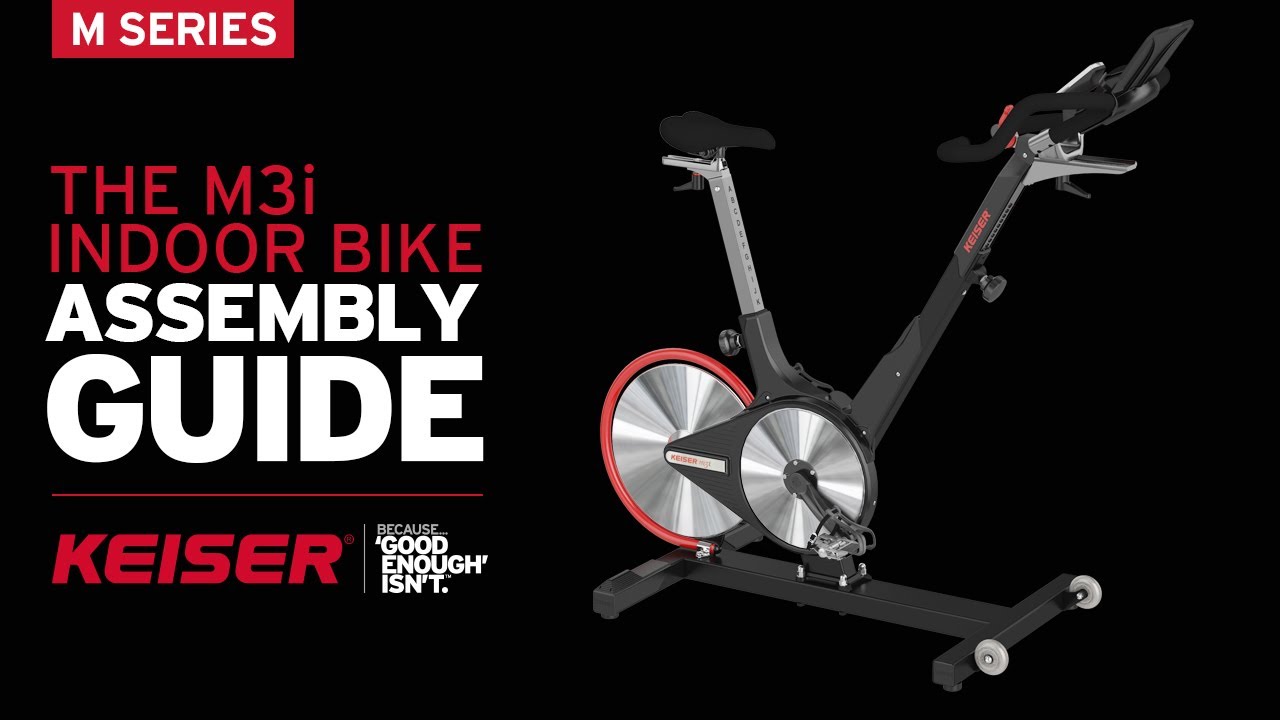
Assembling the Keiser M3I Indoor Cycle can feel like a big task, especially if you are new to fitness equipment. However, this process is easier than many expect. With clear instructions and the right approach, you can set up your Keiser M3I confidently and enjoy a smooth cycling experience. In this guide, you will learn every step, from unpacking the parts to fine-tuning your bike for the first ride. You’ll also discover practical tips to avoid mistakes, save time, and ensure your indoor cycle is safe and ready for use. By the end, you’ll have the knowledge to assemble and maintain your M3I, even if you’ve never built exercise equipment before.
What Makes The Keiser M3i Unique?
Before you start assembly, it helps to understand why the Keiser M3I stands out. This bike is popular for its magnetic resistance system, which gives a smooth, quiet ride. The design is compact, making it ideal for home and gym use. It also features Bluetooth connectivity, allowing you to track workouts on your smartphone. The M3I is known for its durability, with a sturdy frame and high-quality components. Unlike many other indoor bikes, the M3I uses a rear flywheel design, which helps protect the moving parts from sweat and dust. These features mean the assembly is slightly different from cheaper bikes, but the end result is worth the effort.
Another unique feature is the V-shaped frame, which allows for a wide range of seat and handlebar adjustments. This means the bike can fit riders from 4’10” to over 7′ tall, making it suitable for nearly every member of the family or gym.
The belt drive system also means less maintenance and a cleaner ride compared to chain-driven bikes.
Preparing For Assembly
Unboxing And Checking Parts
First, open the box carefully and lay out all the parts. The Keiser M3I comes with several main components:
- Frame
- Handlebars
- Seat post and seat
- Rear stabilizer
- Front stabilizer
- Pedals
- Console (display unit)
- Tools (usually an Allen wrench, screwdriver, and spanner)
- Hardware pack (bolts, washers, nuts)
Check the parts against the instruction manual. Missing parts can cause delays, so confirm everything is present. If you find any missing pieces, contact Keiser support before starting.
Be sure to inspect each part for damage during shipping. Even small dents or scratches can affect performance or assembly, so take a few extra minutes to look everything over. If you see any issues, take a photo and keep the packaging for reference.
Choosing The Right Space
Select a flat, stable area for assembly. Make sure you have enough room to move around the bike. Avoid carpets or uneven flooring, as this can affect the bike’s stability. A clean, well-lit area helps you see small parts and avoid mistakes.
If you plan to keep the bike in a different room, assemble it near its final location. The M3I is lighter than many studio bikes, but moving it fully assembled can still be awkward through narrow doorways or hallways.
Gathering Tools
Although Keiser supplies basic tools, you may want to use your own for comfort. A ratchet wrench, for example, can speed up the process. Keep a towel nearby to protect the frame and parts from scratches.
A small container for bolts and washers can help prevent losing small hardware. If you have a magnetic tray, that works even better, especially if you’re assembling on a hard floor where parts can roll away.
Step-by-step Assembly Guide
Attaching The Rear And Front Stabilizers
The stabilizers keep your bike steady during use. Start with the rear stabilizer:
- Align the rear stabilizer with the holes on the bike frame.
- Insert the bolts and washers through the holes.
- Tighten each bolt using the supplied wrench. Avoid over-tightening, which can damage the threads.
Repeat the same process for the front stabilizer. Make sure both stabilizers are flush with the ground.
It’s a good idea to tighten bolts in a cross-pattern (tighten one side, then the other) to keep the stabilizer level. After tightening, gently rock the frame to test stability. If there’s wobbling, loosen the bolts slightly, reposition the stabilizer, and retighten.
Installing The Seat Post And Seat
The seat post supports your saddle and adjusts for height. Here’s how to install:
- Slide the seat post into the frame tube.
- Secure the post with the adjustment knob. Tighten so it holds firm but still allows height changes.
- Attach the seat to the seat post using the bolts provided. The seat should face forward.
- Use the wrench to tighten the seat bolts. If the seat wobbles, readjust and retighten.
Non-obvious insight: Many beginners forget to align the seat parallel to the bike frame. Misalignment can cause discomfort during riding.
Another detail: before final tightening, sit on the seat and make minor adjustments. Even a few millimeters off-center can affect comfort during long rides. If you plan to share the bike, mark your height adjustment with tape or a marker for quick changes.
Attaching The Handlebars
The handlebars are key for control and comfort. To install:
- Slide the handlebar post into the front tube.
- Secure the post with the adjustment knob.
- Place the handlebars onto the post, aligning the holes.
- Use the supplied bolts and washers to fix the handlebars in place.
- Tighten the bolts evenly.
Check that the handlebars are straight and at your preferred height.
Handlebar angle can also affect comfort. Some riders prefer the bars tipped slightly forward for an aggressive stance, while others like them level for comfort. Test a few positions before fully tightening.
Installing The Pedals
Pedal installation is simple but requires care. Each pedal is marked “L” (left) or “R” (right):
- Locate the right pedal and thread it clockwise into the right crank arm.
- Locate the left pedal and thread it counterclockwise into the left crank arm.
- Use the wrench to tighten each pedal securely.
Non-obvious insight: Many people accidentally cross-thread pedals. If the pedal doesn’t fit easily, stop and check the threading direction.
It helps to start threading each pedal by hand to avoid damage. If you ever hear squeaking while pedaling, check that the pedals are fully tightened.
Mounting The Console
The Keiser M3I console tracks your performance. Install it as follows:
- Attach the console bracket to the handlebars using the included screws.
- Connect the console cable from the bike frame to the console.
- Mount the console onto the bracket and secure it with screws.
Test the console by pressing the power button. If it doesn’t turn on, check the battery and cable connection.
When running the cable, avoid tight bends or pinching under the bracket. A loose connection can cause the console to lose data or disconnect during rides.
Connecting Bluetooth And Calibrating
The Keiser M3I supports Bluetooth for workout tracking. Pair the bike with your smartphone:
- Download the Keiser M Series app from the app store.
- Turn on Bluetooth on your phone.
- Open the app and select “Connect Bike.”
- Follow the prompts to pair the console.
Calibrating ensures accurate resistance readings. Use the app’s calibration feature or follow manual instructions. Proper calibration prevents errors in workout stats.
If your app doesn’t detect the bike, restart your phone and check that the console is on. For best results, keep your phone within a meter of the console during pairing. Calibration should be done with the resistance lever in the default position for correct tracking.
Safety Checks And Fine-tuning
After assembly, run through these checks:
- Ensure all bolts are tight but not over-tightened.
- Check that the bike sits flat on the floor.
- Test the seat and handlebar adjustments.
- Spin the pedals to make sure they rotate smoothly.
- Check the flywheel for any rubbing or noise.
Adjust the seat and handlebars for your height. The seat should be level with your hip when you stand next to the bike. The handlebars should be at a comfortable height for your shoulders.
Spend a few minutes adjusting the fore-aft position of the seat and handlebars. The correct position reduces knee and back strain during long rides. If you’re unsure, test with short rides and adjust gradually until you find your ideal setup.
Comparison: Keiser M3i Vs. Other Indoor Cycles
To help you see why assembly matters, here is a comparison with other popular models.
| Feature | Keiser M3I | Peloton Bike | Schwinn IC4 |
|---|---|---|---|
| Assembly Time (average) | 45 min | 60 min | 50 min |
| Tools Needed | Included + optional | Included | Included |
| Bluetooth Connectivity | Yes | Yes | Yes |
| Weight Capacity | 350 lbs | 297 lbs | 330 lbs |
| Noise Level | Very quiet | Quiet | Quiet |
The Keiser M3I is easier and faster to assemble than most competitors, with a higher weight capacity and quieter operation. Because the flywheel is at the rear, it’s less likely to need cleaning or adjustment after long-term use compared to front-flywheel models.
Troubleshooting Common Assembly Issues
Pedals Not Threading
If a pedal won’t thread easily, stop. Check the direction. The right pedal turns clockwise, the left counterclockwise. Forcing the pedal can damage the crank arm.
If the crank arm threads are damaged, you may need a professional repair. Always start threading by hand and switch to the wrench only when you’re sure the pedal is going in smoothly.
Console Not Working
If the console won’t turn on:
- Check battery placement.
- Confirm cable connection.
- Try replacing batteries.
If problems continue, contact Keiser support.
Some users find that the console cable can loosen during shipping. Double-check connections under the console and inside the frame if you still have issues.
Wobbly Bike
If the bike wobbles, check the stabilizers. Tighten all bolts. Make sure the floor is even. If necessary, place a mat under the bike.
On uneven floors, use adjustable feet (if included) or add shims under the stabilizer ends. Secure footing reduces noise and improves safety.
Loose Seat Or Handlebars
If either part feels loose, adjust the knob or bolts. Use a wrench for extra tightening. Double-check alignment for comfort.
If you notice creaking when riding, it usually means a bolt needs more tightening. Periodically check these areas, especially after your first few rides.
Expert Tips For Smooth Assembly
- Read the manual before starting. It saves time and prevents mistakes.
- Use your own ratchet wrench for faster assembly.
- Lay out all bolts and washers in order. This prevents confusion.
- Take photos of each step. This helps if you need to reassemble later.
- Don’t rush. Careful assembly means fewer problems in the future.
Another tip: if you get stuck at any step, check for video tutorials online. Seeing someone else do the step can clear up confusion quickly.
Keiser M3i Assembly Data
Here is a quick summary of assembly details for the Keiser M3I.
| Component | Estimated Time | Difficulty |
|---|---|---|
| Rear/Front Stabilizers | 10 min | Easy |
| Seat Post & Seat | 8 min | Easy |
| Handlebars | 7 min | Easy |
| Pedals | 5 min | Medium |
| Console | 10 min | Medium |
| Bluetooth Setup | 5 min | Easy |
Most users finish assembly in under 45 minutes. If you take your time and check each step, the process is smooth and low-stress.
Maintenance After Assembly
Once your Keiser M3I is assembled, regular maintenance keeps it running smoothly.
- Wipe down the frame after each use to prevent sweat damage.
- Check bolts monthly and retighten if needed.
- Lubricate the seat post and pedal threads every few months.
- Inspect the console batteries and replace as required.
A well-maintained bike lasts longer and provides a better workout.
Some owners add a small drop of silicone lubricant to the adjustment knobs if they feel stiff. Also, check for dust around the flywheel and clean gently with a soft cloth—never use harsh cleaners. Regular maintenance ensures smooth operation and prevents unwanted noises during rides.

Assembly Mistakes To Avoid
Using The Wrong Tools
Using tools not meant for the job can strip bolts or damage parts. Stick with the supplied tools or use high-quality alternatives.
If you don’t have experience with hand tools, ask a friend for help rather than using pliers or power tools that can cause damage.
Ignoring Instructions
Skipping steps or guessing can lead to unsafe setups. Follow the manual carefully.
Even if you have assembled bikes before, small differences in the M3I’s design make reading each step important. Many issues happen when users assume all bikes assemble the same way.
Over-tightening Bolts
Too much force can crack plastic parts or strip threads. Tighten until secure, but stop if you feel resistance.
If you’re unsure, gently test the tightness by hand before using the wrench for the final turn.
Not Checking Alignment
Misaligned seats or handlebars cause discomfort and injury. Take time to align all parts.
A simple way to check is to step back and look at the bike from the side and front before your first ride. This extra minute can save you from aches or the need to reassemble later.
Assembly Cost And Time Estimate
Most people assemble the Keiser M3I themselves. Hiring a professional costs between $100-$200. DIY assembly usually takes 45-60 minutes. If you are new to fitness equipment, plan for an hour.
If you choose professional assembly, ask if they include a final safety check and basic calibration. Some services offer a quick tutorial on use and maintenance, which can be helpful for first-time buyers.
Keiser M3i Assembly Vs. Professional Installation
| Factor | DIY Assembly | Professional Installation |
|---|---|---|
| Cost | Free | $100-$200 |
| Time Required | 45-60 min | 30-45 min |
| Skill Needed | Basic tools | None |
| Satisfaction | High (DIY pride) | High (convenience) |
| Warranty Impact | None | None |
DIY assembly is cost-effective and rewarding. Professional installation is quicker but adds expense. Many people find that doing the assembly themselves helps them understand the bike better, making future maintenance easier.
Where To Find Official Support And Manuals
Keiser provides detailed manuals and video guides. If you get stuck, visit the official site: Keiser Support. Their customer service is responsive and can guide you through tough spots.
You can also find user forums and community videos online that show real-world assembly tips. These often include tips for unique home setups or common beginner questions.
Real User Experiences
Most users report that assembly is straightforward. People with no previous experience complete the process in under an hour. Some found the pedal threading tricky but fixed it by reading instructions closely. Others appreciated the Bluetooth setup for easy workout tracking.
A few users noted that having a second person to help hold the frame or stabilizers made the process feel easier, especially when lining up bolts. Many riders recommend taking breaks between steps to double-check work and avoid missing small details.
Frequently Asked Questions
How Long Does It Take To Assemble The Keiser M3i?
Assembly takes about 45 minutes for most users. Beginners may need up to an hour. Having a helper can speed things up.
Can I Assemble The Keiser M3i Alone?
Yes. The bike is designed for solo assembly. If you have limited strength, ask someone to help with lifting the frame.
What Tools Do I Need For Assembly?
Keiser supplies basic tools. You may prefer a ratchet wrench and screwdriver for comfort. Avoid power tools to prevent over-tightening.
Is Bluetooth Setup Difficult?
No. The Keiser M3I uses a simple app. Download the app, turn on Bluetooth, and follow prompts. If you have trouble, check the manual or contact support.
What Should I Do If A Part Is Missing?
Check all packaging before contacting Keiser. If a part is missing, reach out to their support team. They are known for fast replacements.
Assembling your Keiser M3I Indoor Cycle is a satisfying project. With careful steps and the right tools, you’ll enjoy a sturdy, high-quality bike ready for countless workouts. Take your time, follow instructions, and soon you’ll be riding with confidence.


