Does Cubii Jr1 Track Calories
Many people today want to stay healthy, even if they spend most of their day sitting. The Cubii Jr1 is a popular under-desk elliptical machine that helps people move their legs while working or relaxing. But if you want to lose weight or track your daily health progress, you need to know more than just how much you move—you want to know how many calories you are burning. So, does the Cubii Jr1 track calories? In this article, you’ll learn exactly how the Cubii Jr1 works, what data it gives you, how accurate it is for calorie tracking, and ways you can improve your workout tracking with or without built-in features.
What Is The Cubii Jr1?
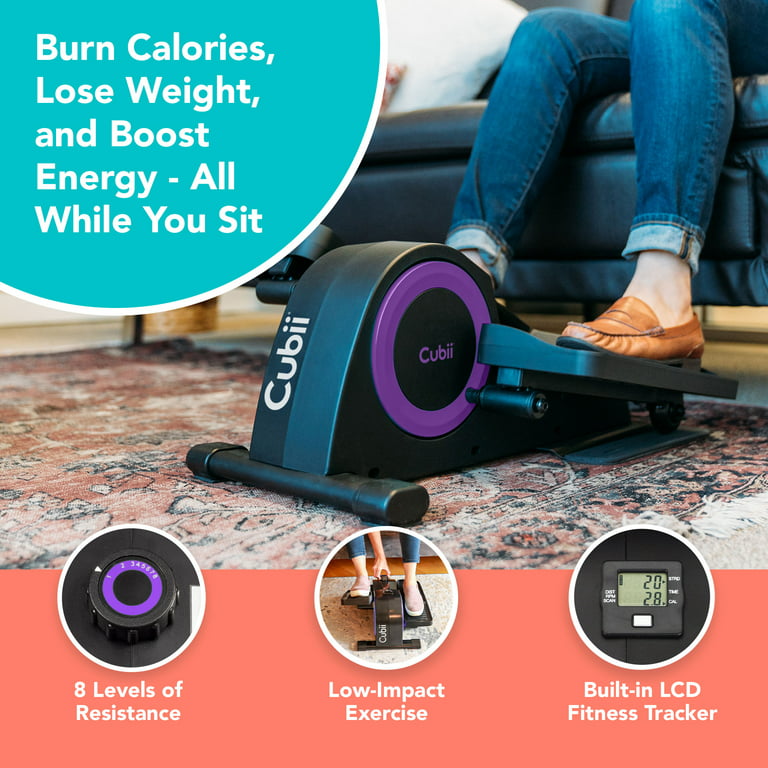
The Cubii Jr1 is a compact elliptical machine designed to fit under your desk or in front of your couch. Unlike large gym equipment, it’s small and quiet. This means you can use it while watching TV, reading, or doing computer work. The goal is to help you move more, especially if you have a job or lifestyle where you sit for many hours.
Cubii Jr1 is different from some other fitness devices in a few ways:
- It does not need you to stand up or balance your full weight.
- It is low-impact, which is easier on your knees and joints.
- It allows you to multitask—work and exercise at the same time.
The Cubii Jr1 comes with a small built-in display. This display shows several metrics as you pedal, such as:
- Time exercised
- Distance pedaled
- Stride count (number of steps)
- Estimated calories burned
People like the Cubii Jr1 because it’s simple to use, fits many lifestyles, and is quiet enough for shared spaces. But how reliable are its calorie numbers? To answer that, you need to know how the device tracks your activity.
What Data Does Cubii Jr1 Track?
The Cubii Jr1’s small display screen gives you a few important pieces of information during your workout. Let’s look at what you can expect to see.
Main Metrics Displayed
- Time – How many minutes you’ve pedaled.
- Distance – The distance you would have traveled if walking (measured in miles or kilometers).
- Strides – The number of pedal strokes you’ve completed.
- Calories – The estimated calories burned during your session.
The device does not connect to Wi-Fi or Bluetooth. That means you must read the numbers from the display—there’s no smartphone app or automatic syncing to other health trackers. This makes it simple, but also means you need to write down your results if you want to keep a record.
How These Metrics Work
The Cubii Jr1 uses sensors inside the device to count each pedal stroke. It knows how much resistance you are using (you can change the resistance level with a dial) and how long you pedal. With this information, it estimates your distance and calories burned.
One important thing to know: The Cubii Jr1 does not know your personal details, such as your weight, height, age, or gender. These are factors that affect how many calories a person burns. The machine uses a general formula based on the average user.

Does The Cubii Jr1 Track Calories?
Yes, the Cubii Jr1 tracks estimated calories burned. When you pedal, the display screen will show a calorie number for your current session. This number increases as you pedal longer or at a higher resistance level.
However, “tracking calories” can mean different things. The Cubii Jr1 gives you an estimate—not an exact measurement. Here’s how it works:
- The Cubii Jr1 counts your pedal strokes and resistance level.
- It uses a standard calculation to estimate how much energy the average person would use.
- The calorie number you see is based on this calculation.
In simple words, the Cubii Jr1 does track calories, but it uses a “one-size-fits-all” formula.
What Makes The Calorie Estimate Less Precise?
There are a few reasons the Cubii Jr1’s calorie count may not match your actual calories burned:
- Personal Differences – Calorie burn depends on your weight, age, gender, and fitness level. The Cubii Jr1 does not ask for this information.
- Effort Level – If you pedal slowly or only use the lowest resistance, you burn fewer calories. Pedaling faster or with more resistance burns more. The machine can only estimate based on pedal speed and resistance, not on your real effort or heart rate.
- Body Position – Sitting up straight or slouching changes how much your body works. The machine can’t measure this.
If you want a calorie number that’s just for you, you need more than what the Cubii Jr1 gives you. But for many users, the estimate is good enough to see trends: if the number is going up, you’re moving more.
How Accurate Is Calorie Tracking On The Cubii Jr1?
Many people buy the Cubii Jr1 to help with weight loss or to get more active. If you are serious about tracking calories burned, you might wonder if the number on the display is trustworthy.
The Science Behind Calorie Tracking
Calorie burn depends on many factors:
- Body weight: Heavier people burn more calories for the same activity.
- Muscle mass: More muscle means more calories burned.
- Age: Younger people often burn calories faster.
- Gender: Men and women burn calories at different rates.
- Intensity: Faster or harder pedaling uses more energy.
The Cubii Jr1’s formula doesn’t know these details. It uses average values. For example, the calculation might assume a user weighs about 150 pounds and pedals at a medium pace. If you weigh less or more, or pedal differently, the estimate could be off.
Comparing Cubii Jr1 Calorie Tracking With Other Devices
Here’s a simple comparison between the Cubii Jr1 and other popular ways to track calories.
| Device/Method | Personal Data Input | Tracks Heart Rate | Accuracy Level |
|---|---|---|---|
| Cubii Jr1 | No | No | Basic estimate |
| Fitbit/Smartwatch | Yes | Yes | Medium to high |
| Chest-strap Heart Rate Monitor | Yes | Yes | High |
| Gym Elliptical | Sometimes | Sometimes | Medium |
As you can see, the Cubii Jr1 offers simple calorie tracking. But if you want personalized accuracy, you’ll need another device or extra steps.
Real-world Accuracy Examples
Suppose two people use the Cubii Jr1 for 30 minutes at the same resistance:
- Person A weighs 120 pounds.
- Person B weighs 200 pounds.
The Cubii Jr1 might show both users burned 120 calories. But in reality, Person B burned more because heavier people use more energy for the same movement.
On the other hand, if Person A pedals much faster than Person B, but the Cubii Jr1 only counts strides, the calorie number may still be off.
Many owners of the Cubii Jr1 share that the calorie number is a good way to see their own progress, but not for comparing with others or for exact calorie counting.
How The Cubii Jr1 Calculates Calories
To understand what you’re seeing on the display, it helps to know how the Cubii Jr1 estimates calories.
The Calorie Formula
Most fitness machines (including the Cubii Jr1) use a simple formula based on:
- Number of pedal strokes (strides)
- Distance pedaled
- Resistance level
- Time
The Cubii Jr1 multiplies these by a “calories per stride” or “calories per minute” value. This value is based on research with average users, but it does not change for your body.
For example, the Cubii Jr1 might use a value like 0. 5 calories per stride. If you pedal 200 strides, it shows 100 calories burned. But if you pedal slower, or your legs are smaller or larger, your real calorie burn may be different.
Limitations Of The Built-in Calculation
- No input for weight, age, or gender
- No measurement of heart rate or breathing
- Assumes all movement is equal
The Cubii Jr1’s calorie estimate works best as a general guide. If you do the same workout each day and the calorie number goes up, you’re moving more. But don’t expect it to match the results from a medical-grade test.
How To Get More Accurate Calorie Data With Cubii Jr1
If you want a better idea of your real calorie burn, there are ways to improve the accuracy—even when using the Cubii Jr1.
Use A Fitness Tracker
Wearing a Fitbit, Apple Watch, or similar device while using the Cubii Jr1 can help. These devices use your weight, age, and heart rate to estimate calorie burn.
- Start a workout on your fitness tracker. Choose “elliptical” or “other.”
- Wear the tracker on your wrist or ankle (if allowed).
- Compare the tracker’s calorie number to the Cubii Jr1’s estimate.
Most people find the fitness tracker gives a more personal number.
Use Online Calorie Calculators
You can find calorie calculators online. Enter your weight, age, and how long you exercised. Choose “elliptical” or “stationary cycling” as the activity.
- Record how many minutes you pedaled and at what resistance.
- Enter your personal details in the calculator.
- Use this number as a more accurate estimate.
Manual Tracking
Write down:
- Time spent on the Cubii Jr1
- Resistance level
- Strides or distance
- Calorie number from the display
Over time, you’ll see patterns. If you want, you can adjust the calorie number up or down based on your body weight.
Example: Adjusting Calorie Burn For Body Weight
Suppose the Cubii Jr1 says you burned 100 calories in 30 minutes. If you weigh less than 150 pounds, you probably burned less. If you weigh more, you burned more. As a rough guide:
- For each 10 pounds over 150, add about 7% to the number.
- For each 10 pounds under 150, subtract about 7%.
It’s not perfect, but it helps make the estimate fit your body.
Cubii Jr1 Vs. Cubii Pro: What’s The Difference In Tracking?
Some people wonder if they should buy the Cubii Jr1 or pay more for the Cubii Pro. The main difference is tracking and technology.
Here’s a side-by-side look:
| Feature | Cubii Jr1 | Cubii Pro |
|---|---|---|
| Calories Displayed | Yes | Yes |
| Bluetooth/App Sync | No | Yes |
| Personal Data Entry | No | Yes (via app) |
| Automatic Tracking | No | Yes |
| Price Range | Lower | Higher |
The Cubii Pro can connect to your phone, record workouts, and use your personal information for better calorie estimates. If automatic tracking and more accurate calories are important to you, the Pro version is worth considering.
Common Mistakes When Tracking Calories With Cubii Jr1
People often expect too much from the Cubii Jr1’s calorie display. Here are a few mistakes to avoid:
- Treating the number as exact – The displayed calories are only an estimate.
- Ignoring personal factors – Your weight, age, and speed all matter.
- Not using the right resistance – Higher resistance burns more calories, but only if you keep up the effort.
- Comparing with others – Your calorie number is only for you, not for comparing with friends or family.
- Skipping consistency – The best use is to watch your own progress over time.
Tips To Maximize Calorie Burn With Cubii Jr1
Even if the calorie number is just an estimate, you can use the Cubii Jr1 to burn more calories by following these tips:
- Increase resistance gradually – As you get stronger, turn the dial higher.
- Pedal faster for short bursts – Try “intervals” where you go faster for 1–2 minutes.
- Use it more often – Add extra sessions during TV or phone calls.
- Sit up straight – Good posture helps your muscles work harder.
- Track your progress – Write down your numbers. Even if not exact, trends help you stay motivated.
Is Cubii Jr1 Calorie Tracking Good Enough For Weight Loss?
If you want to lose weight, you need to burn more calories than you eat. The Cubii Jr1 helps you move more, which can help with weight loss. But because the calorie number is an estimate, use it as a motivation tool—not as your only guide.
It’s smart to combine Cubii Jr1 workouts with:
- A healthy diet
- Regular walking or other exercise
- Tracking total calories eaten and burned
For most people, the Cubii Jr1 is a good way to add movement to a busy life. But for medical or serious fitness goals, use other tools for accurate calorie tracking.

Who Should Use The Cubii Jr1 Calorie Tracker?
The Cubii Jr1’s built-in display is best for:
- Beginners who want a simple way to see progress
- Office workers or seniors who need to move more
- People who don’t want to use apps or technology
If you’re training for an event, need precise numbers, or want to sync with other devices, consider a more advanced model or use a fitness tracker with the Cubii Jr1.
How People Really Use The Cubii Jr1 Calorie Feature
Many Cubii Jr1 users say the calorie number helps them stay motivated. They compete with themselves to beat yesterday’s score, or try to reach a daily goal. Some people try to “earn” a snack by pedaling for a certain number of calories.
But experienced users know the number is just a guide. They combine it with other healthy habits and don’t worry if it’s off by a bit.
One non-obvious tip: Use the distance or stride count as your main goal, not just calories. These numbers are more consistent and less affected by body size.
Expert Opinions On Cubii Jr1 Calorie Tracking
Health experts agree that moving more is always better than sitting. The Cubii Jr1 helps people who might otherwise be inactive. While the calorie tracking is basic, it’s better to have an estimate than none at all.
Some studies show that under-desk ellipticals can help with weight control, improve blood sugar, and boost mood. But for serious calorie tracking, devices that measure your heart rate or use personal data are more accurate.
For more on calorie tracking and exercise, see the Wikipedia page on calories.
Frequently Asked Questions
Does The Cubii Jr1 Show Calories On The Screen?
Yes, the Cubii Jr1 shows an estimated calorie number on its built-in display during your workout. This number increases as you pedal more.
How Does The Cubii Jr1 Calculate Calories?
The Cubii Jr1 uses the number of pedal strokes, time, and resistance level to estimate calories. It does not ask for your weight, age, or gender, so the estimate is based on an average user.
Is The Cubii Jr1’s Calorie Number Accurate?
The calorie count is a general estimate. It does not match the accuracy of fitness trackers or devices that use your heart rate and personal data. Use the number as a rough guide, not an exact measurement.
Can I Make The Cubii Jr1’s Calorie Count More Accurate?
You can improve accuracy by using a fitness tracker (like a Fitbit or Apple Watch) while using the Cubii Jr1, or by using online calorie calculators with your personal details.
Should I Choose The Cubii Jr1 Or Cubii Pro For Better Tracking?
The Cubii Pro offers Bluetooth syncing and uses personal data via an app for better accuracy. If you want simple, screen-only tracking, the Jr1 is fine. For more detailed records and personal calorie data, the Pro is a better choice.
Staying active is the most important thing. Whether you use the Cubii Jr1’s calorie number or another tool, the key is to keep moving and enjoy the health benefits every day.