
Cubii Jr1 Vs Cubii Pro Differences: A Complete Comparison
If you want to exercise while sitting, you may have heard about Cubii under-desk ellipticals. Two models stand out: the Cubii Jr1 and the Cubii Pro. These compact machines help you burn calories, improve circulation, and stay active at work or home. But which one is right for you? The differences are not just about price—they include features, technology, and user experience.
Choosing between Cubii Jr1 and Cubii Pro can be confusing. Both promise low-impact workouts, but their functions and extras vary. This article explains the main differences, compares important features, and helps you decide which Cubii fits your needs best. You’ll also see real-life examples, practical advice, and answers to common questions.
Overview: Cubii Jr1 And Cubii Pro
The Cubii Jr1 is often called the entry-level Cubii. It’s designed for simple, easy exercise. The Cubii Pro is marketed as a smart, connected version, offering Bluetooth and app integration. Both models look similar at first glance, but their capabilities set them apart.
What Is A Cubii Under-desk Elliptical?
A Cubii is a small elliptical machine that fits under your desk or table. You pedal while sitting, so it’s good for people with limited mobility or those who spend long hours at a desk. It’s popular in offices, homes, and even rehab centers.
Who Should Consider Cubii Jr1 Or Pro?
- Office workers wanting to stay active
- Seniors needing gentle exercise
- People recovering from injury
- Anyone looking for low-impact cardio
Design And Build Quality
Both Cubii Jr1 and Pro share a similar look: compact, sturdy, and easy to use. But subtle differences affect performance and durability.
| Feature | Cubii Jr1 | Cubii Pro |
|---|---|---|
| Dimensions | 23″ x 17.5″ x 10″ | 23″ x 17.5″ x 10″ |
| Weight | 27 lbs | 27 lbs |
| Material | Plastic, steel parts | Plastic, steel parts |
| Build Quality | Solid, basic | Solid, premium feel |
| Color Options | Gray, purple, blue | Black, silver, chrome |
Both models are nearly identical in size and weight. The Pro sometimes feels sturdier due to its finish and color scheme, but this is mainly cosmetic.
Pedal Design And Comfort
The pedals on both machines are large and have non-slip surfaces. This makes them comfortable for most shoe sizes and types. If you plan to use it barefoot or with socks, the Jr1’s pedals are slightly softer.
Practical tip: If you have wide feet or plan to use the Cubii for long sessions, check the pedal width before buying.

Resistance Levels And Adjustability
Both Cubii Jr1 and Cubii Pro offer eight resistance levels. You adjust these with a dial, making it easy to change the intensity.
| Resistance Levels | Adjustability | Use Cases |
|---|---|---|
| 8 | Manual dial | Light to moderate exercise |
The resistance is smooth on both models, but some users report the Pro has a slightly quieter mechanism, especially at higher levels. This difference is minor, but important if you work in a quiet office.
How Resistance Changes Workout
Low resistance is good for warm-ups and rehab. Higher resistance helps with calorie burning and muscle toning. Both models can suit beginners and experienced users, but the Pro’s smoother resistance may feel better during intense sessions.
Display And Tracking Features
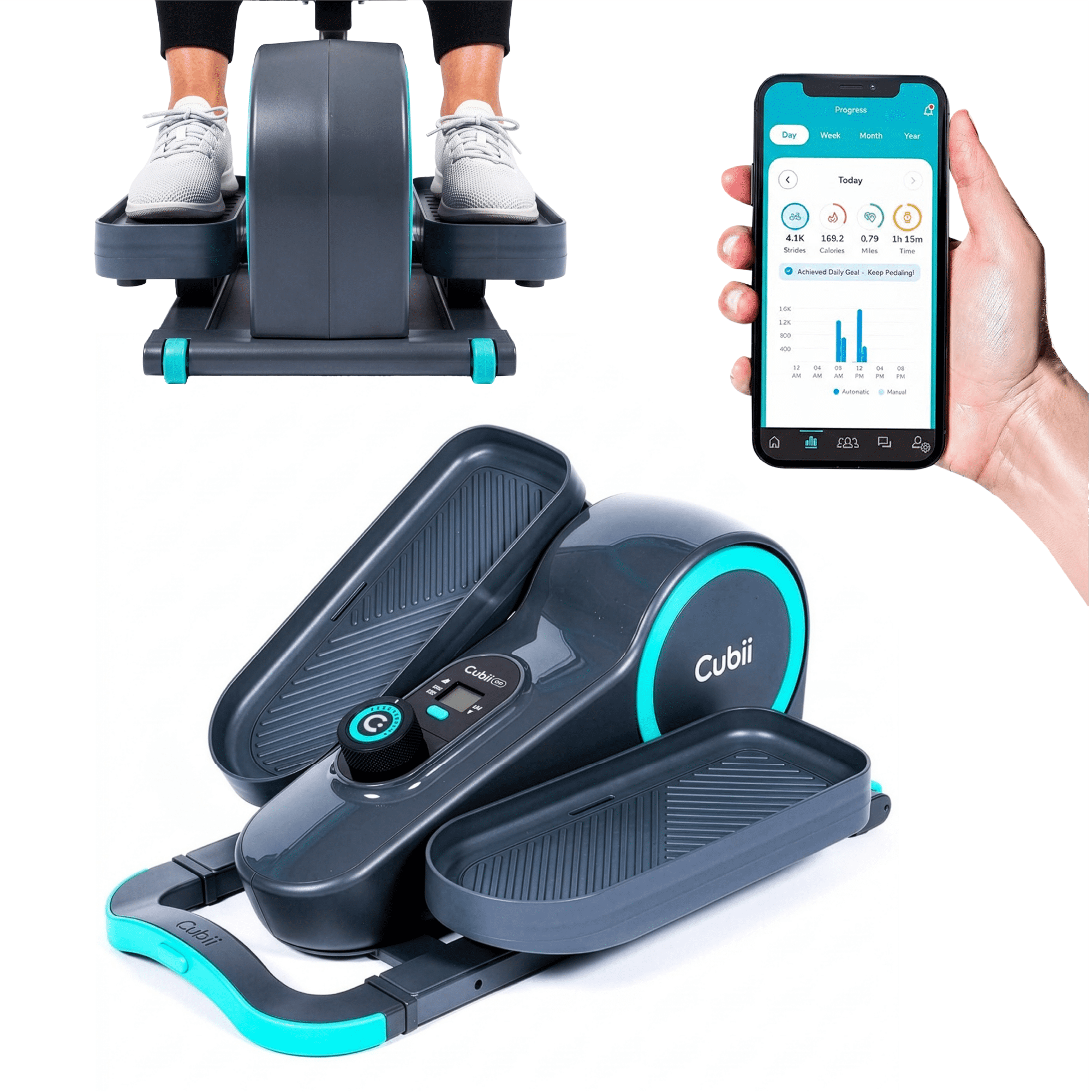
This is where the real gap starts to show. The Cubii Jr1 has a basic display, while the Pro offers smart features and app connectivity.
Cubii Jr1 Display
- LCD screen shows calories, distance, strides, and time.
- Located on the main unit, easy to read.
- No Bluetooth or app connection.
Cubii Pro Tracking
- No built-in display; all tracking is done via Bluetooth.
- Syncs with Cubii app on your phone or tablet.
- Tracks calories, distance, strides, and time.
- Can sync with Fitbit, Apple Health, and other platforms.
The Pro’s smart tracking is useful if you want to monitor progress over time or share results with friends. The Jr1 is simpler—good if you only want to see numbers while you pedal.
Non-obvious insight: Many beginners overlook the value of long-term tracking. The Pro’s app can motivate you by showing progress charts, streaks, and goals.
Bluetooth And App Connectivity
Bluetooth connectivity is the biggest difference between Cubii Jr1 and Cubii Pro.
| Model | Bluetooth | App Integration |
|---|---|---|
| Cubii Jr1 | No | No |
| Cubii Pro | Yes | Yes (Cubii app, Fitbit, Apple Health) |
With the Pro, you can:
- Connect to the Cubii app
- Set daily or weekly goals
- Join group challenges
- Sync with third-party fitness apps
The Jr1 does not offer any of these features. If you like technology and want to track your workouts digitally, the Pro is the clear choice.
Price And Value
Cubii Jr1 is more affordable, while the Pro costs more due to its smart features.
- Cubii Jr1: Around $249–$299
- Cubii Pro: Around $349–$399
Prices may change based on sales or bundles. The Pro often includes free shipping or accessories, but the Jr1 is usually the better value for basic use.
Is The Pro Worth The Extra Cost?
If you love data, tracking, and challenges, the Pro is worth the extra money. If you just want a simple machine for movement, the Jr1 gives you everything you need.
Common mistake: Some buyers pay more for the Pro without using its Bluetooth features. If you don’t plan to use the app, the Jr1 is a smarter purchase.
Noise And Smoothness
Both models are quiet, but the Pro is slightly quieter at higher resistance. This matters if you work in a shared office or watch TV while using the Cubii.
- Cubii Jr1: Quiet operation (under 55 decibels)
- Cubii Pro: Ultra-quiet (under 50 decibels)
The difference is minor, but noticeable if you’re sensitive to noise.
Assembly And Portability
Cubii ellipticals are easy to assemble. Both Jr1 and Pro come with clear instructions. Most people set them up in under 10 minutes.
- No tools required (included in box)
- Easy to move (built-in handle)
- Fits under most desks
Pro tip: If your desk is low, measure the space before buying. Both models are about 10 inches tall.
Warranty And Customer Support
Both Cubii Jr1 and Pro offer a one-year warranty. You can extend this for a fee. Cubii’s customer support is responsive and helpful.
- Email and phone support
- Online FAQs and manuals
- Replacement parts available
If you buy from Cubii’s official website, you get full warranty and support. Buying from third-party sellers may affect warranty coverage.
Real-life Examples And User Experiences
For Office Workers
Sara, an accountant, uses the Cubii Pro at her desk. She likes tracking her steps and calories with the app. Her team has monthly challenges, which keeps her motivated.
For Seniors
John, age 72, uses the Cubii Jr1 at home. He prefers the simple display and doesn’t care about Bluetooth. He enjoys gentle exercise while watching TV.
For Rehab Patients
Mary broke her ankle and needs low-impact movement. Her doctor recommended the Cubii Jr1. She tracks her progress with the LCD screen and finds it easy to use.
For Fitness Fans
Alex uses the Cubii Pro for extra cardio. He syncs data to his Fitbit and likes seeing improvement over time. The quiet operation lets him use it during conference calls.
Comparing Pros And Cons
Cubii Jr1
Pros:
- Lower cost
- Simple display
- Easy to use
- Good for beginners
Cons:
- No Bluetooth
- Limited tracking
- Fewer color options
Cubii Pro
Pros:
- Bluetooth and app integration
- Advanced tracking
- Quiet operation
- Syncs with other devices
Cons:
- Higher price
- No built-in display
- May be too advanced for some users
Which Cubii Is Best For You?
Ask yourself:
- Do you want to track workouts on your phone? If yes, choose the Pro.
- Do you need a basic machine for movement? The Jr1 is enough.
- Is price a concern? The Jr1 offers better value.
- Are you motivated by challenges and goals? The Pro’s app is useful.
- Do you need extra quiet operation? The Pro is slightly quieter.
Non-obvious insight: Many users buy the Pro for its technology but end up using only basic features. Think about your real needs before deciding.
Detailed Feature Comparison Table
Here is a side-by-side summary of important differences:
| Feature | Cubii Jr1 | Cubii Pro |
|---|---|---|
| Display | LCD screen | No display (uses app) |
| Bluetooth | No | Yes |
| App Integration | No | Yes (Cubii, Fitbit, Apple Health) |
| Resistance | 8 levels | 8 levels |
| Noise Level | Quiet | Ultra-quiet |
| Price | $249–$299 | $349–$399 |
| Color Choices | 3 | 3 |
| Warranty | 1 year | 1 year |
Cubii Jr1 Vs Cubii Pro: Common Buyer Mistakes
- Buying for features you won’t use: Many people get the Pro for Bluetooth but never use the app.
- Ignoring desk height: Both models need about 10 inches clearance. Some desks are too low.
- Not checking warranty: Buy from official sources for best support.
- Expecting intense workouts: Cubii machines are for light to moderate exercise, not high-intensity.

Practical Tips For Choosing
- If you want a machine that’s easy and simple, go for the Jr1.
- If you enjoy tech, data, and fitness apps, the Pro is a better fit.
- Consider your budget and real needs—not just features.
- Test the machine if possible before buying.
- Ask about return policy in case it doesn’t fit your space.
Non-obvious insight: The Jr1’s LCD display is easier for some seniors to read than the Pro’s app. If you’re buying for an older user, consider this carefully.
Cubii Jr1 Vs Cubii Pro: Expert Advice
As an experience-based guide, I recommend thinking about your routine. If you already use fitness apps and track steps, the Pro’s Bluetooth and integration will add value. If you just want to move more while sitting, the Jr1 is less expensive and just as effective.
For people with limited mobility, both models offer the same movement and resistance. The Pro’s app is a bonus, not a necessity.
If you plan to share the Cubii with family, the Jr1’s simple display makes it easy for everyone to use. The Pro is better for tech-focused users who want smart features.
Where To Buy And Official Links
For the latest models and full warranty, buy from Cubii’s official site or trusted retailers. For more information, visit the official Cubii website: Cubii Official Site.
Frequently Asked Questions
What Is The Main Difference Between Cubii Jr1 And Cubii Pro?
The main difference is Bluetooth and app integration. The Cubii Pro connects to your phone, tracks workouts, and syncs with fitness apps. The Jr1 has a simple LCD display and no smart features.
Can Cubii Jr1 Or Cubii Pro Be Used For Rehabilitation?
Yes, both models are good for rehab and gentle exercise. They provide low-impact movement, which is safe for most people recovering from injury. The Jr1 is often preferred in rehab settings for its simple display.
Is The Cubii Pro Much Quieter Than The Jr1?
The Cubii Pro is slightly quieter at high resistance, but both are quiet enough for office or home use. The difference is only noticeable in very quiet spaces.
Can I Use Cubii Jr1 Or Pro Under Any Desk?
Both machines are about 10 inches tall. You need at least this much clearance under your desk. Measure your space before buying. Some desks with drawers or shelves may not fit.
Is The Cubii Pro Worth The Extra Money For Most Users?
The Pro is worth it if you want Bluetooth, app tracking, and integration with fitness platforms. If you just want basic movement and do not use fitness apps, the Jr1 is more affordable and just as effective.
Choosing between Cubii Jr1 and Cubii Pro depends on your goals, tech preferences, and budget. Both are reliable, but their features suit different users. Take your time, think about your needs, and you’ll make the right choice.

