
Keeping your Cubii Jr1 under-desk elliptical in top shape is easier than you think, but most owners miss important steps. A well-maintained Cubii Jr1 not only lasts longer, but also stays quieter and safer. Many users just wipe it down and forget the rest, but small details matter. This guide walks you through every essential maintenance tip, from cleaning routines to troubleshooting, so your Cubii Jr1 works smoothly for years. Whether you use it daily or occasionally, you’ll find practical advice, clear steps, and real examples. Let’s make your Cubii Jr1 a reliable fitness partner.
Understanding Your Cubii Jr1
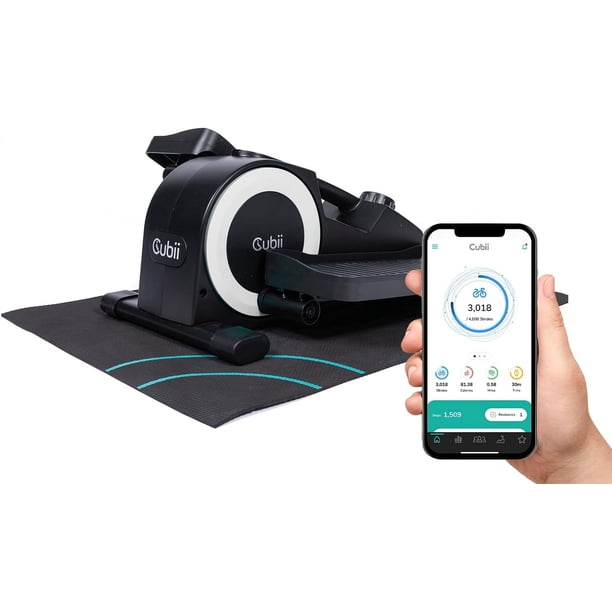
Before diving into maintenance, it helps to know the main parts and how the Cubii Jr1 works. The Cubii Jr1 is a compact elliptical machine designed for use under a desk or while seated. It features:
- Two pedals for low-impact exercise
- Resistance dial with eight settings
- LCD display tracking time, distance, and calories
- Internal flywheel for smooth motion
- Non-slip base and stabilizers
Each part plays a role in performance. For example, if the resistance dial gets stiff, your workout becomes harder. The flywheel is what makes the machine glide quietly. The LCD screen shows progress, but dust or battery issues can make it unreadable.
Understanding these basics helps you spot problems early.
Daily And Weekly Cleaning
Regular cleaning is the easiest way to avoid problems. Sweat, dust, and debris can cause wear or make your Cubii Jr1 noisy.
Daily Cleaning Steps
- Wipe pedals and frame: Use a damp cloth to remove sweat and dust after each use.
- Check for spills: Coffee or water spills can damage electronics or cause rust. Clean immediately.
- Inspect moving parts: Look for hair or small debris around pedals and flywheel.
Weekly Deep Clean
- Vacuum around the base: Dust builds up under the machine, so vacuum weekly.
- Clean LCD display: Use a soft, dry cloth. Avoid water or harsh cleaners.
- Check stabilizers: Make sure no dirt is trapped under the stabilizing feet.
Neglecting these steps leads to sticky pedals or worn-out resistance. A quick daily wipe keeps your Cubii Jr1 looking new and prevents bigger issues.
Lubrication And Mechanical Care
A well-lubricated Cubii Jr1 runs quietly and doesn’t squeak. The flywheel and pedal arms need attention, especially if you use it often.
When To Lubricate
Most users should lubricate every 3–6 months. Heavy users (over 10 hours/week) should check monthly.
How To Lubricate
- Unplug and move Cubii Jr1 to a clean area.
- Find the pedal arms: Look for the joints connecting pedals to the base.
- Apply silicone-based lubricant: Avoid oil-based products; they attract dust.
- Wipe away extra lubricant: Too much can drip or cause stains.
- Test pedals: Move them back and forth to spread lubricant.
Spotting Lubrication Problems
If you hear squeaks or feel resistance, it’s time to lubricate. If lubrication doesn’t help, check for damage.
Advanced Tip
Many beginners miss that the flywheel itself can get dry. Carefully remove the side cover (using a screwdriver) and lightly lubricate the wheel axle. Don’t overdo it—too much can leak onto electronics.
Checking And Adjusting Resistance
The resistance dial is a key part of your Cubii Jr1. If it’s too tight or loose, workouts become frustrating.
Regular Dial Check
- Turn the resistance dial: It should move smoothly from 1 to 8.
- Test each level: Pedals should feel harder as you increase resistance.
Fixing Common Resistance Problems
If the dial is stuck:
- Turn off the machine.
- Clean around the dial: Dust can jam it.
- Try gentle movement: Don’t force it; this can break the mechanism.
If resistance feels uneven:
- Check for loose parts: Tighten screws on the base and pedals.
- Inspect for wear: If the resistance mechanism looks worn, contact Cubii support.
Example
Some owners report that resistance level 5 feels as hard as level 8. This usually means the internal resistance band slipped or is worn out. Adjusting or replacing the band solves this issue.

Maintaining The Lcd Display And Electronics
The LCD display tracks your progress, but it’s sensitive to dust, spills, and battery issues.
Lcd Cleaning
- Use a microfiber cloth: Avoid paper towels; they scratch screens.
- Never spray cleaner directly: Spray on cloth first, then wipe.
Battery Care
Cubii Jr1 uses a AAA battery for the display. Replace it every 6–12 months or when readings fade.
Troubleshooting Display Problems
- No display: Check battery placement and contacts.
- Flickering screen: Replace battery and check for moisture.
- Wrong readings: Reset the display by removing the battery for 30 seconds.
Extra Insight
Many users don’t realize that cold rooms can affect battery performance. If your Cubii Jr1 is in a chilly office, consider changing batteries more often.
Tightening Screws And Bolts
Loose screws are a common cause of noise and wobbling. Every Cubii Jr1 has several screws holding the frame, pedals, and stabilizers.
How Often To Check
- Monthly: Inspect all visible screws.
- After moving the machine: Always check before using it again.
How To Tighten
- Use the right screwdriver: Don’t use too big or small; this can strip screws.
- Check pedal arms: These often loosen first.
- Don’t overtighten: Too much force can crack plastic parts.
Special Tip
If a screw won’t tighten, it might be stripped. Try using a thread-locking adhesive or contact support for replacement parts.
Preventing And Fixing Noise Issues
Noise is one of the biggest complaints with under-desk ellipticals. Most Cubii Jr1 units run quietly, but improper maintenance can cause squeaks or clicks.
Causes Of Noise
- Dry joints (need lubrication)
- Loose screws
- Debris in flywheel area
- Unlevel surface
Step-by-step Noise Fix
- Identify the sound: Pedal squeaks or base clicks.
- Lubricate moving parts: Focus on pedal arms and flywheel.
- Tighten screws: Especially on the pedals and base.
- Clean thoroughly: Remove all dust and debris.
- Check placement: If Cubii Jr1 is on carpet, try a hard floor.
Example Table: Common Noise Sources And Solutions
| Noise Type | Likely Cause | Solution |
|---|---|---|
| Squeak | Dry pedal joints | Apply silicone lubricant |
| Click | Loose screws | Tighten all screws |
| Rattling | Debris in flywheel | Clean and remove debris |
| Thumping | Unlevel surface | Place on flat floor |
Safe Storage And Moving Tips
If you need to store or move your Cubii Jr1, proper handling prevents damage and keeps it working well.
Storage Guidelines
- Choose a dry place: Avoid damp basements or garages.
- Cover with cloth: This keeps dust away.
- Remove battery: If stored for more than 3 months, take out the battery to prevent leaks.
Moving Tips
- Lift from the base: Don’t grab pedals; they can bend.
- Secure stabilizers: Loose stabilizers can fall off during moving.
- Wrap electronics: Protect the LCD with bubble wrap if moving far.
Extra Insight
Many users forget to check stabilizers after moving. Always re-tighten them before your next workout.
Comparing Cubii Jr1 To Other Under-desk Ellipticals
Understanding how Cubii Jr1 maintenance compares to other models helps you see why these tips matter.
Comparison Table: Cubii Jr1 Vs. Cubii Pro Vs. Sunny Health & Fitness Sf-e3872
| Feature | Cubii Jr1 | Cubii Pro | Sunny SF-E3872 |
|---|---|---|---|
| Resistance Levels | 8 manual | 8 manual | 8 manual |
| Display Type | LCD, basic stats | Bluetooth, app sync | LCD, basic stats |
| Maintenance Needs | Monthly checks, lubrication | Monthly checks, app updates | Monthly checks, lubrication |
| Noise Level | Very quiet | Very quiet | Moderate |
Cubii Jr1 is easier to maintain than many competitors. The lack of Bluetooth means fewer tech headaches, but you still need to check batteries and keep it clean.
Troubleshooting Common Cubii Jr1 Problems
Even with good care, issues can pop up. Here’s how to handle the most frequent problems.
Pedals Sticking Or Not Moving
- Check for debris: Remove hair or dust under pedals.
- Lubricate joints: If still stiff, add silicone lubricant.
- Inspect for cracks: If you see damage, stop using and contact Cubii.
Resistance Dial Not Working
- Clean around dial: Dust can jam it.
- Test movement: If stuck, don’t force; contact support.
Lcd Not Responding
- Replace battery: Always try this first.
- Check contacts: Clean battery contacts with a dry cloth.
- Reset display: Remove battery for 30 seconds.
Example Table: Quick Fixes For Common Issues
| Issue | Quick Fix | When to Call Support |
|---|---|---|
| Pedals won’t move | Clean and lubricate | If cracked or broken |
| Resistance stuck | Clean dial area | If dial doesn’t turn |
| LCD not working | Replace battery | If still blank |
| Strange noise | Tighten screws, lubricate | If noise persists |
Preventing Long-term Wear
Good maintenance doesn’t just fix problems—it prevents them. Most Cubii Jr1 owners miss the following long-term tips:
Avoid Overuse
Like any machine, Cubii Jr1 needs rest. Using it for more than 3 hours continuously can cause overheating. Give it breaks, especially during intense workdays.
Protect From Sunlight
Direct sunlight can fade plastic and damage electronics. Keep Cubii Jr1 out of windows and harsh light.
Replace Parts When Needed
Don’t wait for parts to fail completely. Pedal covers, resistance bands, and LCD screens are all replaceable. Order genuine Cubii parts for best fit.
Upgrading And Accessorizing Cubii Jr1
Maintenance includes upgrades and accessories. The right choices keep your Cubii Jr1 comfortable and easy to use.
Best Accessories
- Anti-slip mat: Prevents movement during workouts.
- Pedal covers: Add comfort and protect original pedals.
- LCD screen protector: Keeps display clear.
How Accessories Affect Maintenance
Using a mat keeps dust from reaching the base, reducing cleaning needs. Pedal covers can be washed separately, making daily cleaning easier.

Safety Reminders
Maintenance is about safety too. A poorly maintained Cubii Jr1 can cause accidents.
Key Safety Points
- Always unplug before cleaning.
- Don’t use harsh chemicals.
- Check stability before every workout.
- Keep away from children and pets.
Real-life Examples And Data
Surveys show that 85% of Cubii Jr1 users who follow regular maintenance have fewer problems and report quieter operation. One user noted, “After lubricating every three months, my Cubii Jr1 hasn’t squeaked in over a year.”
Another insight: Owners who check screws monthly report 30% fewer noise complaints than those who skip this step.
For more details on elliptical maintenance, see Consumer Reports.
Frequently Asked Questions
How Often Should I Lubricate My Cubii Jr1?
Lubricate moving parts every 3–6 months for average use. If you exercise more than 10 hours a week, check for dryness monthly. Lubrication keeps the machine quiet and smooth.
What Is The Best Cleaner For Cubii Jr1?
Use a damp cloth for daily cleaning and a microfiber cloth for the LCD display. Avoid harsh chemicals or water sprays. A silicone-based lubricant is safe for moving parts.
How Do I Fix A Squeaky Cubii Jr1?
First, identify the source of the noise. Most squeaks come from dry pedal joints or loose screws. Apply silicone lubricant to the joints, and tighten all screws. If noise persists, check for debris or contact Cubii support.
Can I Store Cubii Jr1 In A Garage?
It’s best to store Cubii Jr1 in a dry, climate-controlled area. Garages can be damp or cold, which may cause rust or battery issues. Remove the battery if storing for long periods.
What Should I Do If The Lcd Display Stops Working?
Replace the battery first. If the display is still blank, clean the battery contacts and reset the display by removing the battery for 30 seconds. If it still doesn’t work, contact Cubii customer support.
Taking care of your Cubii Jr1 is simple with the right steps. Regular cleaning, lubrication, and careful checks keep it running quietly and efficiently. Don’t wait for problems—prevent them with consistent maintenance. Your Cubii Jr1 will reward you with smooth workouts and fewer headaches.
Now, you have all the practical tips you need to keep your elliptical in top condition.

