
Can Fitness Trackers Track Workouts Automatically?
For many people, a fitness tracker is more than just a wearable gadget—it’s a daily partner for better health. You might use it to count steps, track sleep, or monitor heart rate. But one question often comes up: can fitness trackers really track workouts automatically? This is not just about recording your run or bike ride. It’s about whether these devices can recognize when you start an activity and log it without you pressing any buttons.
Today’s trackers promise a lot, but do they deliver? Understanding how they work, what they can do, and their limits is important before you trust them with your fitness journey. This article explores the science behind automatic workout tracking, the real-life performance of popular devices, and what you should know to get the most from your tracker.
You’ll also discover tips, common mistakes, and expert advice—so you can decide if automatic tracking is enough for your needs.
How Automatic Workout Detection Works
Fitness trackers have evolved quickly. Early models needed you to start and stop activities manually. Now, many claim to detect exercises on their own. But how does this magic happen?
Most modern trackers use a mix of motion sensors, heart rate monitors, and sometimes even GPS data. These sensors collect information about your movements and body signals. Advanced algorithms then analyze this data in real time. If your movement matches a known pattern, the device labels it as a workout—like walking, running, or cycling.
For example, if you suddenly start moving faster, your heart rate rises, and your arm swings in a running pattern, the tracker might decide you’re jogging. If you slow down but keep steady movement, it may switch to “walking. ” Some high-end trackers even use machine learning models trained on thousands of users’ data to improve accuracy.
But there’s a catch: not all activities are easy to recognize. Simple actions like walking or running are easier to detect. More complex or stationary exercises, such as weightlifting or yoga, are much harder for algorithms to spot automatically.
Which Workouts Can Fitness Trackers Detect Automatically?
The ability to recognize workouts depends on both the device and the type of activity. Here’s a look at common workouts and how well they’re detected.
Walking
Most fitness trackers can automatically detect walking. Your steps, arm movements, and pace provide clear signals. If you walk for at least 10 minutes, many devices will log it as a walk—even if you forget to press a button.
Running
Running is also easily recognized. Trackers use faster movement, increased heart rate, and GPS data (if available) to spot a run. Some devices can even tell the difference between jogging and sprinting.
Cycling
Detecting cycling is a bit harder, especially on a stationary bike. Outdoor cycling patterns are picked up through GPS and rhythm, but indoor cycling may not be logged unless you start it manually.
Swimming
Waterproof trackers can sense swimming motions, but accuracy varies. Some models, like the Apple Watch Series 8 or certain Garmin devices, automatically log swimming if you’re in the pool for a set time. However, laps and strokes might not always be correct without manual input.
Elliptical
The elliptical machine mimics walking or running, but your arms and legs move differently. High-end trackers might detect it after a few minutes, but it’s less reliable than for outdoor activities.
Strength Training
Most trackers struggle with weightlifting or bodyweight exercises. Movements are short and varied, making them hard to detect. Some advanced models try to guess using heart rate spikes and repetitive motion, but results are mixed.
Yoga And Pilates
Slow, controlled movements are tough for algorithms. While some trackers claim to detect yoga, automatic logging is rare. You’ll usually need to start these workouts manually.
Other Activities
Sports like tennis, basketball, or dancing often go undetected unless you manually log the session. Specialized trackers, like some from Polar or Garmin, have modes for these sports, but most do not track them automatically.
Popular Fitness Trackers And Their Automatic Tracking Features
Different brands use different technologies and offer unique features. Here’s how major fitness trackers compare for automatic workout detection.
| Brand/Model | Automatic Workout Detection | Best for | Limitations |
|---|---|---|---|
| Apple Watch Series (6, 7, 8) | Walking, Running, Cycling, Elliptical, Swimming | All-around fitness | Strength, yoga detection limited |
| Fitbit Charge 5 | Walking, Running, Outdoor Cycling, Swimming | Everyday activities | Indoor cycling, weights not automatic |
| Garmin Venu 2 | Walking, Running, Cycling, Elliptical | Active runners/cyclists | Strength, HIIT detection limited |
| Samsung Galaxy Watch 5 | Walking, Running, Rowing, Swimming | Multi-sport users | Free weights not detected |
| Xiaomi Mi Band 7 | Walking, Running, Cycling | Basic tracking | Limited workout recognition |
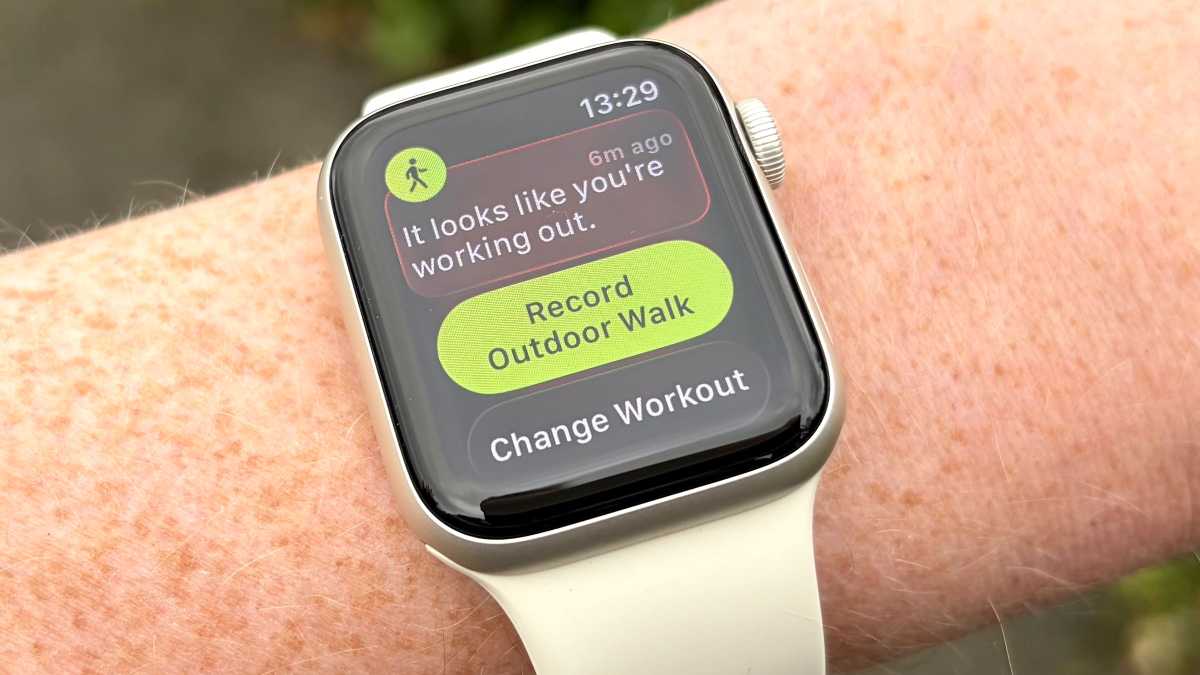
Apple Watch Series 8 is one of the most advanced for automatic detection. It will send you a notification when it senses a workout and ask if you want to log it. Fitbit devices have a feature called SmartTrack which automatically records many activities if they last long enough.
Garmin is well-known among athletes. While many activities are detected, the device often asks for manual confirmation to improve accuracy.
Samsung Galaxy Watch stands out for swimming and rowing detection, but like others, it misses most strength training unless started by the user.
Xiaomi Mi Band is simple and affordable but works best for basic activities.
What Influences Automatic Workout Detection Accuracy?
Even the best trackers sometimes miss workouts or mislabel them. Several factors can affect how well your device detects activities.
Activity Duration
Most devices require you to sustain an activity for at least 10 minutes before it’s logged. Short bursts—like walking to the mailbox—may not appear in your workout history.
Intensity And Pattern
Trackers look for specific movement patterns. If your movement is too gentle or not rhythmic, the device might not recognize it as a workout. For example, slow-paced walking or mixed activities (like circuit training) can confuse sensors.
Position And Fit
Wearing your tracker too loosely or on the wrong wrist reduces accuracy. Sensors need good skin contact. Also, if you carry items or push a stroller, your arm movement changes, which can prevent detection.
Device Settings
Some trackers let you customize what activities are detected automatically. If this feature is turned off, you may not see all your workouts logged. Always check your device settings for “auto-detect” or similar options.
Firmware And Software Updates
Manufacturers often improve detection algorithms through updates. Keeping your tracker and app updated helps you get the latest improvements.
Benefits Of Automatic Workout Detection
Automatic tracking offers clear advantages for busy or forgetful users.
- Convenience: No need to remember to press “start” before each workout.
- Consistency: More activities get logged, so you have a fuller picture of your health.
- Motivation: Seeing all your movement tracked can encourage you to stay active.
- Data trends: Automatic logs create a more accurate history for reviewing progress.
But these benefits come with some trade-offs, especially when it comes to accuracy and detail.
Common Limitations And Mistakes
No fitness tracker is perfect. Here are frequent issues users face with automatic detection.
Missed Workouts
Short activities, or those with mixed movements, often go untracked. If you do a 7-minute HIIT session, your tracker may not log it because it’s too brief or varied.
False Positives
Sometimes, trackers log a workout when you’re not exercising. For example, riding in a bumpy car or pushing a shopping cart might trigger a “walk” or “run. ”
Incomplete Data
Automatic logs may lack details like calories burned, heart rate zones, or exercise type. Manual logging often provides richer data.
Overlapping Activities
If you switch from running to cycling, your tracker might not divide the activities correctly. This can lead to confusing summaries.
Device Specific Errors
Some trackers are better suited for certain activities. For example, a Garmin may excel at cycling but lag behind in swimming detection. Always match the device to your main workout style.
How To Improve Your Tracker’s Automatic Workout Accuracy
There are practical steps you can take to get better results from your fitness tracker.
- Wear it snugly: A tight fit ensures sensors capture your body’s signals.
- Choose the right wrist: Some devices allow you to set which wrist you wear them on. Make sure it matches your real wearing style.
- Update software regularly: Install the latest firmware and app updates to improve detection.
- Check activity settings: Enable auto-detection for the activities you do most.
- Move with rhythm: Keeping a steady pace helps the algorithm identify your workout.
- Manually log tricky activities: For things like yoga, weightlifting, or short workouts, start and stop the activity manually for best results.
- Review your data: Check your logs and correct mistakes in your app. Some platforms let you edit activity details after the fact.
Non-obvious tip: Some trackers use your heart rate to guess activity, so having dry, clean skin helps the sensor work better. Also, regularly cleaning your device’s sensors can prevent errors.
Manual Logging Vs. Automatic Detection
Is automatic detection enough, or should you log workouts manually? The answer depends on your goals.
| Method | Pros | Cons |
|---|---|---|
| Automatic Detection | Effortless, good for cardio, records most daily movement | Misses short/complex workouts, less detailed data |
| Manual Logging | Customizable, supports all activity types, more data (like sets/reps) | Easy to forget, takes more time |
If you do lots of strength training or mixed workouts, manual logging gives better results. If you mostly walk, run, or cycle, automatic detection works well for tracking your general fitness.
Real-world Examples
Let’s look at how automatic workout tracking works in daily life.
Case 1: The Busy Parent
Maria wears a Fitbit and walks her kids to school every morning. She often forgets to start a workout, but her tracker logs the walk automatically. On weekends, she does a 20-minute yoga session, but this never shows up unless she remembers to start it manually.
Case 2: The Amateur Athlete
James trains for a triathlon with a Garmin device. His runs and bike rides are auto-detected, but when he does circuit workouts at the gym, he needs to log them himself. Sometimes, his tracker mistakes a slow jog for a walk, so he checks his activity log weekly.
Case 3: The Office Worker
Lisa wears an Apple Watch. During her lunch break, she goes for a brisk walk. Her watch asks if she wants to start a workout. She accepts, and the device logs the session. Later, she tries out a new elliptical machine; her watch picks it up but mislabels it as a “walk.
”
These stories show that while automatic tracking works well for common activities, it is not flawless. Users need to know when to trust the device and when to step in.
The Future Of Automatic Workout Detection
The technology behind fitness trackers is advancing fast. New models use machine learning and larger data sets to improve accuracy. Some brands now combine movement, heart rate, skin temperature, and even blood oxygen data to guess what you’re doing.
In the future, trackers may recognize complex workouts, like CrossFit or dance, without user input. Voice assistants may let you correct or label workouts after the fact. Some apps already use AI to suggest corrections based on your past activities.
However, privacy and data security will become more important as trackers collect more sensitive information. Always review privacy settings and understand where your data goes.
For the latest research on wearable fitness technology and health, see this resource from the National Institutes of Health.

Tips For Choosing A Fitness Tracker With Good Automatic Workout Detection
Not all trackers are created equal. Here’s what to consider if automatic workout tracking is important to you.
- Activity types: Make sure your most common workouts are supported.
- Water resistance: If you swim, choose a waterproof model.
- Battery life: Tracking uses battery power. Devices with longer life need less charging.
- App quality: A good app makes it easy to edit, view, and share your workouts.
- Sensor quality: Look for devices with multiple sensors (accelerometer, heart rate, GPS) for better accuracy.
- Community and support: Brands with active user communities or good customer support can help you solve problems.
Common buyer mistake: Choosing a tracker based on looks or price alone. Always check reviews and user feedback for real-world accuracy.
Frequently Asked Questions
How Long Does An Activity Have To Last For Automatic Tracking To Work?
Most fitness trackers require you to perform an activity for at least 10 minutes before it is logged automatically. Shorter activities may not be detected, so for those, manual logging is best.
Can Fitness Trackers Detect Indoor Workouts Automatically?
Some can, but accuracy varies. Treadmill running is often detected by high-end models, while stationary cycling and weightlifting are rarely recognized without manual input.
Why Does My Tracker Sometimes Log A Workout When I Wasn’t Exercising?
Trackers use movement and heart rate data, which can be triggered by activities like cleaning, shopping, or driving on a bumpy road. If this happens often, adjust your device’s sensitivity in the settings.
Are There Fitness Trackers That Automatically Detect Strength Training?
A few advanced models try to detect strength training by analyzing repetitive movements and heart rate spikes. However, results are not very reliable, so manual logging is still recommended for these workouts.
Will Future Trackers Be Able To Detect All Types Of Workouts Automatically?
Technology is improving quickly. Machine learning and better sensors are making trackers smarter, but it may take a few more years before they can reliably detect every workout type without user input.
Fitness trackers have come a long way in making exercise tracking easier. Automatic workout detection is a valuable tool for those who want effortless logs of their daily activities, but it’s not perfect. Understanding what your device can (and cannot) do helps you use it more effectively—and keeps you moving towards your fitness goals.


