
When you buy a fitness tracker, you want it to help you reach your health goals—not to become another gadget that’s difficult to manage. One of the most basic skills every fitness tracker owner must learn is how to keep it powered up.
But if you’ve ever stared at your new device and wondered where to start, you’re not alone. Charging a fitness tracker seems simple, but the process can be surprisingly different from one brand or model to another. If you’re looking to understand every part of charging your fitness tracker—from finding the right cable to keeping your battery healthy—this guide covers everything you need to know.
Understanding Fitness Tracker Charging Basics
Fitness trackers, whether from Fitbit, Garmin, Xiaomi, or lesser-known brands, all need power to function. Unlike old-school watches, most trackers don’t use coin cell batteries that last for months or years. Instead, they rely on rechargeable batteries—usually lithium-ion or lithium-polymer—which need regular charging.
There are two main reasons why understanding charging is so important:
- Battery life and performance: Charging your tracker the right way helps the battery last longer and work better.
- Device safety: Incorrect charging or using the wrong cable can damage your tracker or even cause safety problems.
Some fitness trackers can last a week or longer between charges. Others may need charging every two or three days, especially if you use advanced features like GPS or heart rate tracking. Before you start, check your device’s manual for recommended charging frequency and cable type.
Different Types Of Fitness Tracker Chargers
Not all fitness trackers use the same charging method. Here are the most common types:
1. Usb Cable Charging
Many fitness trackers use a special USB charging cable that comes with the device. This cable often has a unique connector on one end (to fit your tracker) and a standard USB plug on the other. You plug the USB end into a power source, such as:
- A laptop or computer
- A USB wall charger
- A power bank
The other end attaches to the tracker itself. Sometimes, the connector is magnetic; other times, it’s a clip or cradle.
2. Magnetic Dock Or Clip
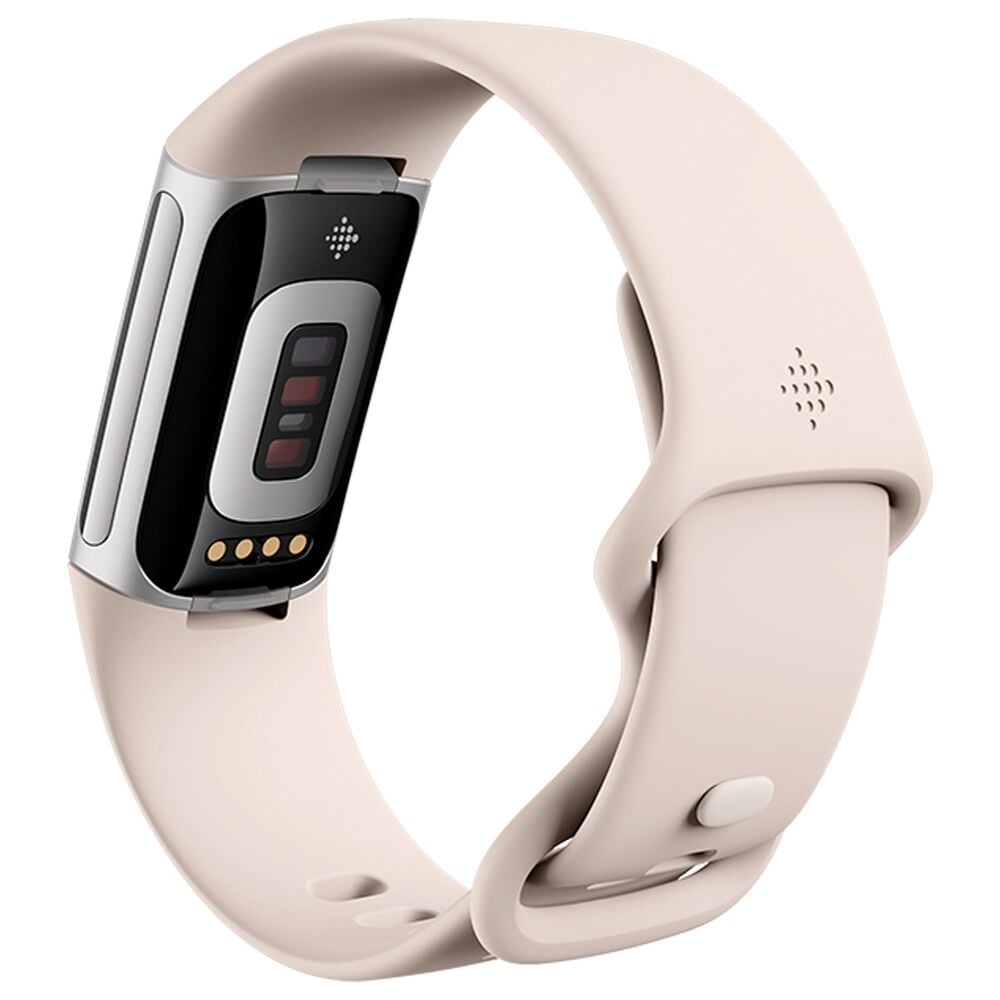
Some models, like recent Fitbit or Amazfit devices, use a magnetic charger. This dock or clip has metal pins that line up with contacts on your tracker. Magnets help snap the charger into the correct position, making it easy to connect.
3. Built-in Usb Plug
Certain trackers—such as some Xiaomi Mi Band versions—have a removable strap and a USB connector built into the tracker body. You pull the tracker out of the strap and insert it directly into a USB port for charging.
4. Wireless Charging
A few high-end trackers, especially smartwatches that double as fitness trackers, support wireless charging. You simply place the device on a charging pad, and it starts charging using electromagnetic induction.
5. Proprietary Charging Solutions
Some brands have their own unique charging solutions. For example, Garmin often uses a proprietary cable with a custom connector. Losing or damaging this cable means you’ll need to order a replacement from the manufacturer.
Below is a quick overview of how popular brands charge their fitness trackers:
| Brand | Charging Method | Average Charging Time | Battery Life (Typical Use) |
|---|---|---|---|
| Fitbit | Magnetic clip/dock, USB cable | 1-2 hours | 5-7 days |
| Xiaomi Mi Band | Built-in USB plug | 1.5 hours | 14-20 days |
| Garmin | Proprietary USB cable | 1-1.5 hours | 7-14 days |
| Samsung Galaxy Fit | Magnetic dock, USB cable | 1-2 hours | 7 days |
| Huawei Band | Magnetic charging cradle | 1-1.5 hours | 10-14 days |
Step-by-step Guide: Charging Your Fitness Tracker
Charging your fitness tracker may seem straightforward, but a few important details can prevent problems and help your device last longer.
1. Identify Your Charging Method
First, check your user manual or the manufacturer’s website to confirm which charging method your tracker uses. Never try to force a cable or connector that doesn’t fit; you could damage the contacts.
2. Prepare Your Charging Cable Or Dock
- If your device uses a magnetic dock, make sure the contacts are clean and free from sweat or dirt.
- For USB cable chargers, inspect the cable for any signs of fraying or damage.
- If your tracker has a built-in USB plug, remove it carefully from the band to avoid breaking the strap or connector.
3. Connect To A Power Source
Plug the USB end into a safe power source. Avoid using cheap, unbranded wall chargers, as these may provide unstable power and damage your battery. Good options are:
- The original charger that came with your phone or tablet
- A computer USB port
- A reputable power bank
4. Attach The Tracker To The Charger
- For magnetic chargers, line up the pins and let the magnets snap into place.
- With a clip charger, gently squeeze and attach the clip so the metal contacts touch.
- For built-in USB trackers, insert the plug directly into the USB port, making sure it’s fully seated.
5. Check For Charging Indicators
Most trackers show a battery symbol, vibration, or light when charging starts. If you don’t see any sign of charging, disconnect and try again. Make sure the contacts are clean and the cable is working.
6. Wait For A Full Charge
Charging usually takes 1 to 2 hours. Most devices show a progress bar or battery icon. Avoid removing the tracker before it’s fully charged unless necessary. Over time, partial charges may reduce battery accuracy.
7. Unplug And Reattach The Band
Once charging is complete, disconnect your tracker. If you removed the band, reattach it carefully.
8. Store The Charger Safely
Keep your charging cable or dock in a safe place. Losing it can be frustrating, especially for trackers that use proprietary chargers.
How To Tell If Your Fitness Tracker Is Charging
Knowing if your tracker is charging is important to avoid surprises. Most devices give clear signals:
- Battery icon: The screen shows a battery symbol or progress bar.
- LED light: Some trackers have a small light that blinks or glows during charging.
- Vibration: A short vibration can signal charging has started.
- App notification: Some brands update the connected app to show charging status.
If your tracker doesn’t show any of these signs, check:
- Is the cable or dock correctly attached?
- Are the charging contacts clean?
- Is your power source working?

Common Fitness Tracker Charging Problems (and Fixes)
Even with care, you may run into charging issues. Here are some common problems and how to solve them:
1. Tracker Not Charging
- Check contacts: Sweat, dust, or lotion on the charging pins can block the connection. Gently clean with a cotton swab and a little alcohol.
- Try another cable or charger: Sometimes the cable is faulty. Swap with another if possible.
- Restart your tracker: Some models need a reset before charging will start.
- Inspect for damage: Look for bent pins or broken connectors.
2. Tracker Charges Slowly
- Use a more powerful charger: Charging from a computer USB port is usually slower than using a wall charger.
- Don’t use the tracker while charging: Features like heart rate monitoring can slow charging.
- Avoid low-quality cables: Cheap cables may not supply enough power.
3. Tracker Overheats While Charging
- Unplug immediately: Overheating can damage your device or cause safety issues.
- Let it cool down: Wait before trying again.
- Check for software updates: Sometimes, firmware bugs can cause overheating.
4. Charging Stops Before Full
- Try a different power source: Some USB ports deliver less power.
- Update your device: Manufacturers sometimes fix charging bugs with software updates.
- Contact support: If the problem continues, your battery may need replacement.
How Often Should You Charge A Fitness Tracker?
Battery life depends on your usage and the device model. Here are some general guidelines:
- Light use (steps, time, sleep): Charge every 7-14 days.
- Heavy use (GPS, heart rate, smart features): Charge every 2-5 days.
- Older trackers: Battery life may drop after a year or two.
Don’t wait until your tracker is completely dead. Lithium batteries last longer if you charge when the battery drops to 20-30% instead of letting it go to zero.
Best Practices For Charging And Battery Health
To keep your fitness tracker battery healthy for as long as possible, follow these tips:
1. Use Only Approved Chargers
Always use the cable or dock that came with your device. If you need a replacement, buy from the manufacturer or a trusted retailer.
2. Avoid Extreme Temperatures
Charging in very hot or cold conditions can damage the battery. Ideal charging temperature is between 10°C and 35°C (50°F–95°F).
3. Don’t Overcharge
Most modern trackers stop charging automatically when full, but it’s still better not to leave them plugged in for days at a time.
4. Clean Charging Contacts Regularly
Sweat, dust, and skin oils can block charging. Wipe the contacts on your tracker and charger every few weeks.
5. Store With Some Charge
If you won’t use your tracker for weeks, charge it to about 50% before storing. Don’t leave it completely empty or full.
Charging Different Brands: What You Need To Know
Charging steps can vary slightly by brand. Here’s a quick guide to some of the most popular fitness trackers.
Fitbit
Fitbit uses magnetic charging cables for most models. The cable attaches to the back of the tracker, and the screen shows a battery icon. For older models, you may need to place the tracker in a cradle.
Tip: Fitbit’s contacts are sensitive to sweat and skin oils. Wipe them regularly.
Garmin
Garmin’s proprietary cable snaps into place on the back or side of the device. The screen lights up to show charging status.
Tip: Garmin cables look similar but are not always interchangeable between models.
Xiaomi Mi Band
Remove the core unit from the strap and plug it into the USB charger. Make sure it’s fully inserted into the charging dock.
Tip: Be gentle when removing the tracker from the band, as the small pins can break if forced.
Samsung Galaxy Fit
Uses a magnetic dock with a USB cable. The device vibrates and shows a battery icon.
Tip: If your Galaxy Fit won’t charge, try restarting it by holding the power button.
Huawei Band
Uses a small magnetic charging cradle. Attach the tracker, then plug into USB.
Tip: If your Huawei Band isn’t charging, clean the contacts and try a different USB port.
Comparison: Charging Time And Battery Life By Brand
Understanding how long you need to charge your tracker—and how long it will last after charging—helps you plan your usage. Here’s a side-by-side look at popular models:
| Device | Charging Time | Battery Life | Charging Method |
|---|---|---|---|
| Fitbit Charge 5 | 2 hours | 7 days | Magnetic dock |
| Garmin Vivosmart 5 | 1 hour | 7 days | Proprietary USB |
| Xiaomi Mi Band 7 | 1.5 hours | 14 days | Built-in USB |
| Samsung Galaxy Fit2 | 2 hours | 15 days | Magnetic dock |
| Huawei Band 6 | 1 hour | 14 days | Magnetic cradle |
Two Important Tips Most Beginners Miss
Many new fitness tracker users overlook two important points:
- Firmware updates can affect charging: Sometimes, a device that suddenly won’t charge just needs a firmware update. Always keep your tracker’s software up to date.
- Charging speed drops at high battery levels: Most trackers charge quickly up to 80% and then slow down. This helps protect battery health. If the last 20% seems slow, it’s normal.
What To Do If You Lose Your Charger
Losing your charger can be frustrating, but don’t panic:
- Buy from the official store: Always get a replacement from the brand’s website or an authorized dealer.
- Double-check compatibility: Some brands have similar-looking chargers that don’t fit all models.
- Ask customer service: If you’re not sure which charger you need, contact the manufacturer for help.
Safety Tips When Charging Your Fitness Tracker
Charging is usually safe, but it’s good to follow a few rules:
- Don’t charge your tracker near water or in damp conditions.
- Don’t use damaged cables or chargers.
- Unplug your device if it gets very hot.
- Keep chargers away from small children and pets.

When To Replace Your Fitness Tracker Battery
Most fitness tracker batteries last 2-3 years with normal use. If you notice any of these signs, it might be time to replace the battery or buy a new tracker:
- The battery drains much faster than before, even with light use.
- Your tracker won’t turn on, even after charging.
- The device gets unusually hot while charging.
Some brands, like Garmin or Fitbit, offer battery replacement services, but for most low-cost trackers, buying a new device is more practical.
Maximizing Battery Life: Extra Tips
If you want to charge less often and extend your battery’s lifespan, try these strategies:
- Lower the screen brightness.
- Turn off always-on display or wake-on-wrist features.
- Limit notifications from your phone.
- Disable GPS and heart rate monitoring when not needed.
- Update your tracker’s software regularly.
If you want more details on battery types and charging safety, you can check the Lithium-ion battery Wikipedia page.
Frequently Asked Questions
How Long Should I Charge My Fitness Tracker?
Most fitness trackers need 1 to 2 hours to fully charge. The exact time depends on the model and battery size. Check your user manual for specific instructions, and avoid charging for much longer than needed.
Can I Use My Phone Charger To Charge My Fitness Tracker?
Yes, as long as the charger provides a safe voltage and current (usually 5V, 1A or less). Always use the original cable or a certified replacement. Avoid cheap, unbranded chargers, as they may damage your device.
Is It Bad To Charge My Tracker Overnight?
Modern trackers usually stop charging automatically when full, so overnight charging is generally safe. However, charging for too long, especially in hot environments, can slightly reduce battery life over time.
What Should I Do If My Fitness Tracker Gets Wet Before Charging?
Dry your tracker completely before charging. Water or moisture on the contacts can cause corrosion or short circuits. Use a dry cloth and, if possible, let the device air-dry for a few hours.
Can I Charge My Fitness Tracker With A Power Bank?
Yes, most fitness trackers can be charged with a power bank. Just make sure the power bank provides the correct voltage (5V) and is from a reputable brand to avoid damaging your device.
Keeping your fitness tracker charged and ready doesn’t have to be a challenge. With the right habits and a little care, your device will always be there to track your steps, workouts, and sleep. By understanding how charging works, handling your charger carefully, and looking after your battery, you’ll get the best performance and longest life from your fitness tracker.

