
Every day, millions of people trust their fitness trackers to tell them how many calories they burn. Whether you’re running, walking, or just going about your day, your device gives you a number. But have you ever wondered how these trackers actually calculate that number? Is it science, guesswork, or a little bit of both? Understanding how fitness trackers estimate calories burned can help you use them better and set realistic health goals. In this guide, you’ll discover the technology, formulas, and hidden limitations behind these popular devices. You’ll also learn how to get more accurate results and avoid common mistakes that many beginners make.
What Are Fitness Trackers And Why Do People Use Them?
Fitness trackers are wearable devices, like smartwatches or bands, that monitor your physical activity. Their main goal is to help you understand your daily habits and improve your health. Most people use them to count steps, check their heart rate, track sleep, and, importantly, estimate calories burned.
These devices became popular because they make health data easy to access. You can see your results instantly, set targets, and even compete with friends. Many also connect to apps on your phone, so you can track your progress over days, weeks, and months.
The Basics: What Does “calories Burned” Mean?
When we talk about calories burned, we mean the amount of energy your body uses to do things. This includes:
- Basal Metabolic Rate (BMR): Energy your body needs for basic functions, like breathing and keeping your heart beating, even when you’re resting.
- Physical Activity: Any movement you do, from walking to intense exercise.
- Thermic Effect of Food (TEF): Energy used to digest and process food.
Fitness trackers focus mostly on your physical activity, but some also estimate your total daily energy use by including your BMR.

Key Sensors And Data Fitness Trackers Use
To estimate calories burned, fitness trackers combine several types of data. Here are the most important sensors and information they use:
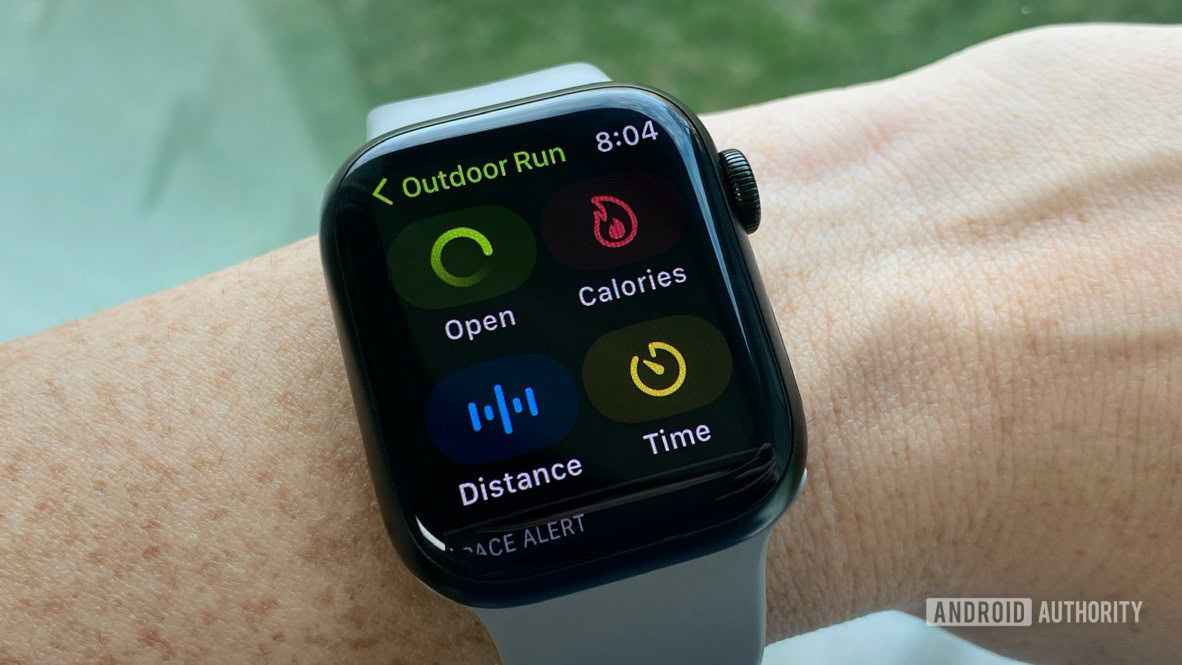
- Accelerometer: Measures movement and direction. It helps count steps and detect activities like running or cycling.
- Heart Rate Monitor: Uses light to sense your pulse through your skin. This is called photoplethysmography (PPG).
- Gyroscope: Detects rotation and helps track activities like swimming or cycling.
- GPS: Measures your speed and distance when you move outdoors.
- Personal Information: When you set up your tracker, you enter details like age, weight, height, and gender.
These pieces of information are combined using algorithms to estimate your calorie burn.
The Science: Main Methods Used To Calculate Calories Burned
1. Step Counting And Movement Analysis
Most basic fitness trackers use step counting as a starting point. The device measures how many steps you take and uses your personal data to estimate the calories burned.
For example, if you weigh more, each step burns more calories. If you walk faster, you burn more than if you walk slowly. Trackers use an average value called METs (Metabolic Equivalent of Task) to estimate the energy cost of walking or running.
Non-obvious insight: Fitness trackers often struggle to tell the difference between walking and other arm movements (like brushing teeth or clapping), which can lead to errors in step-based calorie estimates.
2. Heart Rate-based Estimation
More advanced trackers use your heart rate to improve accuracy. When you exercise, your heart beats faster to deliver more oxygen to your muscles. The harder you work, the higher your heart rate, and the more calories you burn.
By analyzing your heart rate along with your age, gender, and weight, trackers estimate how intense your activity is. This helps them adjust the calorie calculation for different exercises.
Example: If you go for a brisk walk and your heart rate is high, the tracker knows you are working harder than if you stroll slowly.
3. Gps And Activity Recognition
Some activities, like cycling or hiking, are better tracked with GPS. GPS measures your speed, distance, and elevation change. When you cover more ground or go uphill, you burn more calories.
Trackers also use activity recognition algorithms to guess what kind of exercise you are doing. For example, if you move your arms in a certain way, the tracker might guess you are swimming or using an elliptical machine.
Non-obvious insight: If you do an activity that the tracker can’t recognize (like carrying groceries upstairs), it may misclassify it or not count the calories correctly.
Common Formulas Used By Fitness Trackers
Fitness trackers don’t invent their own math from scratch. They use standard formulas, sometimes with slight changes. Let’s look at some of the most common ones.
Harris-benedict Equation For Bmr
To estimate how many calories you burn at rest, trackers often use the Harris-Benedict equation. It calculates your Basal Metabolic Rate (BMR) based on your weight, height, age, and gender.
For men:
BMR = 88. 362 + (13. 397 × weight in kg) + (4. 799 × height in cm) – (5. 677 × age in years)
For women:
BMR = 447. 593 + (9. 247 × weight in kg) + (3. 098 × height in cm) – (4. 330 × age in years)
Mets And Activity Multipliers
METs are a way to compare how much energy different activities use. Sitting quietly is 1 MET. Walking at a moderate speed is about 3–4 METs. Running can be 8–12 METs or more.
Calories burned per minute = (MET value) × (body weight in kg) × 3. 5 ÷ 200
Fitness trackers use activity data (from sensors) to guess the MET value and then plug your weight into the formula.
Heart Rate-based Formulas
Some trackers use your heart rate to estimate calories burned more accurately during exercise. One popular formula is:
Calories burned per minute = [(age × 0. 2017) – (weight × 0. 09036) + (heart rate × 0. 6309) – 55. 0969] × time ÷ 4. 184
This formula gives a better estimate, especially for workouts that don’t involve lots of steps, like cycling or rowing.
How Fitness Trackers Combine Data
Modern fitness trackers don’t rely on just one piece of data. They use machine learning algorithms to analyze all the information at once. Here’s a simplified flow of how data is combined:
- You enter your age, weight, height, and gender.
- The tracker measures your movement (steps, speed, acceleration).
- It checks your heart rate (especially during exercise).
- GPS is used for outdoor activities to track distance and speed.
- The device matches your activity pattern to known activities (like walking, running, cycling).
- It applies the right formula (METs for walking, heart rate for cycling, etc. ).
- The tracker adds your BMR (resting calories) to your activity calories to give you a total.
As a result, the calorie number you see is a combination of multiple estimates and calculations.
How Accurate Are Fitness Trackers At Calculating Calories Burned?
Many people assume their tracker is 100% accurate, but this is not true. Several studies show that even the best devices can be off by 10–30% or more. Here’s a comparison of accuracy for popular fitness trackers:
| Device | Typical Calorie Error Range | Main Strength | Main Weakness |
|---|---|---|---|
| Apple Watch | ±15% | Good heart rate accuracy | Step-based workouts more accurate than cycling |
| Fitbit Charge | ±20% | Consistent step counting | May overestimate with arm movements |
| Garmin Forerunner | ±12% | Excellent GPS data | Heart rate less accurate for dark skin tones |
| Xiaomi Mi Band | ±25% | Affordable, simple tracking | Lower accuracy for intense exercise |
As you can see, no device is perfect. Differences in skin tone, tattoo ink, body hair, and even how tightly you wear the tracker can affect readings.
Non-obvious insight: Trackers tend to be more accurate for steady, repetitive movements (like running) and less accurate for strength training, yoga, or mixed activities, where movement patterns are complex.
Factors That Influence Calorie Calculations
Many things can affect how accurately your fitness tracker calculates calories burned:
- Personal Data Accuracy: If you enter the wrong weight, height, or age, your tracker’s estimates will be off.
- Device Placement: Wearing the device too loosely or on the wrong wrist may change readings.
- Type of Activity: Trackers do better with walking or running. Activities like cycling, rowing, or weightlifting are harder to track.
- Sensor Limitations: Sweat, water, tattoos, and dark skin can sometimes interfere with heart rate sensors.
- Firmware and Algorithm Updates: Manufacturers regularly update their algorithms. Sometimes this improves accuracy; sometimes it changes your numbers unexpectedly.
Are Fitness Trackers Reliable For Weight Loss?
Many people use fitness trackers to help with weight loss. But if your device overestimates calories burned, you might eat more than you should. On the other hand, underestimation can make you feel discouraged.
Here’s a comparison of using a fitness tracker alone versus combining it with manual logging and professional advice:
| Method | Pros | Cons | Best For |
|---|---|---|---|
| Fitness Tracker Only | Easy, fast, automatic | Potentially inaccurate calorie data | General motivation |
| Tracker + Food Logging | Better understanding of intake and burn | Time-consuming | Serious weight loss goals |
| Tracker + Professional Advice | Personalized guidance | May cost more money | People with health conditions |
Practical tip: Use your tracker for motivation and trends, not as a precise calorie counter. Focus on long-term patterns instead of day-to-day numbers.
Common Mistakes Beginners Make
Even experienced users can fall for some easy traps. Watch out for these frequent mistakes:
- Trusting the Device Blindly: Remember, the calorie count is an estimate, not a fact.
- Ignoring Manual Input: Some trackers let you log activities manually. If you swim, lift weights, or do yoga, add these for better accuracy.
- Wearing the Tracker Incorrectly: Loose straps or wearing it on the wrong wrist affects readings, especially heart rate.
- Not Updating Personal Data: If your weight changes, update it in the app. Even small changes matter.
- Using One-Size-Fits-All Settings: Some trackers ask about your fitness level. Be honest—selecting “athlete” by mistake can change your calorie burn estimate a lot.
How To Get More Accurate Calorie Burn Estimates
You can’t make your tracker perfect, but you can help it do a better job:
- Input accurate personal data: Update your weight, height, age, and gender regularly.
- Wear your device correctly: Make sure it is snug but comfortable, especially during exercise.
- Use manual logging for tricky activities: If your device doesn’t recognize your workout, log it manually in the app.
- Pair with chest strap heart monitors: These are more accurate than wrist sensors, especially for intense workouts.
- Pay attention to trends: Look for weekly or monthly patterns, not single days.
- Update your device firmware: Manufacturers often improve tracking algorithms.
Experience-based guide: Many athletes use fitness trackers as a guide but track their calories with food apps and use chest strap monitors for serious training. Combining these methods gives the best results.
Do All Trackers Use The Same Methods?
No, not all trackers are the same. Each brand has its own way of combining data and formulas. Some use advanced AI and large databases of movement patterns. Others use simpler step and heart rate data.
Premium devices, like Apple Watch or Garmin, often include more sensors and smarter algorithms. Cheaper models may skip heart rate or GPS, leading to less accurate calorie counts.
Practical advisor note: Don’t compare calorie numbers between two different brands. Focus on the trends from your own device.
The Future: How Will Calorie Counting Improve?
Researchers and companies are working to make calorie estimates better. Here’s what the future may bring:
- Better sensors: New technology will measure things like sweat composition or muscle activity for more accurate data.
- Personalized algorithms: Devices may learn your unique body patterns over time and adjust calculations.
- Integration with health records: Your tracker could combine data from your doctor to give more tailored advice.
- Improved activity recognition: AI will better understand mixed or unusual exercises.
For now, remember that your tracker is a helpful guide, not a perfect scientist.
When Should You See A Professional?
If you have a medical condition, are training for an event, or aren’t seeing results, consider talking to a doctor or fitness professional. They can help you interpret your tracker’s data and set safe goals. Sometimes, health issues can affect calorie burn in ways trackers can’t detect.
Frequently Asked Questions
How Do Fitness Trackers Know How Many Calories I Burn?
Fitness trackers use sensors to measure movement and heart rate. They combine this with your personal details, like age, weight, and height. Using formulas and activity data, the device estimates your calorie burn. It’s not exact, but it gets close, especially for regular activities.
Why Do Different Trackers Give Me Different Calorie Numbers?
Each brand uses its own sensors, formulas, and algorithms. Some focus more on steps, others on heart rate or GPS. That’s why the same workout can show different calorie numbers on different devices.
Are Heart Rate-based Trackers More Accurate?
For most people, heart rate-based trackers are more accurate than simple step counters, especially during activities where you don’t take many steps, like cycling or rowing. But even heart rate sensors can be affected by skin tone, tattoos, and how you wear the device.
Can Fitness Trackers Count Calories For Weightlifting And Yoga?
Most trackers have trouble with activities like weightlifting, yoga, or Pilates. These don’t involve steady movement, so the tracker may underestimate your calorie burn. Logging these activities manually or using a chest strap monitor can help.
Where Can I Learn More About The Science Behind Calorie Tracking?
For a deeper dive into the science and technology behind calorie tracking, check out this detailed article from Wikipedia.
Fitness trackers are amazing tools for motivation and self-awareness. They help you see trends, set goals, and stay active. But remember, the calories burned number is always an estimate. Use your device wisely, focus on healthy habits, and enjoy the journey towards better fitness.

