
Do Fitness Trackers Need Apps? A Complete Guide
Fitness trackers are now everywhere—on wrists at the gym, in offices, on runners, and even on kids at school. These small devices promise to help us move more, sleep better, and live healthier lives. But there’s one big question many people ask: Do fitness trackers need apps? If you’re thinking about buying a fitness tracker, or already have one, understanding how apps connect to these devices is important. This guide will give you a clear, honest look at what fitness tracker apps do, why they might matter, and when you can skip them.
What Is A Fitness Tracker?
A fitness tracker is a wearable device that measures your physical activity. Most track steps, distance, calories burned, heart rate, and sometimes even sleep. Some models look like simple bands, while others are more like smartwatches with screens and extra features.
Popular brands include Fitbit, Garmin, Xiaomi, Apple, and Samsung. These devices work using internal sensors. For example, an accelerometer tracks movement, while an optical sensor measures heart rate. The data is usually shown on a small screen, but often, there’s more information available in a connected smartphone app.
What Do Fitness Tracker Apps Do?
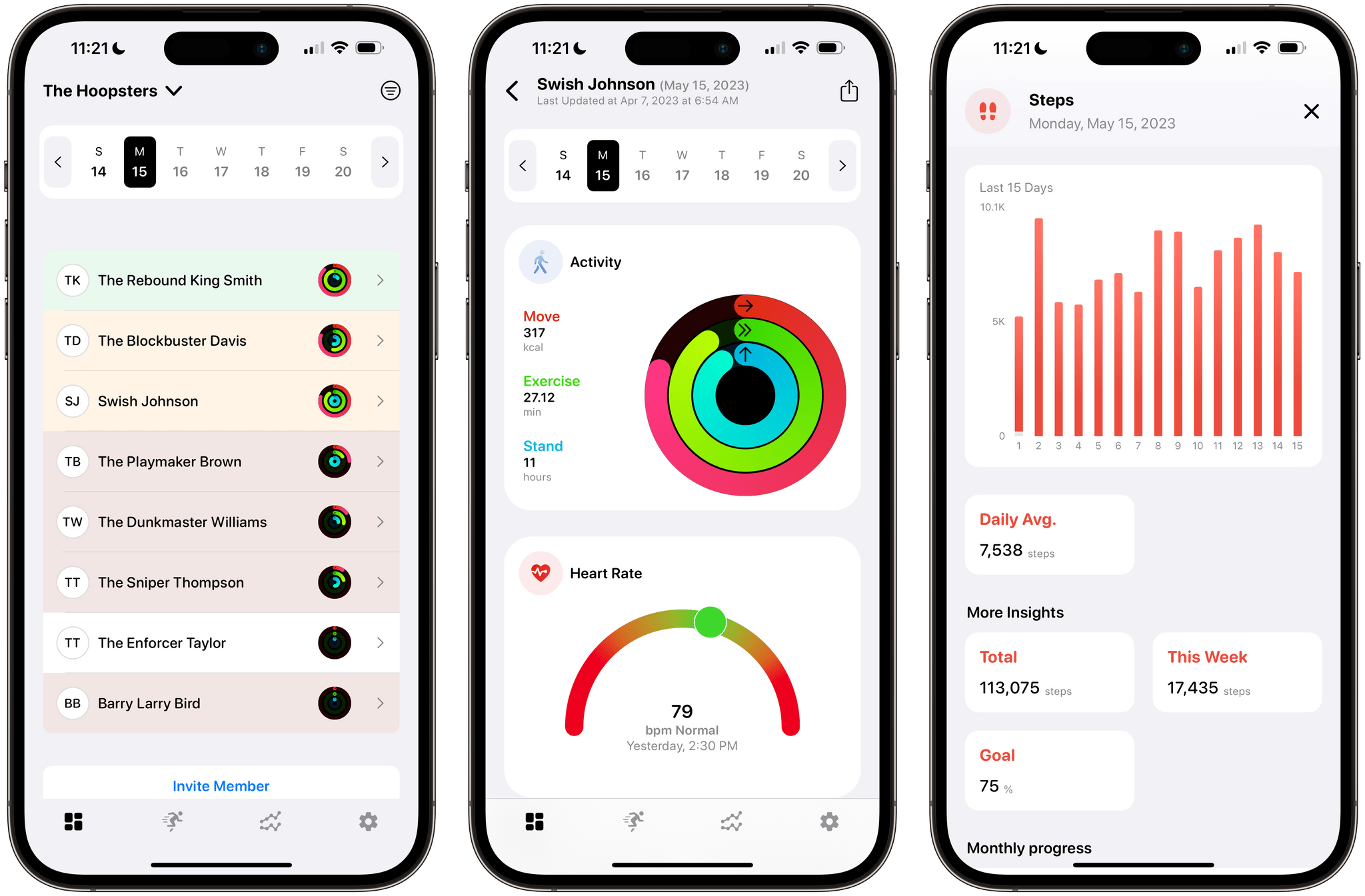
Most fitness trackers come with a companion app for your phone or tablet. These apps are often free and are made by the tracker’s brand (like Fitbit app, Mi Fit, or Garmin Connect). But what do these apps actually do?
- Sync and Store Data: The app collects all your activity data from the tracker and saves it for you to view later. The tracker itself usually stores data for a few days, but the app keeps weeks, months, or even years of information.
- Data Visualization: Apps show your data as graphs, charts, and trends. You can see how your steps or heart rate change over time. This helps you spot patterns.
- Goal Setting: Most apps let you set goals (like 10,000 steps daily or 8 hours of sleep). The app tracks your progress and sends reminders or celebrations.
- Detailed Insights: Apps can analyze your data and give advice. For example, they might suggest going to bed earlier if your sleep is short.
- Social Features: Many apps have friend lists, challenges, and leaderboards. You can compete with friends or join groups for motivation.
- Manual Logging: Apps allow you to add activities not tracked by the device (like cycling, swimming, or yoga), log food, water, or weight.
- Integration with Other Apps: Some apps connect with Apple Health, Google Fit, or MyFitnessPal, so your data is shared with other health tools.
- Software Updates: Occasionally, the app updates the tracker’s software to fix bugs or add new features.

Can Fitness Trackers Work Without Apps?
This is the heart of the question. The short answer: Some fitness trackers can work without apps, but most features will be limited. Here’s how it breaks down:
What You Can Do Without An App
- See basic stats on the device screen (steps, time, heart rate)
- Use the tracker as a watch or timer
- Track a single day’s activity
What You Lose Without An App
- Saving your data for more than a few days
- Viewing progress over weeks or months
- Setting or changing goals
- Getting detailed sleep analysis or trends
- Updating device software
- Sharing or competing with friends
- Syncing with other apps
Standalone Trackers
A few fitness trackers are designed to work entirely standalone—no app needed. These are usually basic step counters or pedometers. They show your daily steps and sometimes calories on a small screen. However, they do not store long-term data or offer smart features. The Yamax Digiwalker is a classic example.
The Benefits Of Using A Fitness Tracker App
Why bother with the app at all? Here are some strong reasons:
1. Deeper Data And Insights
Looking at your daily step count is nice, but real change happens when you see trends. For example, you might notice you’re more active on weekends, or that your sleep quality drops after stressful days. Apps give you these trends, often with easy-to-read graphs.
2. Motivation And Accountability
Apps often have reminders, badges, and challenges. Seeing a streak of 10,000-step days can keep you motivated. Many people find that joining step challenges with friends helps them stay consistent.
3. Health Integration
Apps can connect to broader health platforms like Apple Health or Google Fit. This creates a full picture of your health, including workouts, nutrition, and even medical data.
4. Customization
With the app, you can set goals, alarms, or even change what data shows on your tracker’s screen. Some apps allow you to change watch faces or notification settings.
5. Device Management
Apps let you update your fitness tracker’s software. This can fix bugs, add new features, or improve battery life. Without the app, you miss these updates.
6. Data Backup
If you lose your tracker, your data is safe in the app. You can often restore your information to a new device.
Non-obvious insight: Many people don’t realize that the app is also the only way to calibrate or reset some trackers. If your step count seems off, the app may offer recalibration tools.

When You Might Not Need An App
There are some situations where you can skip the app:
- You only care about your daily steps, not trends or history.
- You want to avoid sharing personal data online.
- You have a simple pedometer without smart features.
- You don’t own a smartphone or prefer not to use one.
But even in these cases, remember that most modern trackers are designed with apps in mind. You may miss out on the full value of the device.
Data Comparison: With App Vs. Without App
It helps to see the differences side by side. Here’s a simple comparison:
| Feature | With App | Without App |
|---|---|---|
| Step Tracking | Yes (full history, trends) | Yes (daily only) |
| Heart Rate Analysis | Detailed graphs & averages | Instant readings only |
| Sleep Tracking | Trends, advice, scores | Basic info (if any) |
| Goal Setting | Custom goals, reminders | Often not possible |
| Social Challenges | Yes | No |
| Software Updates | Yes (through app) | No |
Privacy And Data Security Concerns
One major reason some people avoid fitness tracker apps is privacy. Most apps ask for an account and collect data about your activity, sleep, and sometimes location. Some even share this data with third parties for research or advertising.
Risks To Know
- Data Breaches: If the app’s servers are hacked, your personal health data could be exposed.
- Data Sharing: Some companies use your data for marketing or sell it to other businesses.
- Location Tracking: Fitness apps may track your running routes, which could be sensitive information.
How To Protect Yourself
- Read the app’s privacy policy before creating an account.
- Use strong, unique passwords.
- Only allow location access if needed.
- Regularly check app permissions on your phone.
- Delete your account if you stop using the app.
Non-obvious insight: You can often use a fake name or limited profile details in the app, as most features don’t require your real identity.
Do All Trackers Require The Same App Experience?
Fitness trackers come in many types. Some give you more freedom than others.
Brand-specific Apps
Most major brands have their own apps (Fitbit, Garmin Connect, Mi Fit, Samsung Health). These apps are built to work best with the brand’s devices. Features are often tightly linked.
Third-party Apps
Some trackers, especially generic or budget models, can sync with third-party apps. For example, a tracker might work with Google Fit or a universal fitness app. However, you may lose access to some brand-specific features.
Device Compatibility Table
Here’s a quick look at how some popular trackers connect with apps:
| Brand | Official App | Third-Party App Support | Works Standalone? |
|---|---|---|---|
| Fitbit | Fitbit app | Limited | Partial (very basic) |
| Garmin | Garmin Connect | Some | Partial |
| Xiaomi/Mi | Mi Fit/Zepp Life | Google Fit | Partial |
| Apple Watch | Apple Health | Many | Yes (with iPhone) |
| Yamax Digiwalker | None | No | Yes (fully) |
Offline Use: What Happens When You’re Not Connected?
Some people want to track activity while offline, traveling, or in areas with no internet. Most trackers and their apps will:
- Store data on the tracker for several days (often up to 7 days)
- Sync data with the app when you reconnect
- Lose unsynced data if the tracker’s memory fills up before syncing
So, you don’t need to be online all the time, but regular syncing is needed for long-term data backup.
Tip: If you travel for weeks without syncing, your tracker may overwrite the oldest data. Try to sync every few days if possible.
Fitness Trackers Without Any App: Do They Exist?
Yes, but they are rare now. The most basic trackers are mechanical pedometers or simple digital step counters. These:
- Do not connect to any app
- Show only steps (sometimes calories)
- Do not save history
Some people prefer these for privacy or simplicity. They cost less and need no technical setup. However, you give up almost all smart features.
Hybrid Models: Trackers With Basic App-free Operation
Some newer trackers offer a middle ground. You can use them without an app for basic stats, but if you want advanced features, you can connect an app later.
For example:
- The Xiaomi Mi Band shows steps, heart rate, and time on its screen.
- The Garmin Vivosmart shows steps and notifications, but for history and settings, you need the app.
Practical advice: If you want flexibility, look for trackers with a readable screen and some onboard features. This way, you can use them without the app in daily life but sync when you want more details.
Common Problems When Not Using The App
Many new users try to skip the app and run into issues:
- Device won’t set up: Most trackers require the app for initial setup.
- Time and date wrong: The tracker may not update its clock without syncing.
- No alarms or notifications: These features often need the app to set up.
- No firmware updates: Bugs or battery problems may never get fixed.
Non-obvious insight: Even if you plan to use your tracker without the app, it’s smart to set it up once with the app and do all available updates.
Fitness Trackers For Kids And Seniors: Do They Need Apps?
For kids and older adults, fitness trackers are often used by caregivers to monitor activity or safety. In these cases:
- The app can help parents see their child’s activity, sleep, or even location.
- Seniors may need help setting up or syncing their tracker. An app can make this easier for family members.
Some trackers are designed for kids, with simple displays and limited app features. For example, the Fitbit Ace series lets parents monitor but gives kids privacy.
The Future Of Fitness Trackers: App Integration Trends
The fitness tracker market is growing fast. New trends suggest apps will become even more central:
- AI and coaching: Apps are using artificial intelligence to give personalized advice.
- Medical-grade features: Some trackers now monitor heart rhythms or oxygen levels, with app-based reports for doctors.
- Voice integration: More apps work with smart assistants like Alexa or Google Assistant.
- Subscription services: Many brands now offer premium app features for a monthly fee, like guided workouts or deeper analysis.
Key Factors When Choosing A Fitness Tracker (app Vs. No App)
If you’re shopping for a tracker, ask yourself:
- Do you want to track long-term progress?
- Are you motivated by challenges or badges?
- Do you care about privacy and data sharing?
- Do you want to connect with other health apps or devices?
- Will you often be offline or without your phone?
If you answer “yes” to most, choose a tracker with a good app. If you just want basic step counts and prefer privacy, a simple, app-free tracker may be enough.
Real-life Example: A Week With And Without The App
Let’s look at two users:
- Maria uses her tracker with the app. She checks her sleep trends, joins a walking challenge with friends, and gets reminders to move. After one week, she notices her sleep is poor on weekdays and adjusts her bedtime.
- John uses his tracker without the app. He sees his daily steps and heart rate, but that’s all. After a week, he forgets to check some days and doesn’t notice any patterns.
Maria gets more value and motivation because the app helps her see the big picture.
Evidence And Research: Do Apps Improve Health Results?
Studies suggest that using apps with fitness trackers can lead to better health outcomes. A review in the Journal of Medical Internet Research found that people who use both trackers and apps are more likely to increase their activity and maintain healthy habits compared to those who use trackers alone (JMIR Research).
The likely reasons:
- Apps provide feedback and reminders
- Social features add accountability
- Long-term tracking shows progress
Still, the tracker itself is a tool—results depend on your motivation and consistency.
Frequently Asked Questions
What Happens If I Never Install The App For My Fitness Tracker?
If you never install the app, your tracker will only show basic stats like steps, time, and sometimes heart rate. You will not be able to set up the device fully, update the software, or view long-term history. Some trackers may not work at all without initial app setup.
Are There Any Fitness Trackers That Do Not Require A Smartphone?
Yes, simple pedometers and some basic fitness bands can work without a smartphone. However, most modern trackers are designed to work best with a phone app for setup and advanced features.
Can I Use A Fitness Tracker With A Computer Instead Of A Phone?
Some brands offer web dashboards where you can see your data after syncing it with your phone. Very few trackers sync directly with computers, as most use Bluetooth to connect to phones.
Is My Data Safe When I Use A Fitness Tracker App?
Most major brands use secure servers, but no system is 100% safe. Always read the privacy policy and use strong passwords. You can find more about data security from official resources like the FTC’s guide.
Can I Switch Apps With My Fitness Tracker If I Don’t Like The Official One?
Some trackers can sync with third-party apps (like Google Fit or Strava), but you may lose access to some features. Always check compatibility before buying a tracker if you want to use a different app.
Fitness trackers are powerful tools, but their real value often comes from the apps that support them. While it’s possible to use a tracker without an app, you may miss out on motivation, long-term progress, and smart features. If privacy or simplicity is your priority, a basic tracker may be enough.
For everyone else, the app is where fitness tracking truly comes alive. Take some time to choose the approach that fits your life—and remember, the best tracker is the one you’ll actually use.

