
Wearing a sleep tracker can help you understand your sleep habits, improve your rest, and live healthier. But like any wearable device, sleep trackers sit close to your skin for hours every night. They collect sweat, dead skin, body oils, and sometimes even dust or makeup.
Over time, this can make your tracker less accurate and less comfortable—and even cause skin irritation or bad smells. That’s why knowing how to clean a sleep tracker is just as important as using it.
Many people think wiping the band with a tissue is enough. But sleep trackers have sensors, bands made from different materials, and charging ports that need special care. Some even have water-resistance ratings, while others do not. Cleaning your sleep tracker the right way keeps it working well and helps avoid damage.
Let’s look at a full, practical guide to caring for your sleep tracker—whether it’s a Fitbit, Oura Ring, Apple Watch, or another brand.
Why You Must Clean Your Sleep Tracker
Sleep trackers are designed for daily, long-term contact with your skin. Sweat, oils, and dirt build up quickly. If you don’t clean your device:
- Bacteria and germs can grow on the surface.
- Skin irritation or rashes may appear, especially for people with sensitive skin.
- Sensors may stop working properly if oils or dirt block them.
- Bands can stain or wear out faster.
- Bad odors can develop.
A recent study found that 95% of wrist-worn devices had microbial contamination after just one week of use. That’s not only bad for your skin but also for the tracker’s lifespan.
What Materials And Tools You Need
Cleaning your sleep tracker is simple, but using the right materials is key. Never use harsh chemicals—these can damage plastics, metals, and electronic parts. Here’s what you need:
- Soft lint-free cloth (microfiber is best)
- Cotton swabs for small areas and charging ports
- Mild soap (fragrance-free is safest)
- Warm water (not hot)
- A small bowl for mixing soap and water
- Rubbing alcohol (70% isopropyl alcohol)
- Toothpick or soft brush for stubborn dirt (optional)
- Clean towel for drying
If your tracker has a leather, silicone, or metal band, you’ll need to adjust your method slightly. Always check the manufacturer’s instructions.
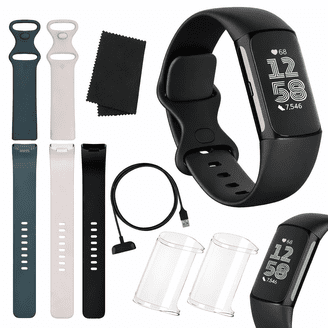
Step-by-step Guide: Cleaning Your Sleep Tracker
Remove The Tracker From Your Wrist
Start by taking off the sleep tracker. If possible, remove the band from the device. This allows you to clean all surfaces and avoid water getting into electronic parts.
Wipe Away Surface Dirt
Use a dry microfiber cloth to gently wipe the tracker and band. This removes loose dust, lint, and sweat. Focus on the back of the device where it touches your skin and the band’s inner side.
Cleaning The Device Body
Most sleep trackers (like the Oura Ring, Fitbit, or Apple Watch) are water-resistant but not waterproof. That means you can use a damp cloth, but never submerge the device.
- Dampen the cloth with warm water (not soaking wet).
- Add a drop of mild soap. Avoid soaps with strong fragrances or moisturizers.
- Gently wipe the device’s surface, paying special attention to the sensor area.
- For small crevices or the back, use a slightly damp cotton swab.
- If your device allows, wipe the sensors with a cotton swab dipped in rubbing alcohol. This removes oils without harming the sensor.
Important: Never pour water or alcohol directly onto the tracker. Always apply to the cloth or swab first.
Cleaning The Band
Bands come in different materials, and each needs a specific approach.
Silicone Bands
- Wash with mild soap and water.
- Rinse well and dry with a towel.
- For strong odors, wipe with a little rubbing alcohol.
Leather Bands
- Wipe gently with a dry cloth.
- For stains, use a slightly damp cloth (water only, no soap).
- Avoid alcohol, as it can dry out leather.
Metal Bands
- Wipe with a damp cloth.
- For stubborn grime, use a soft brush.
- Dry completely to avoid rust.
Fabric Or Woven Bands
- Hand wash with mild soap and water.
- Rinse and air dry completely.
Cleaning The Charging Port And Sensors
Charging ports can collect dust or sweat. Use a dry cotton swab or toothpick to gently remove any debris. If you notice stubborn build-up, dip the swab in alcohol and let it dry before charging again.
Sensors must stay clean for accurate data. Wipe them with a clean, dry cloth. For oily build-up, use a drop of rubbing alcohol on the cloth.
Drying The Tracker
After cleaning, dry all parts with a clean towel. Let everything air dry for at least 10 minutes before reassembling or charging.
Reassembling And Wearing
Once fully dry, reattach the band and make sure no moisture remains in small spaces. Your tracker is now ready to wear.
Special Care For Popular Sleep Trackers
Some sleep trackers have unique features or materials. Here’s how to clean the most common brands:
| Brand | Key Cleaning Point | Material Note |
|---|---|---|
| Fitbit | Use mild soap, avoid soaking the tracker | Silicone bands, water-resistant but not waterproof |
| Apple Watch | Remove from charger, avoid soap on the device | Multiple band types; check band care instructions |
| Oura Ring | Wipe with alcohol cloth, avoid scratching the surface | Titanium metal, water-resistant |
| Whoop Strap | Hand wash band, do not soak electronics | Fabric band, must air dry |
Always check your device’s support page for the latest recommendations.

How Often Should You Clean Your Sleep Tracker?
You don’t need to deep-clean your tracker every day, but regular care keeps it safe and comfortable.
- Light cleaning: Wipe down the band and device every 2-3 days.
- Deep cleaning: Wash bands and sensors weekly or after heavy sweating (e.g., during workouts).
- Immediate cleaning: After exposure to lotions, sunscreen, or swimming (even if water-resistant).
If you notice any skin irritation or visible dirt, clean it right away.
Mistakes To Avoid When Cleaning Your Sleep Tracker
Many users accidentally damage their devices by using the wrong methods. Here are some common mistakes to avoid:
- Soaking the device: Never put the main tracker in water, even if it’s labeled water-resistant.
- Strong chemicals: Avoid bleach, window cleaners, or alcohol gels on the band or device body.
- Rough scrubbing: Don’t use abrasive pads or brushes that can scratch surfaces.
- Not drying fully: Moisture can damage electronics if you reassemble too quickly.
- Ignoring band care: Each material (leather, silicone, fabric) has unique needs. Using the wrong cleaner can ruin the band.
Following the right steps keeps your tracker safe and effective.
Non-obvious Tips For Longer Device Life
Many people overlook these steps, but they can make a big difference:
- Rotate bands: If possible, use more than one band. This lets each band dry fully and reduces wear.
- Avoid direct sunlight: Dry bands in the shade. Sunlight can fade or crack materials, especially leather or silicone.
- Check water resistance regularly: Gaskets and seals can wear out. If your tracker is older, be extra careful with moisture.
- Clean after illness: After having a cold or flu, clean your device to avoid re-exposure to germs.
These small habits keep your device looking new and working well for years.
Comparing Cleaning Needs For Different Trackers
Different trackers need different care. Here’s a quick comparison:
| Tracker Type | Water Resistance | Cleaning Frequency | Special Cautions |
|---|---|---|---|
| Wristband (e.g., Fitbit, Apple Watch) | Usually water-resistant | 2-3 times a week | Avoid soaking, check band material |
| Smart Ring (e.g., Oura) | Water-resistant | Weekly | Avoid scratches, keep sensors clear |
| Clip-on Tracker | Rarely water-resistant | Weekly | Never submerge, clean with dry cloth |
| Headband Tracker | Not water-resistant | After every use | Hand wash fabric parts only |
This helps you plan your routine based on what you wear.
What If Your Sleep Tracker Smells Bad?
Sometimes, even after cleaning, your tracker smells. This is usually because bacteria or sweat got deep into the band. To fix this:
- Soak silicone or fabric bands in soapy water for 15-20 minutes, then rinse and dry well.
- Wipe metal bands with alcohol.
- For stubborn smells, sprinkle baking soda on the band and let it sit for an hour before rinsing.
- Never use perfume or deodorant spray on the device—it can damage materials.
If your band still smells, it may be time to replace it.
When To Replace Your Band Or Device
No matter how well you clean, bands eventually wear out. Replace your band if you notice:
- Cracks or tears (silicone, leather)
- Fraying (fabric)
- Rust (metal)
- Loss of elasticity
For the device itself, if sensors stop working, the charging port is damaged, or cleaning does not restore accuracy, contact customer support or consider upgrading.
How Clean Trackers Improve Your Sleep Data
Clean sensors mean better contact with your skin. This leads to more accurate heart rate, movement, and sleep stage tracking. If your tracker often shows gaps in data or gives odd results, a dirty sensor is often the cause.
One small study showed that regular cleaning improved tracker accuracy by up to 20%. Good hygiene keeps you healthy—and your sleep data reliable.
For more on sleep tracker care and accuracy, see the Fitness Tracker Wikipedia page.
Frequently Asked Questions
How Often Should I Clean My Sleep Tracker?
Wipe the device and band every 2-3 days, and do a deeper clean weekly or after heavy sweating. Clean immediately after contact with lotions, sunscreen, or salt water.
Can I Use Hand Sanitizer To Clean My Tracker?
It’s better not to. Hand sanitizers often contain gels or fragrances that can leave a residue. Use rubbing alcohol (70%) on a cloth or cotton swab instead.
What Should I Do If Water Gets Inside My Tracker?
Remove the band and dry the device with a towel. Leave it in a dry, warm place (not direct sun) for 24 hours before turning it on. If problems continue, contact customer support.
Can I Wear My Sleep Tracker In The Shower?
Check your device’s water resistance rating. Most trackers are splash-proof, not waterproof. It’s safest to remove your tracker before showering.
My Tracker Is Still Irritating My Skin After Cleaning. What Can I Do?
Try switching to a different band material (hypoallergenic options are available). Make sure you dry both your skin and the device before wearing. If irritation continues, take a break from wearing your tracker and consult a doctor.
Keeping your sleep tracker clean is simple but important. With regular care, you’ll keep your device comfortable, accurate, and long-lasting. Good sleep starts with good habits—even before you close your eyes.

